



Home / Services / WordPress to Shopify migration
WordPress to Shopify Migration Service
We migrate WordPress and WooCommerce stores to Shopify with every product, customer, order, review and blog post moved, every old link redirected to keep your Google traffic, and a store your team can edit without a developer.
- 1,300+ Shopify projects since 2017
- Shopify Partner
- Native Shopify code, no page builder
- 90 days of support after launch
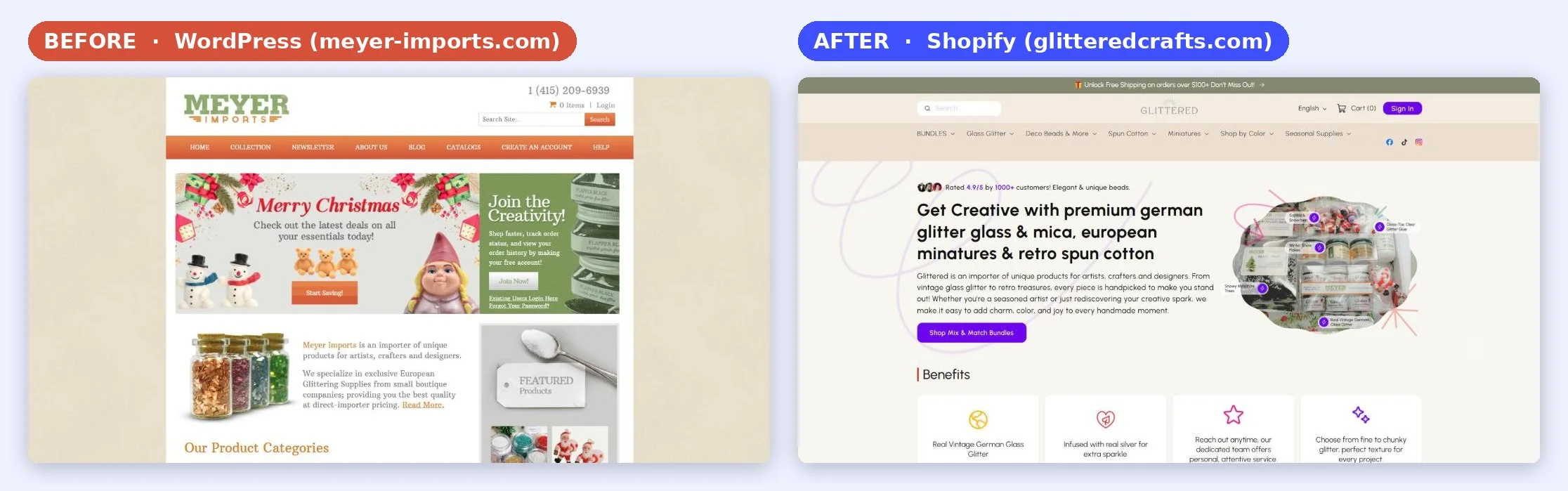
What a WordPress to Shopify migration moves
Here is where everything goes. We use this list on every project, so nothing gets left on the old site.
| On WordPress / WooCommerce | On Shopify | What to know |
|---|---|---|
| Products and variations | Products with variants | Titles, descriptions, prices, SKUs, stock and images. Up to 3 options per product, like size, color and material. |
| Product categories | Collections | Manual or automated collections, with the same names and handles where possible. |
| Attributes and custom fields | Options and metafields | Custom field data becomes metafields that the theme shows on the page. |
| Customers | Customers | Names, emails, addresses and email consent. Shopify customer accounts log in with a one time code by email, so there are no passwords to move. |
| Orders | Order history | Imported for your records and each customer's history. |
| Reviews | A reviews app | Imported into Judge.me or a similar app, so product pages launch with their reviews. |
| Blog posts and pages | Blog articles and pages | Shopify adds /blogs/news/ and /pages/ to these links, so each one gets a redirect. |
| Coupons | Discount codes | Rules checked: minimums, usage limits and end dates. |
| SEO plugin fields | SEO title and description | Moved for every product, collection, page and post. |
| Media library | Shopify files and CDN | Images re-uploaded to Shopify, and image links inside posts updated. |
What does not move
Plugins, page builder layouts (Elementor, Divi and others) and custom WordPress code don't move. Their job gets done by a Shopify feature, an app, or a section coded into your theme. That's why our first step is a list of what every plugin on your site actually does.
Signs it's time to move your store off WordPress
Most stores I move from WordPress have the same problems. If two or more of these sound familiar, Shopify will save you time and money.
Time to move
- Every change needs a developer. A new banner or a price change turns into a ticket.
- Plugins pile up. Each one adds code, slows the store down and can break on the next update.
- Hosting, speed and security are your job. Updates, backups, caching and security patches never stop.
- Nothing talks to each other. Subscriptions, reviews, email and currencies come from plugins that don't always work together.
- You want to grow with ads. A fast checkout with Shop Pay and one place for sales data make paid traffic easier to scale.
When to stay on WordPress
- Your site is mostly content, with only a handful of products to sell.
- You depend on a custom WordPress feature that has no Shopify version and no app that does the same job.
- You can't spare the time to review designs and test before launch right now.
If a move doesn't make sense for your store, we'll tell you on the first call.
WooCommerce vs Shopify for a growing store
WooCommerce is the shop plugin inside WordPress, so most WordPress stores are WooCommerce stores. Here is what changes day to day when you move.
| WordPress + WooCommerce | Shopify | |
|---|---|---|
| Hosting and security | You pick and pay for hosting, SSL, backups and security plugins | Included: hosting, SSL and a PCI compliant checkout |
| Updates | WordPress, theme and every plugin need updates, and updates can break things | Shopify updates the platform, nothing to install |
| Speed | Depends on your hosting, caching and how many plugins run | Served from Shopify's global CDN |
| Checkout | Built from plugins, payment gateways set up one by one | Shopify checkout with Shop Pay, Apple Pay and Google Pay |
| Editing the store | Often needs a developer or a page builder | Theme sections your team edits in the theme editor |
| Adding features | Plugins of mixed quality | Shopify App Store, reviewed apps |
| Running costs | Hosting + paid plugins + developer time | Monthly plan + the apps you choose. See how much Shopify costs per month |
Our WordPress to Shopify migration process
The same 8 steps on every move. These are real files from our client projects, not mockups.
Week 1Scope, project sheet, designs in Figma, theme setup, homepage and menus
Week 2Product and collection pages, products, customers, orders, reviews and blog moved
Week 3Redirects, tracking, test orders, launch and first week checks
A 3 week timeline like Futureface (80 hours). Smaller stores go faster, big catalogs take longer.
Free review and a scope you can read
Send us your store link. We go through every page, feature, plugin and integration, then send a proposal with the hours for each part. Nothing is left to guess, and you know the price before anything starts.
For Futureface the list covered the homepage, shop page and menus, 4 product pages, the science pages, the blog, redirects, currency conversion, reviews, email and subscriptions.

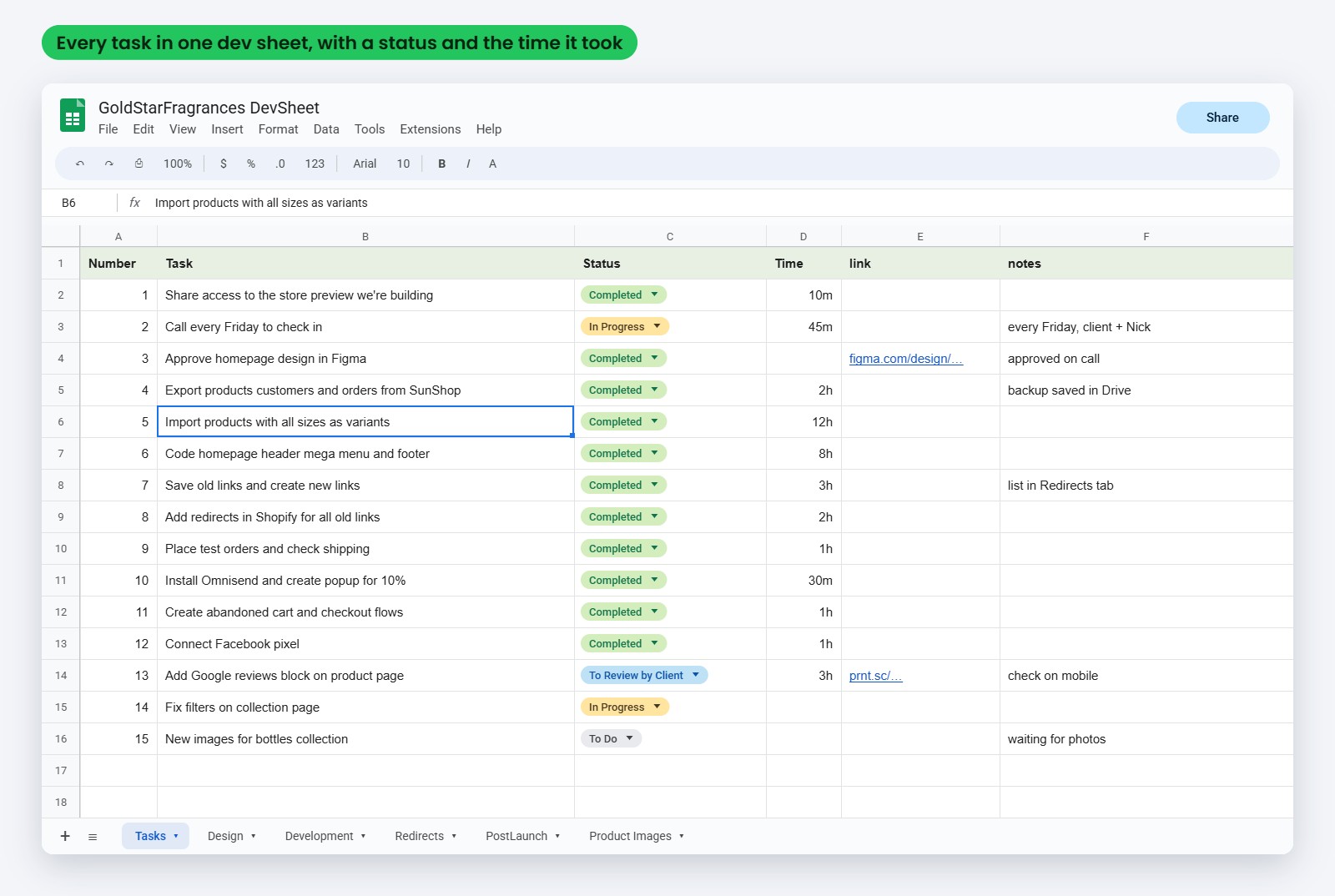
One project sheet for the whole move
Every task is numbered in one Google Sheet, with its status, the old link and the new link. You see what's done, what's in progress and the answer to every question you asked, all in one place.
We split the work into milestones, so you review the store in parts instead of all at the end.
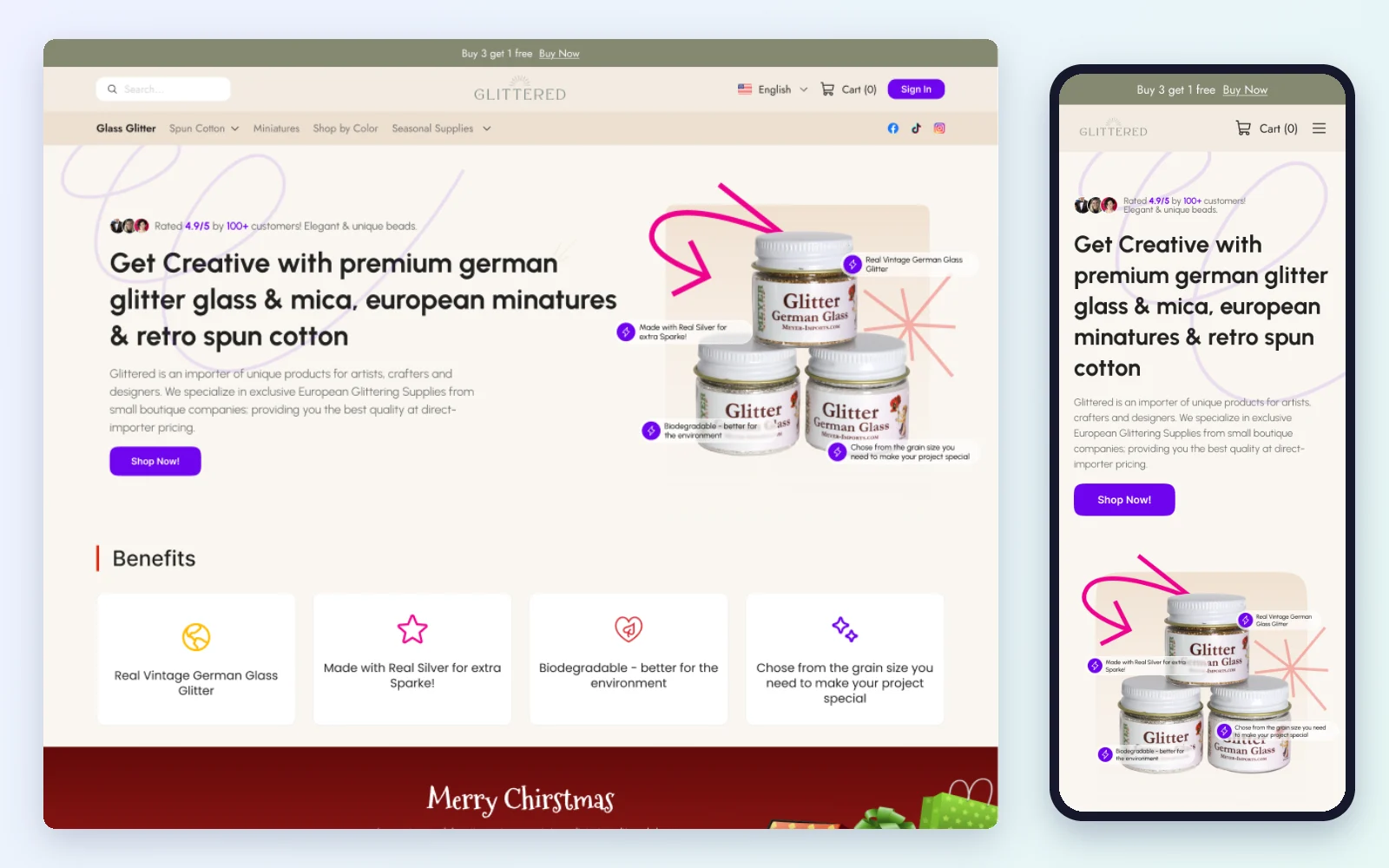
Designed in Figma, approved before code
A migration is the best time to fix what isn't selling. We design the key pages in Figma first, for desktop and mobile, and you approve every section before we code it. No surprises at launch.
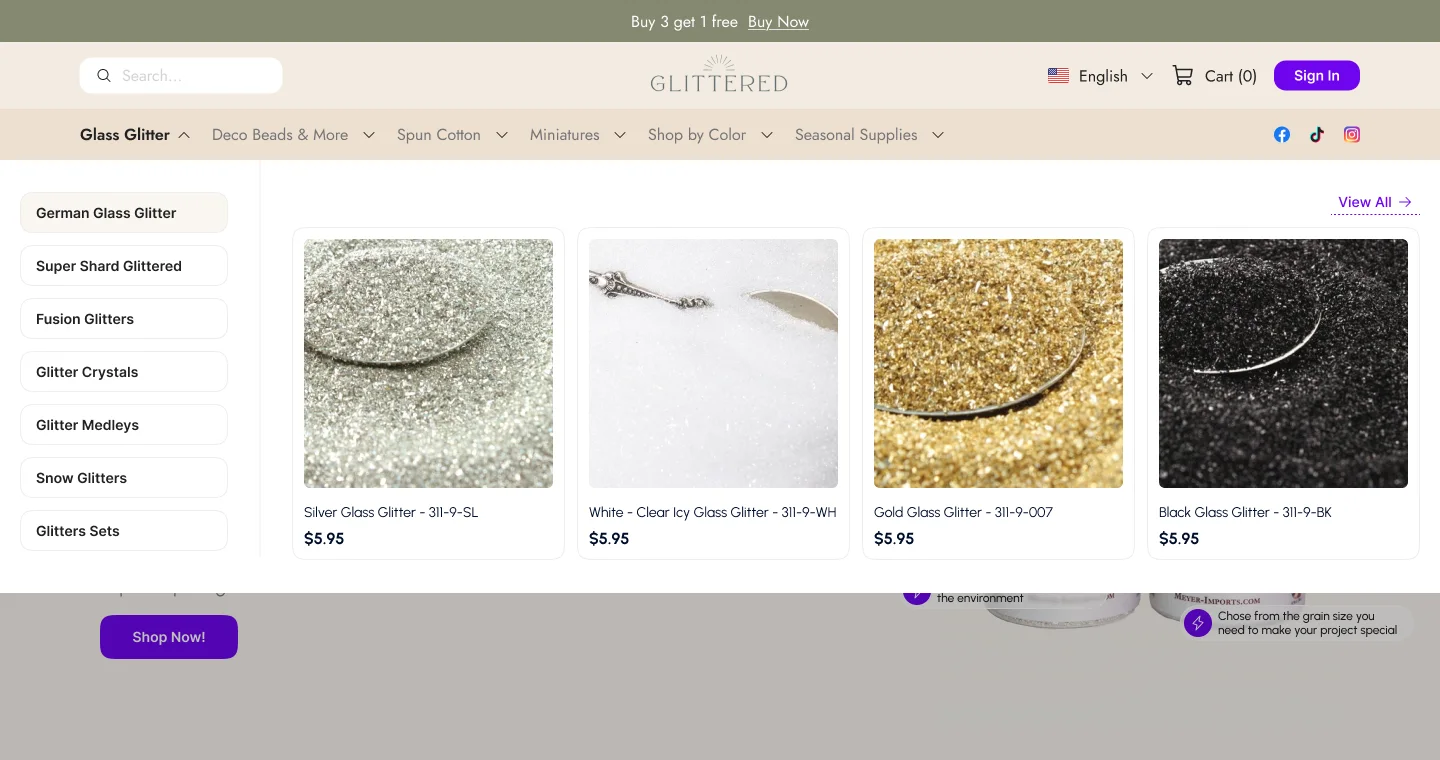
For Glittered Crafts (the old Meyer Imports site) we designed the homepage, product page, collection, filter and search pages, and a mega menu for every product category, so shoppers find glitter, beads and miniatures in two clicks.
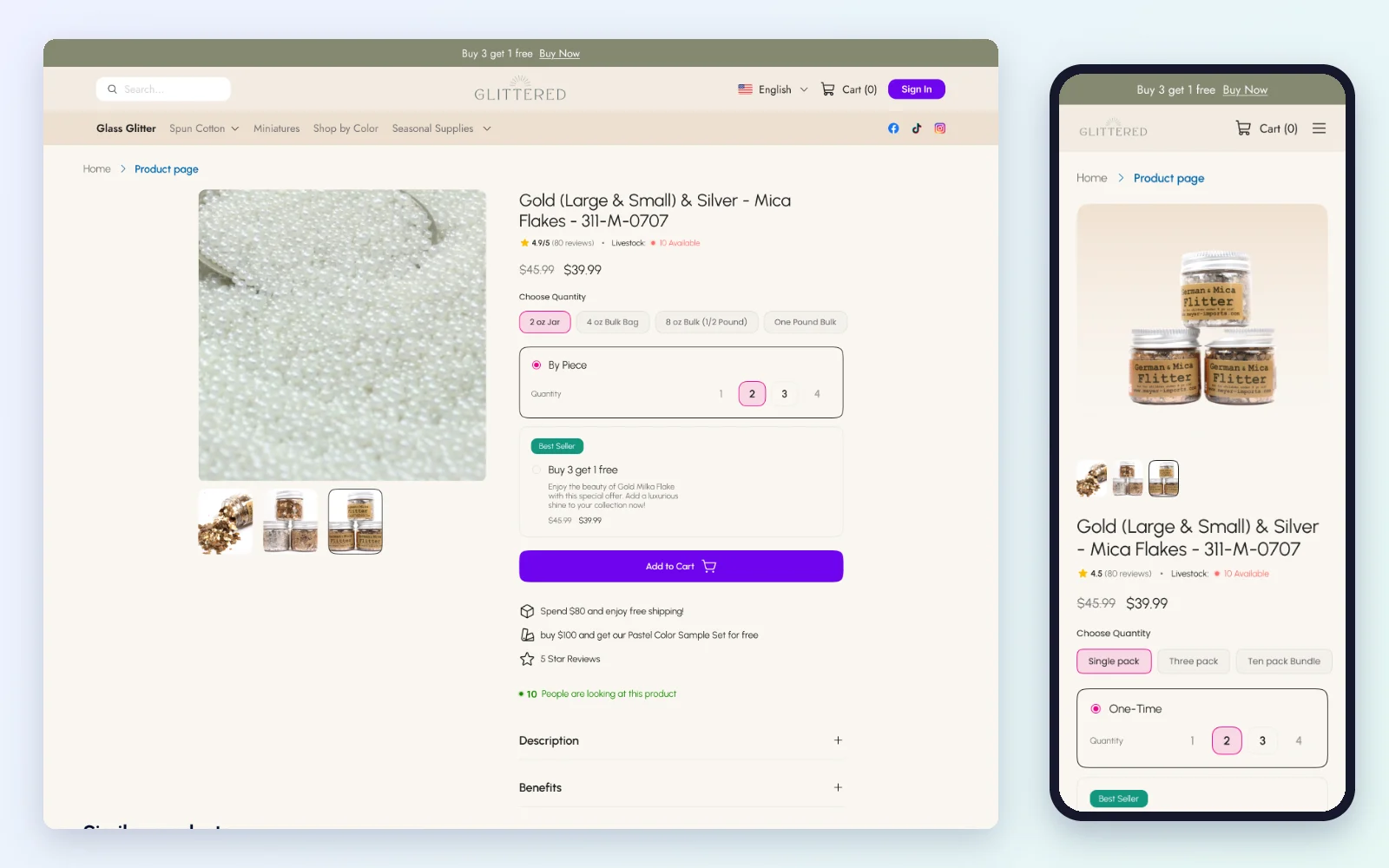
Native Shopify code, not a page builder
A lot of stores get rebuilt with a page builder app. It's fast for the agency, but you pay for it later: a monthly bill that never stops, extra scripts on every page and a store that's hard to change without the app.
We code every section natively, the way Shopify recommends. Your store loads faster, your team edits images, text and videos in the theme editor, and any developer can pick up the code later.
Move the data, then check it
Products and variants, collections, customers, order history, discount codes, pages and blog posts move to the new store. Reviews go into a reviews app like Judge.me, so product pages launch with the same social proof the old ones had.
Then we compare the counts and spot check products, prices and images against the old store.
Map and redirect every old link
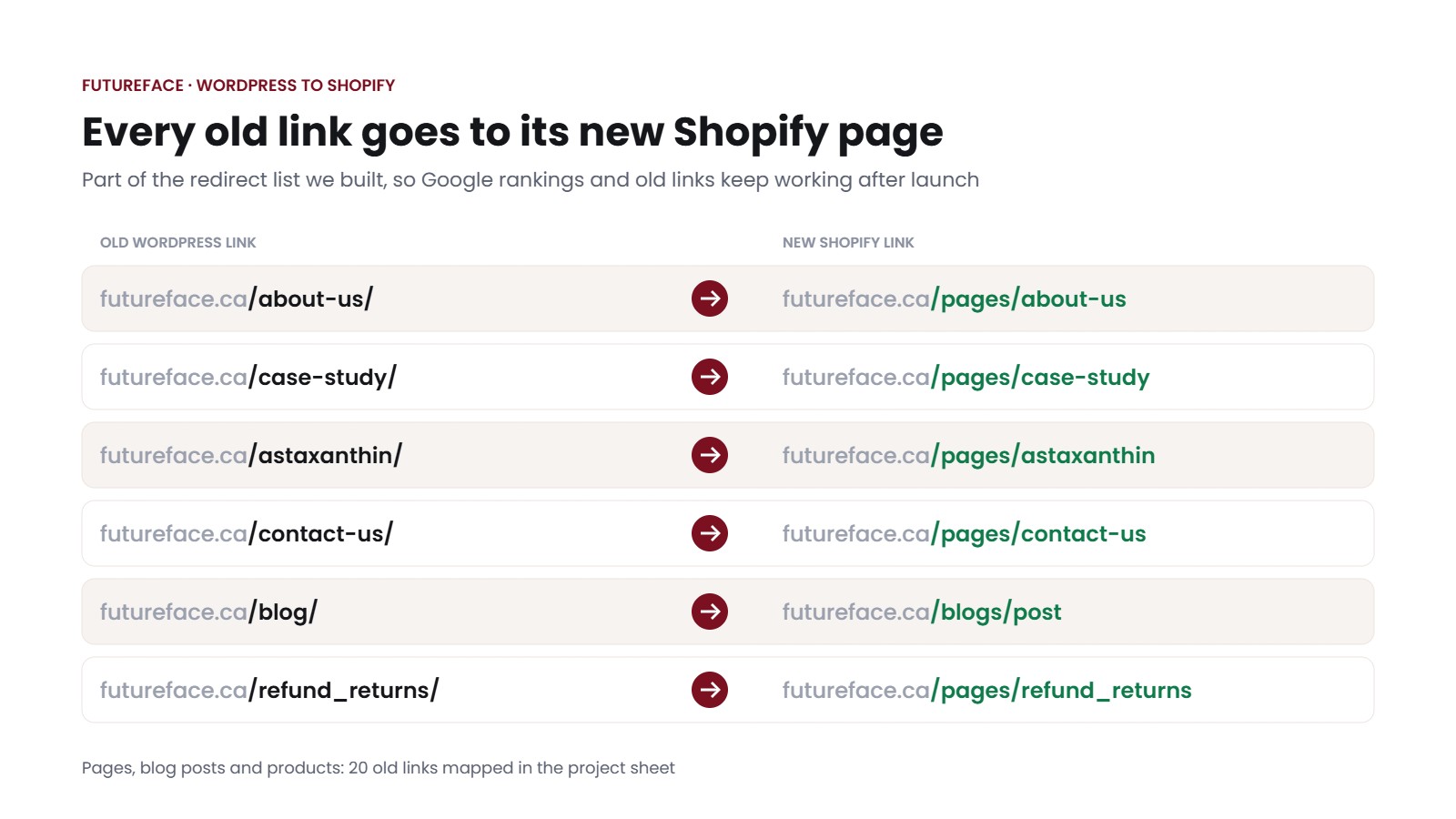
Shopify adds /pages/, /products/ and /blogs/ to its links, and you can't remove them. So futureface.ca/about-us/ on WordPress became futureface.ca/pages/about-us on Shopify.
We list every old link in the project sheet next to its new Shopify address and set up the redirects, so rankings and backlinks carry over. More on this in keeping your Google rankings.
Test orders, then switch the domain
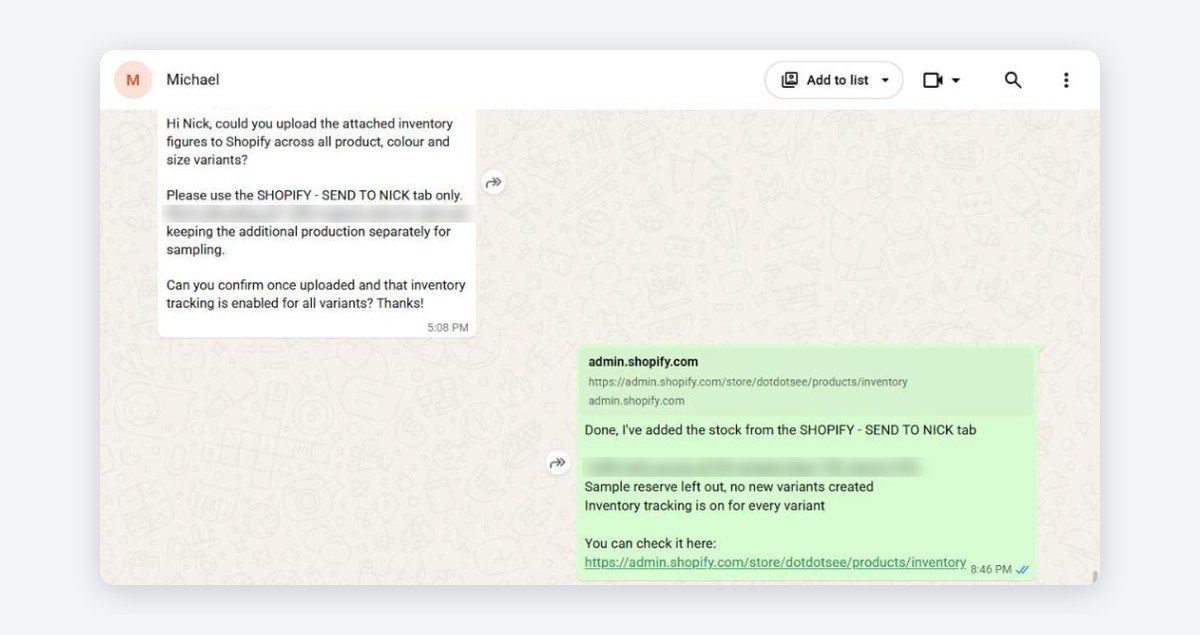
Your WordPress store keeps selling while we build on a private Shopify address. Before launch we place test orders, check every page on a phone, and check tracking and emails.
Then we switch the domain at a time you pick. Futureface got orders on the first day. That's the result you want: the switch happens, customers keep buying, and nobody notices anything except a faster store.

90 days of support, with video instructions
Launch isn't the end. Every migration comes with 90 days of support, so the code is stable, orders go through and your team knows how to manage everything.
We record short videos showing how to edit sections, change images and text, and update products. Quick questions go through WhatsApp, and we reply within 24 hours.
How we keep your Google rankings when you move
Moving platforms doesn't cost you rankings by itself. What costs rankings is old links that end on an error page, titles and descriptions that get lost, and product links that change for no reason. Almost every WordPress link changes on Shopify, so each one needs a 301 redirect to its new page.
| Old WordPress link | New Shopify link |
|---|---|
| /product/blue-glitter/ | /products/blue-glitter |
| /product-category/glitter/ | /collections/glitter |
| /about-us/ | /pages/about-us |
| /how-to-use-glitter/ | /blogs/news/how-to-use-glitter |
| /shop/ | /collections/all |
| /wp-content/uploads/... images | Re-uploaded to Shopify, links updated |
Our SEO checklist on every move
- We collect every old URL: a full crawl, plus your top pages in Google Search Console and the pages other sites link to.
- We keep the same slug as the new handle wherever we can, so blue-glitter stays blue-glitter.
- Each old page redirects to its closest new page. Never everything to the homepage, and no redirect chains.
- SEO titles and meta descriptions move for every product, collection, page and post.
- Internal links inside descriptions and blog posts get updated to the new links.
- On launch day we test the top links by hand and submit the new sitemap in Google Search Console.
- For 90 days we watch Search Console for any link we missed and fix it the same day.
Some movement in the first weeks is normal while Google recrawls the new links. With every old link redirected, rankings settle and your backlinks keep working. We keep the redirects in place for good.
Your WordPress plugins and what replaces them on Shopify
Many plugins aren't needed on Shopify at all, because hosting, speed and security are part of the platform. The rest get replaced by a Shopify feature or one good app.
| WordPress plugin | On Shopify |
|---|---|
| Yoast SEO, Rank Math | Built in SEO fields, automatic sitemap, URL redirects |
| Caching, CDN and speed plugins | Not needed, Shopify hosts and serves the store |
| Security and SSL plugins | Not needed, SSL and a PCI compliant checkout are included |
| WooCommerce Subscriptions | Appstle, Recharge or Shopify Subscriptions, picked by total cost |
| Product reviews plugin | Judge.me or a similar app, with your old reviews imported |
| WPML, Polylang, currency switchers | Shopify Markets with local currencies and translations |
| Mailchimp, Klaviyo or Omnisend plugin | Your email platform's Shopify app, flows rebuilt on Shopify triggers |
| Elementor, Divi and page builders | Native theme sections, no builder app and no monthly fee |
| Product add-ons and extra fields | Metafields, line item properties or an options app |
| Table rate shipping | Shopify shipping profiles, zones and rates |
One example from Futureface: the first subscription app most people think of is Recharge, but for a growing brand we recommended Appstle, because it has a free plan for smaller subscription revenue and paid plans from $10 a month with 0% transaction fees. That's money that stays with the brand every month.
Stores we moved to Shopify
Real projects with real numbers. Read the full case studies for every step.
Futureface: moved in 3 weeks, sales on day one
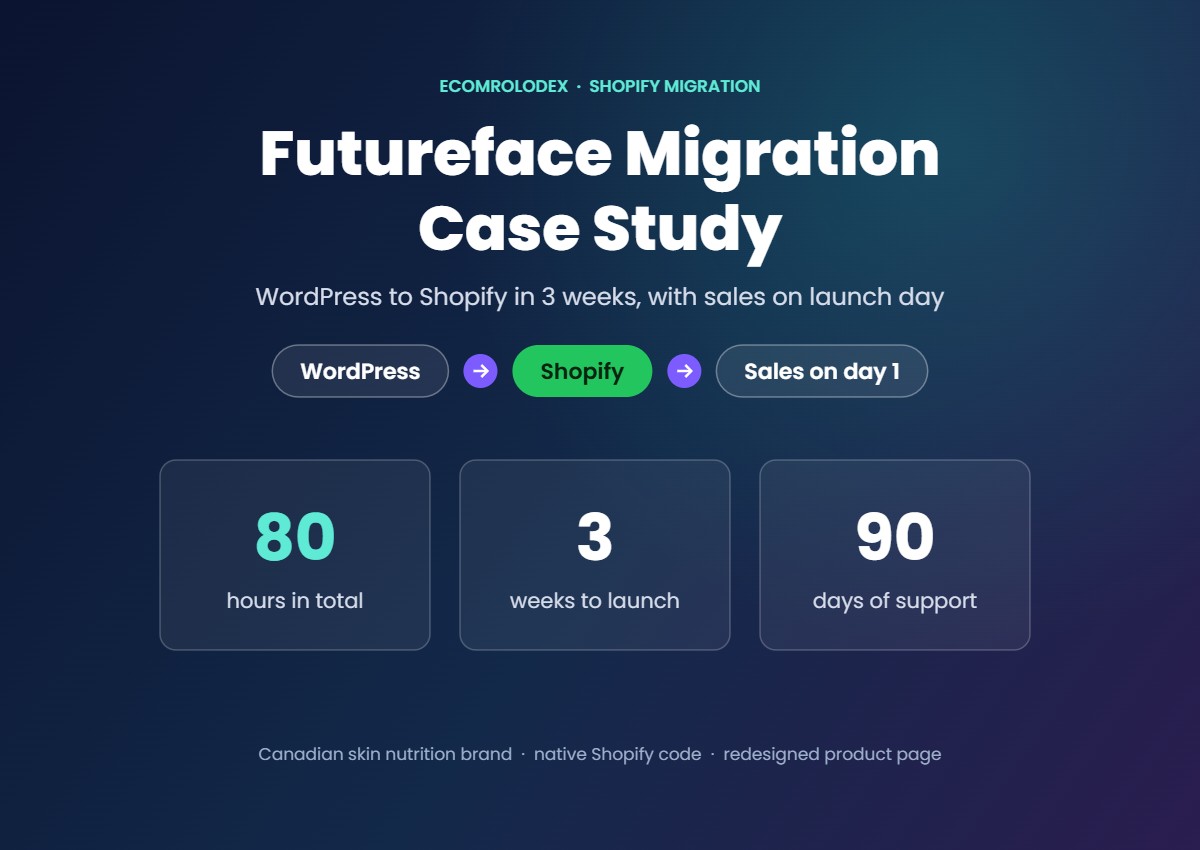
- 80 hours of design and code over 3 weeks, in 3 milestones
- Best selling product page redesigned in Figma
- Reviews moved to Judge.me, Appstle for subscriptions
- Every old link redirected, 90 days of support
Glittered Crafts: from Meyer Imports on WordPress to Shopify
- New store designed in Figma: homepage, product, collection, filter, search
- A mega menu for every category to simplify navigation
- We still support the store more than a year and a half later
"We are huge fans of Nick and his team! Being new to Shopify, we needed some help… Nick and his team are the real deal."John Vieira, Glittered Crafts
See the live store →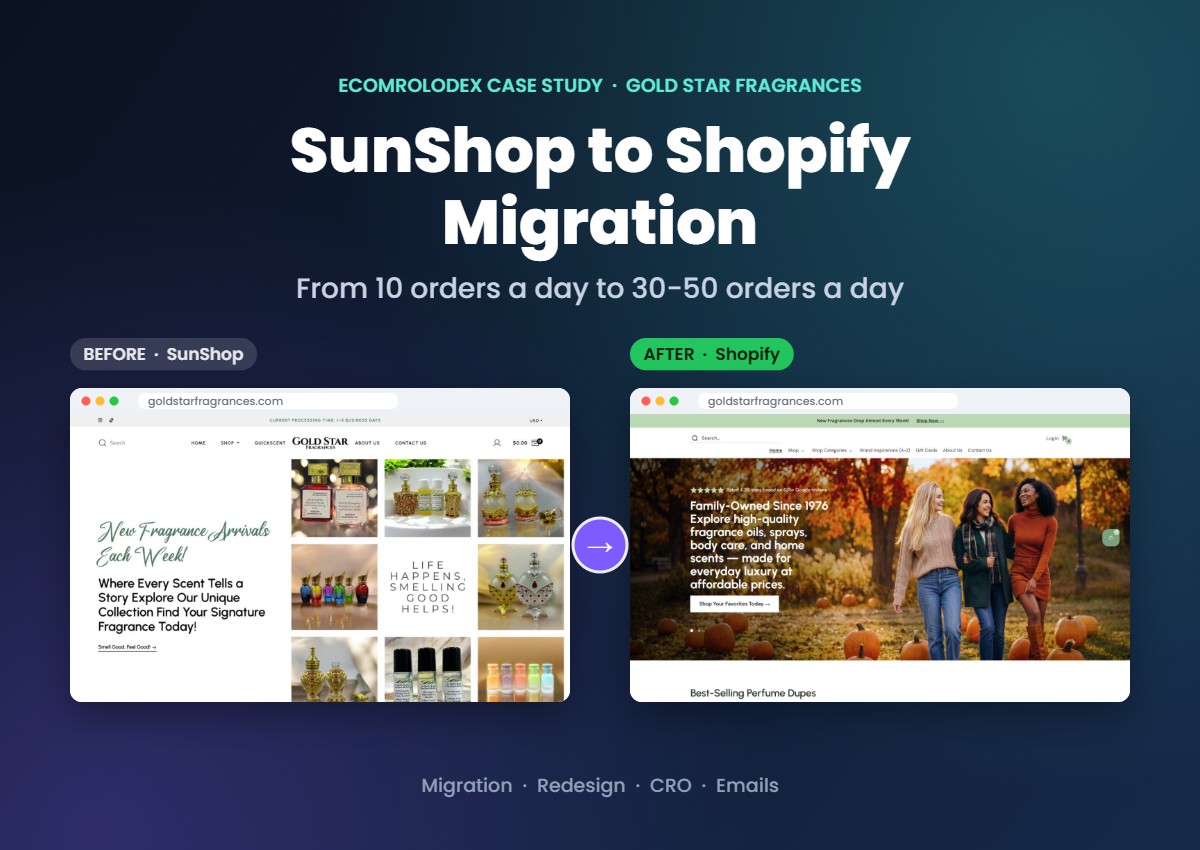
GoldStar Fragrances: from 10 orders a day to 30-50
- A big catalog moved without losing data or SEO
- Every old link redirected
- Now we help them grow every month with CRO, emails and product images
"I cannot recommend Nick and his team at EcomRolodex enough! They have been absolutely excellent to work with from start to finish."Angela, GoldStar Fragrances, New York
Read the GoldStar case study →
Scanmarker Norway: every page rebuilt in native code
- WordPress store moved to Shopify
- Every page rebuilt natively, no page builder
- 96% on Google's best practices check
How long a WordPress to Shopify migration takes and what it costs
Most stores move in 1 to 6 weeks. The time depends on how many products and pages you have, how much custom work there is, and whether we copy your current design or improve it.
| Store | What's included | Real example |
|---|---|---|
| Small store | Simple catalog, theme set up with your branding, key pages, data and redirects | From about 25 hours, 10 to 20 days |
| Growing brand | Custom designed key pages, blog, reviews, subscriptions, currencies, email connected | Futureface: 80 hours, 3 weeks |
| Large catalog or custom features | Big catalog, custom functions, many integrations, full redesign | GoldStar: 200+ hours, about 6 weeks |
What changes the price
- Number of products, variants and custom fields
- Copying your current design or redesigning key pages in Figma
- How many pages and blog posts need to move and be redirected
- Subscriptions, multiple languages or currencies, wholesale
- Integrations: email, shipping, accounting, marketplaces
You get a fixed scope with the hours for every part before we start. Then you pay a deposit and the rest in milestones as each part is delivered and approved. Your Shopify plan and any apps are paid to Shopify and the app makers directly.
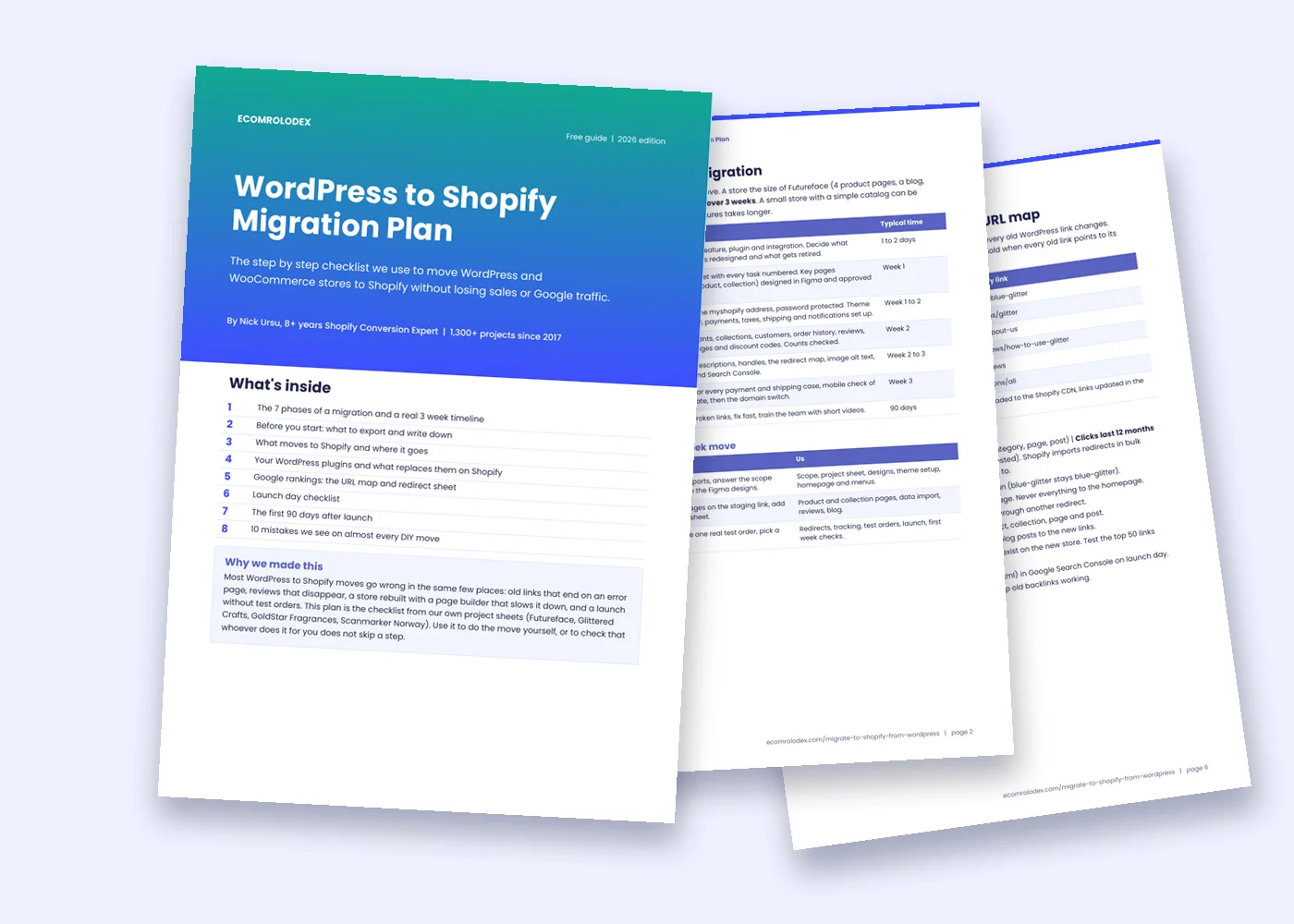
Get the WordPress to Shopify Migration Plan
The step by step checklist from our own project sheets. Use it to do the move yourself, or to check that whoever does it for you doesn't skip a step.
- The 7 phases of a migration and a real 3 week timeline
- What to export before you start
- Where every product, customer and order goes on Shopify
- Your plugins and the Shopify apps that replace them
- The redirect sheet that keeps your Google rankings
- Launch day checklist and the first 90 days
Do it yourself or hire a migration team?
Not every store needs an agency. Here is honest advice from 1,300+ projects.
You can do it yourself if
- You have a small catalog and only a few pages
- Google traffic isn't a big part of your sales yet
- A ready made Shopify theme is fine for now
- You have time to test every order type before launch
Importer apps from the Shopify App Store can move products, customers and orders. Our free migration plan covers the rest.
Hire us if
- Your Google traffic and backlinks bring real sales
- You want a better store, not a copy of the old one
- You have reviews, subscriptions, custom fields or a blog to move
- You'd rather run the business than test checkouts
You get one numbered project sheet, designs you approve, native code and 90 days of support.
The mistakes we fix most often after DIY moves
- Every old link redirected to the homepage instead of its matching page.
- Product handles changed, so the links Google knows stop existing.
- Product pages launched with zero reviews because the reviews were never imported.
- A page builder app that slows the store down and bills every month.
- No real test orders, so the first customer finds the checkout problem.
What store owners say
"I cannot recommend Nick and his team at EcomRolodex enough! They have been absolutely excellent to work with from start to finish. Their professionalism, attention to detail, and dedication to their clients are truly outstanding."
AngelaGoldStar Fragrances, New York. Verified review on the Shopify Partner Directory
"We are huge fans of Nick and his team! Being new to Shopify, we needed some help. We also got ourselves in a bad place by hiring experts who were not really experts. But Nick and his team are the real deal."
John VieiraGlittered Crafts
Questions store owners ask about moving to Shopify
How long does a WordPress to Shopify migration take?
Most stores take 1 to 6 weeks. Futureface took 80 hours over 3 weeks, including a redesigned product page. GoldStar, with a big catalog and custom features, took about 6 weeks. You get the timeline with the scope, before we start.
Will I lose my Google rankings?
Not if every old link redirects to its new page. We map every URL, keep your titles and descriptions, keep product handles where possible, submit the new sitemap and watch Search Console for 90 days. Some movement for a few weeks is normal while Google recrawls.
Is a WooCommerce to Shopify migration different?
WooCommerce is the shop plugin inside WordPress, so it's the same move. The difference is the extra WordPress content: pages, landing pages and blog posts that store only tools often leave behind. We move those too and redirect them.
Will my store go offline during the move?
No. We build the new store on a private Shopify address while your WordPress store keeps selling. The switch is a domain change on a day you pick, after test orders and a full check on mobile.
Can I keep my domain name?
Yes. Your domain points to Shopify on launch day, so customers use the same address. Your email stays with your current email provider.
What happens to customer accounts and passwords?
Customers, their addresses and order history move over. Passwords don't need to: Shopify customer accounts log in with a one time code sent by email. We tell your customers about the new store and how the login works.
Can you move my orders, reviews and subscriptions?
Yes. Orders come over as history, reviews go into a reviews app like Judge.me, and subscriptions move to a subscription app we pick by total cost. Active subscriptions are planned early with your payment provider so they keep billing.
Do I need a redesign when I move?
No, we can rebuild your current design. But you're rebuilding the pages anyway, so we recommend improving your best sellers. We design them in Figma first and you approve every section before we code it.
How much does it cost to migrate from WordPress to Shopify?
It depends on your catalog, pages and custom features. Small stores start from about 25 hours, Futureface was 80 hours and GoldStar 200+. You get a free quote with the hours for every part, then pay a deposit and milestones.
What happens to my WordPress site after launch?
Keep it as a private backup for at least 90 days, hidden from Google, in case you need to check old data. After that you can cancel the hosting. The redirects on Shopify stay forever.
Do you work with agencies?
Yes. We do migrations white label for agencies and consultants, working under your team and your brand. See our white label Shopify service.

Nick Ursu, 9+ years Shopify Conversion Expert
I've worked on Shopify stores since 2017, with 1,300+ projects since then. With my team of designers and developers I move stores from WordPress, WooCommerce, SunShop and custom code to Shopify, then help them sell more with CRO, emails and new pages.
Last updated November 2026. Project details come from our project sheets and Figma files.
Moving your store to Shopify?
Send me your store link. I'll tell you how long the move would take and what I'd fix on the way.