


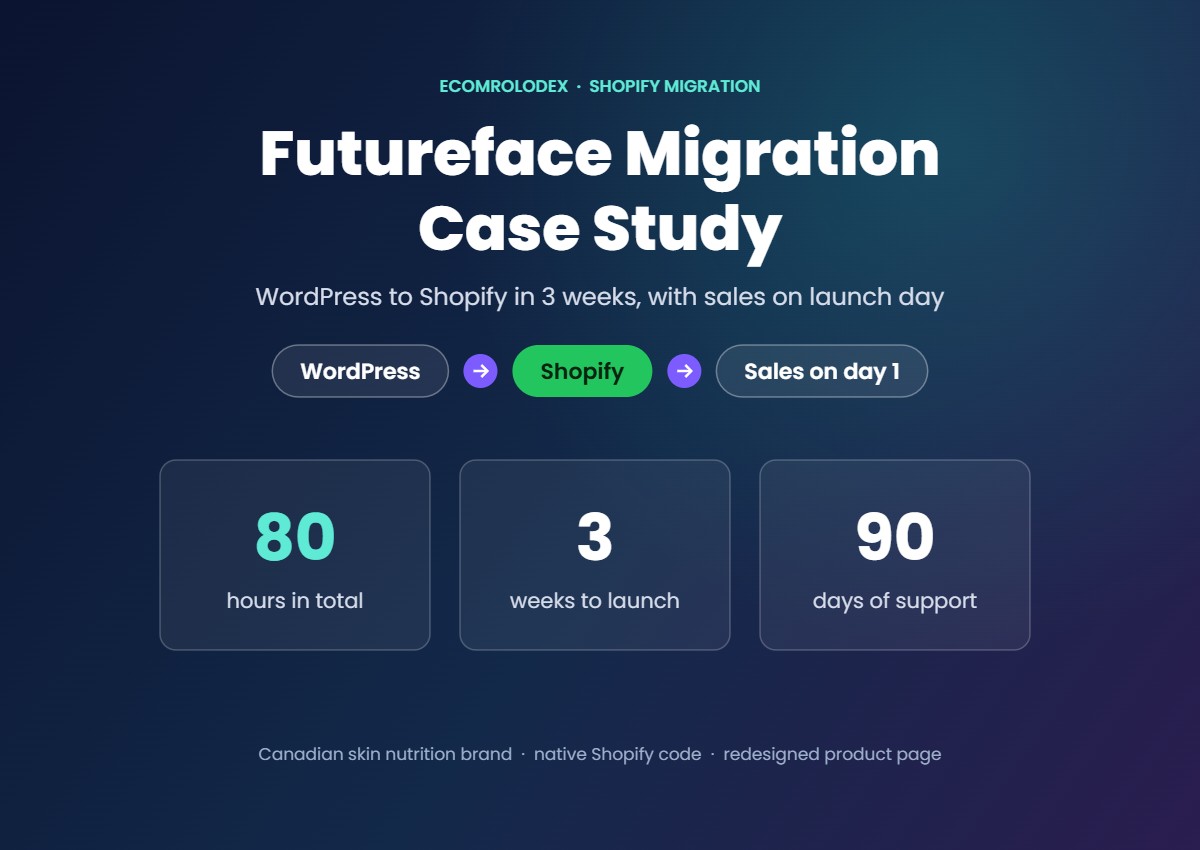
Futureface is a Canadian skin nutrition brand. Gummies, creatine and a moisturizer, all built around astaxanthin. Their store ran on WordPress with WooCommerce, and almost every change needed a developer.
We moved the whole store to Shopify in 3 weeks. 80 hours of design and code, and they got sales on the first day after launch.
In this case study I'll show you how we did it step by step: the plan, why we code natively instead of using a page builder, how we protected their Google traffic, the product page we redesigned, the subscription app we picked and how we support the team after launch.
Quick overview
- Brand: Futureface, skin nutrition supplements from Canada
- Moved from: WordPress and WooCommerce to Shopify
- Time: 80 hours, done in 3 weeks
- Built with: native Shopify code, no page builder
- Extras: a redesigned best-selling product page, Appstle subscriptions, reviews moved to Judge.me, currency conversion
- Launch: sales on the first day
- After launch: 90 days of support and video instructions for their team
Why they wanted to leave WordPress
WooCommerce can sell, but the brand was spending time and money on things that shouldn't need a developer. Most stores I move from WordPress have the same 3 problems:
- Every update needs a developer. A new banner or a price change turns into a ticket.
- Plugins pile up. Each one adds code, slows the store down and can break on the next update.
- Hard to grow. Subscriptions, reviews, email and currencies all come from different plugins that don't always work together.
The goal for Futureface was simple: move to Shopify without losing their Google rankings, make the store easy for their own team to manage, and sell more from the same traffic.
How we planned it
Before we wrote any code, we sent a proposal with every page and feature to build. Nothing was left to guess. The list covered:
- Homepage, shop page and menus
- 4 product pages: the gummy, the moisturizer, CreatineComplete and the inside-out bundle
- The astaxanthin science pages, the case study page and the blog
- About us, contact, returns and privacy pages
- Redirects, currency conversion, reviews, email and subscriptions
Then we split the work into 3 milestones: homepage and menus first, product pages second, and the remaining pages and optimizations last. That's how 80 hours fit into 3 weeks.
Native Shopify code, not a page builder
This is the part most agencies skip. A lot of stores get rebuilt with a page builder app like PageFly or Replo. It's fast for the agency, but the store owner pays for it later: a monthly bill that never stops, extra scripts on every page and a store that's hard to change without the app.
We coded every section natively, the way Shopify recommends. That gave Futureface:
- A store that loads fast. No builder scripts, only the code each page needs.
- Easy edits without a developer. Every section has its own settings in the theme editor, so their team changes images, text and videos themselves.
- No extra monthly fees. There's no builder app to keep paying for.
- Clean code that lasts. It works with Shopify's own tools and updates, and any developer can pick it up later.
It's the same way we rebuilt the stores in our other migrations: one onboarding meeting, every page rebuilt pixel-perfect, and a store the owner can edit on day one.
Moving the content, reviews and links
Every page and blog post rebuilt
We moved the homepage, the shop, all 4 product pages, the astaxanthin science pages (sun damage, skin texture, collagen and oxidative stress), the case study page and the blog posts. Each page got checked on mobile before it went to the client for review.
Reviews moved to Judge.me
Reviews are some of the most valuable content a supplement brand has. We moved them all to Judge.me, so the new product pages launched with the same social proof the old ones had.
Redirects to protect Google traffic
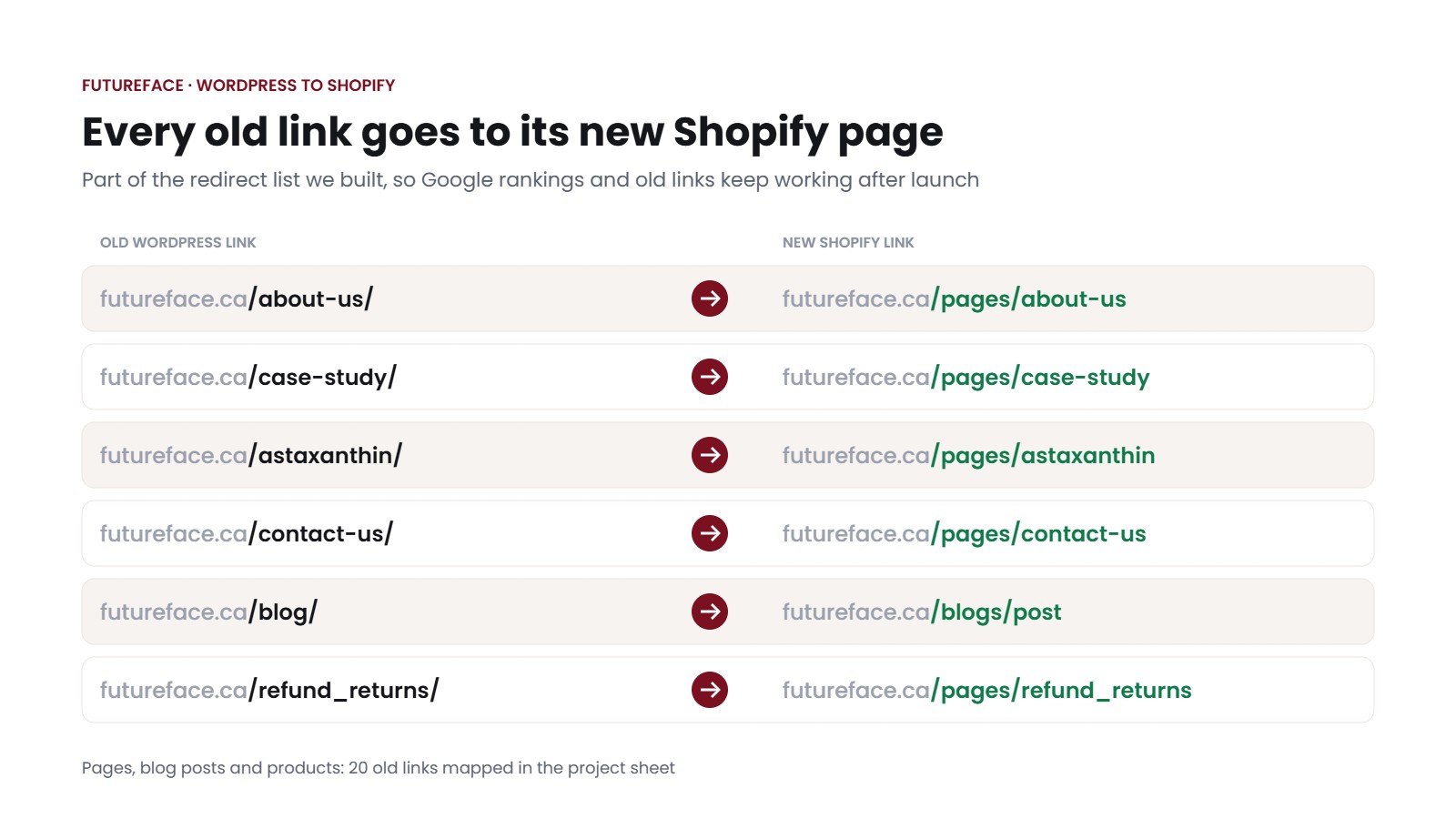
Shopify adds /pages/, /products/ and /blogs/ to its links, and you can't remove them. So futureface.ca/about-us/ on WordPress becomes futureface.ca/pages/about-us on Shopify. Without redirects, every old link on Google and on other websites would end on an error page.
We listed all 20 old links in the project sheet next to their new Shopify address and set up the redirects in Shopify, so their rankings and backlinks carry over to the new store.
Currency and email
We added currency conversion for shoppers outside Canada and connected their existing Klaviyo account to the new store.
Redesigning their best-selling product page
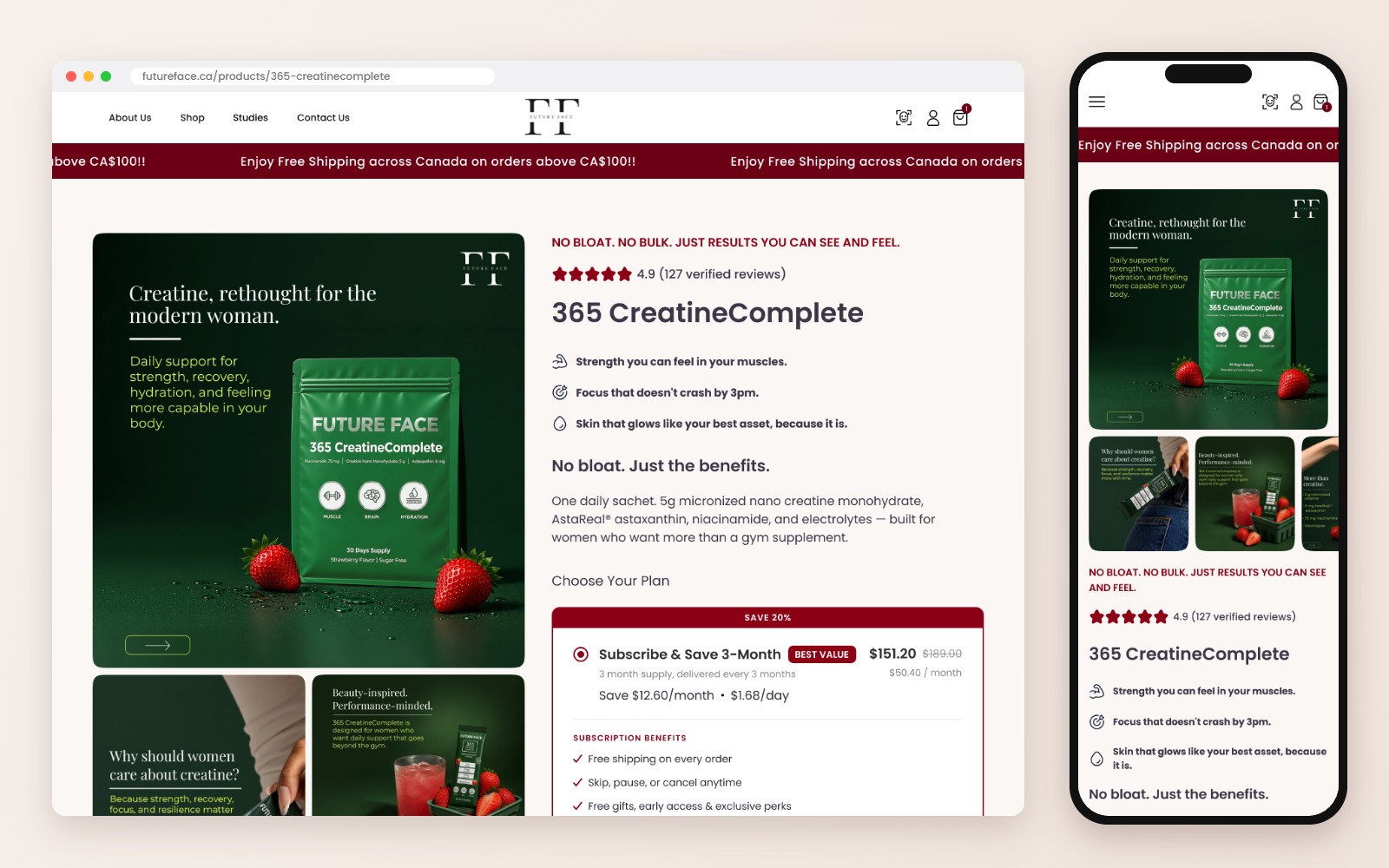
A migration is the best time to fix what's not selling as well as it could. Instead of copying the old 365 CreatineComplete page, we redesigned it for more sales. It's one of their best sellers, so every small improvement there adds up.
We designed it in Figma first. The client approved every section, then we coded it. No surprises at launch.
What we changed:
- Choose your plan right under the price. Subscribe and save is the first option, with the savings and the perks (skip, pause or cancel anytime) spelled out.
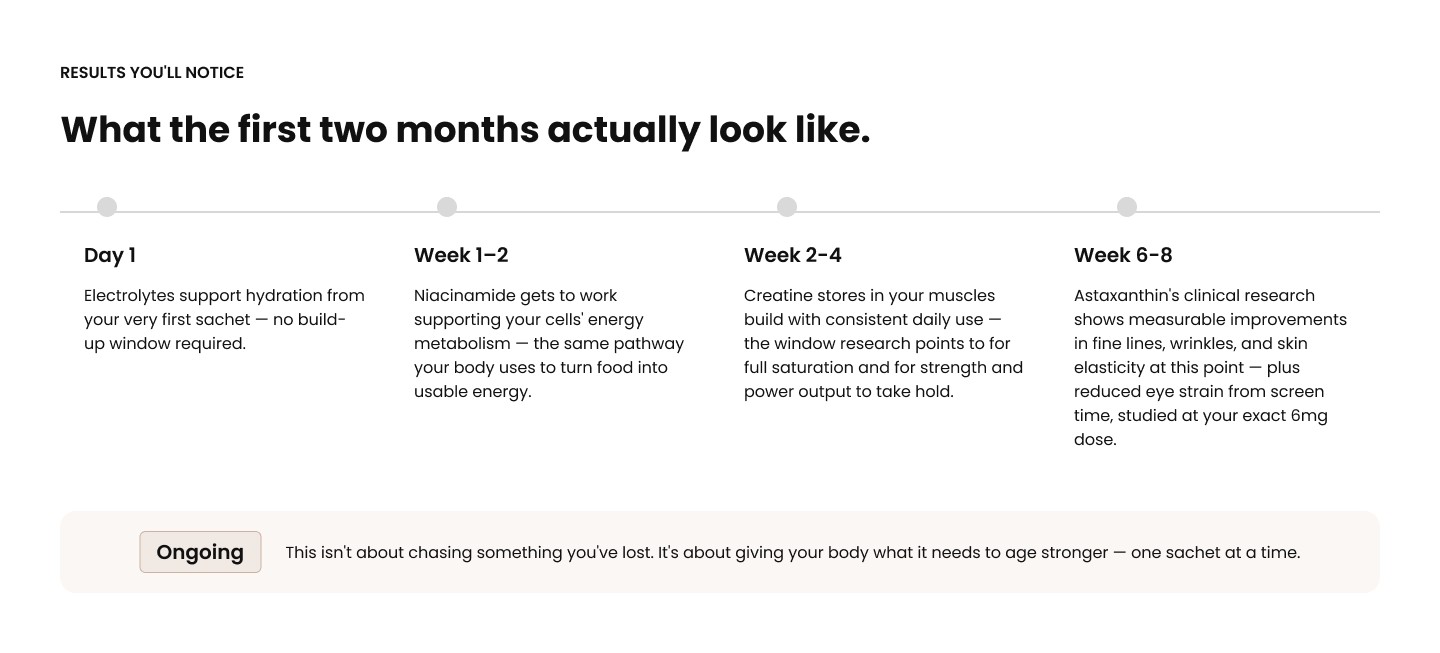
- What the first two months look like. A simple timeline so customers know what to expect week by week.
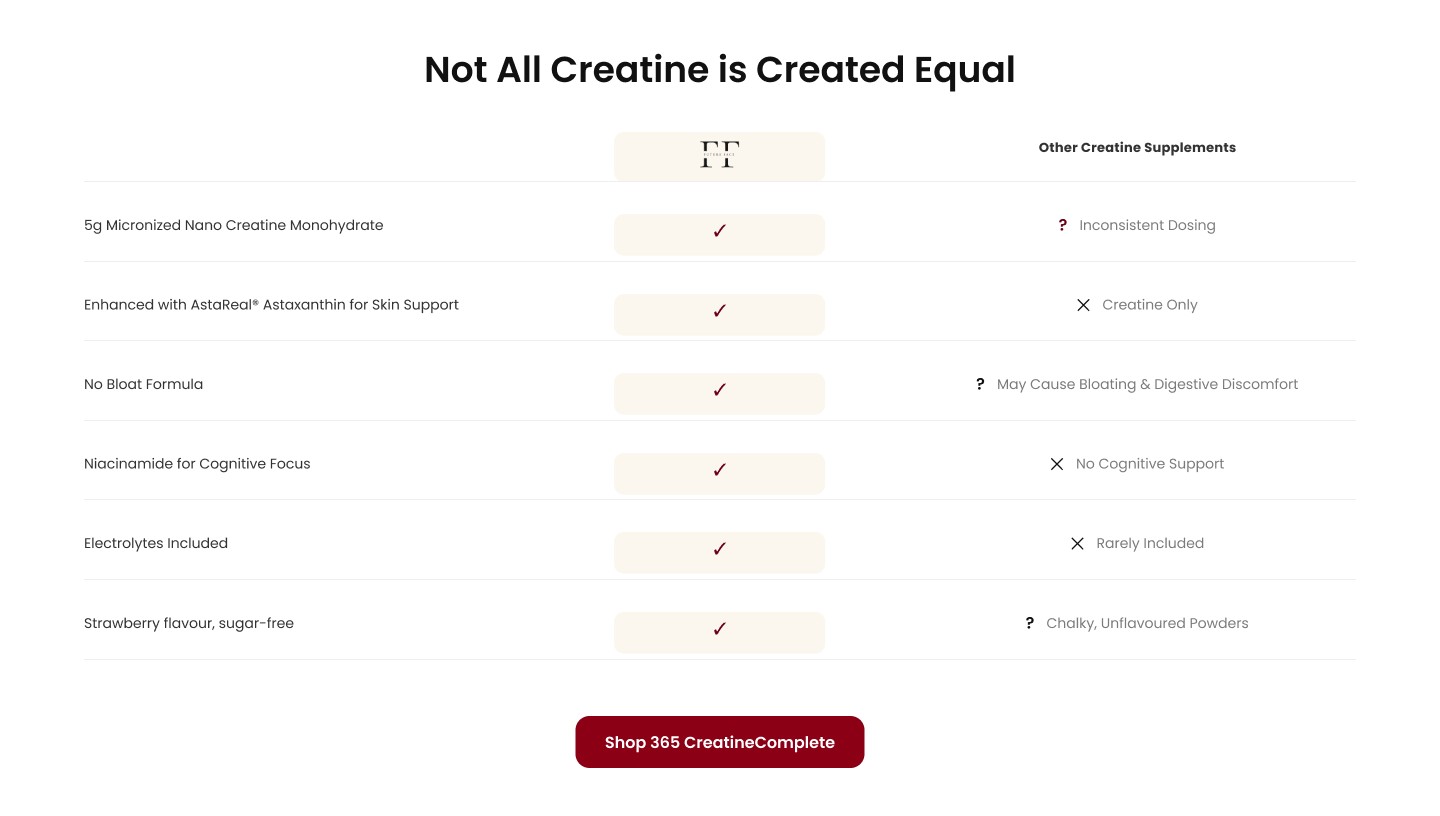
- A comparison table. "Not all creatine is created equal" shows why this one is different from a regular tub of creatine.
- 4 ingredients, zero filler. Each ingredient explained in plain words, with the clinical stats and a chart.
- Video social proof from real customers, plus a "myth busted" section for the most common worry.
- Reviews and FAQs kept where they answer questions before checkout.
Every section was designed for mobile too, because that's where most supplement shoppers buy.
Choosing the right subscription app
For a supplement brand, subscriptions are where the long-term revenue is. The first app most people think of is Recharge. It's a good app, but it's expensive for a growing brand: the Standard plan is $99 a month plus 1.49% and 19 cents on every transaction.
We recommended Appstle instead. It has a free plan for smaller subscription revenue, paid plans start around $10 a month, and there are no transaction fees. For Futureface it does everything they need: subscribe and save, skip, pause or cancel, and a customer portal. We set it up and styled the plan picker so it looks like part of the page, not a widget added on top.
That's money that stays with the brand every single month.
Launch day
Before we switched the domain, we placed test orders and checked every page on mobile. Then we helped them move the domain to Shopify.
Orders came in on the first day. For a migration, that's the result you want: the switch happens, customers keep buying, and nobody notices anything except a faster, nicer store.
90 days of support with video instructions
Launch isn't the end of the project. Every migration we do comes with 90 days of support, to make sure the code is stable, orders go through and the team knows how to manage everything.
For Futureface we recorded video instructions showing their team how to edit sections, change images and text, and update products in the new theme. They can watch them any time, so small changes never wait for a developer. If something comes up, we reply within 24 hours.
How we keep a project like this organized
Two simple tools do most of the work:
- One Google Sheet per project. Every task is numbered, with its status, the old link and the new link. The client sees what's done, what's in progress and the answer to every question they asked, all in one place.
- WhatsApp for quick questions. Screenshots, quick approvals and updates without long email threads. On top of that, a short weekly call and screen recordings as pages get built.
It sounds basic, but it's why a project like this can finish in 3 weeks.
What I'd tell any brand moving from WordPress to Shopify
- Map every old link before launch. Redirects are what keep your Google traffic.
- Skip the page builder. Native code is faster and you don't pay for it every month.
- Move your reviews. Don't launch new product pages with zero reviews.
- Pick apps by total cost, not by name. The subscription app alone can save you hundreds a month.
- Use the move to fix your best seller. You're rebuilding the page anyway.
Questions store owners ask
How long does a WordPress to Shopify migration take?
For Futureface it was 80 hours over 3 weeks, including the product page redesign. A smaller store can be faster. A big store with lots of products or custom features takes longer.
Will I lose my Google rankings?
Not if you redirect every old link to its new Shopify address. That's the most important step of the whole move.
Can I keep my reviews?
Yes. We import them into a reviews app like Judge.me so they show on the new product pages from day one.
Will I need a developer after the move?
Not for everyday changes. Every section is editable in the theme editor, and we give you video instructions plus 90 days of support.
Recharge or Appstle?
Both work. For most growing brands Appstle costs a lot less, because it has no transaction fees. We look at your numbers and recommend the one that fits.
Moving your store to Shopify?
Send me your store link. I'll tell you how long the move would take and what I'd fix on the way.
Project details from our project sheet and the Figma file. Recharge and Appstle prices are from their 2026 plans, check their pricing pages for the latest numbers.
Other Migration Case Studies