


Gold Star Fragrances is a family-owned fragrance oil brand that has been around since 1976. They sell fragrance oils inspired by designer perfumes, plus bottles, body care, incense and home scents.
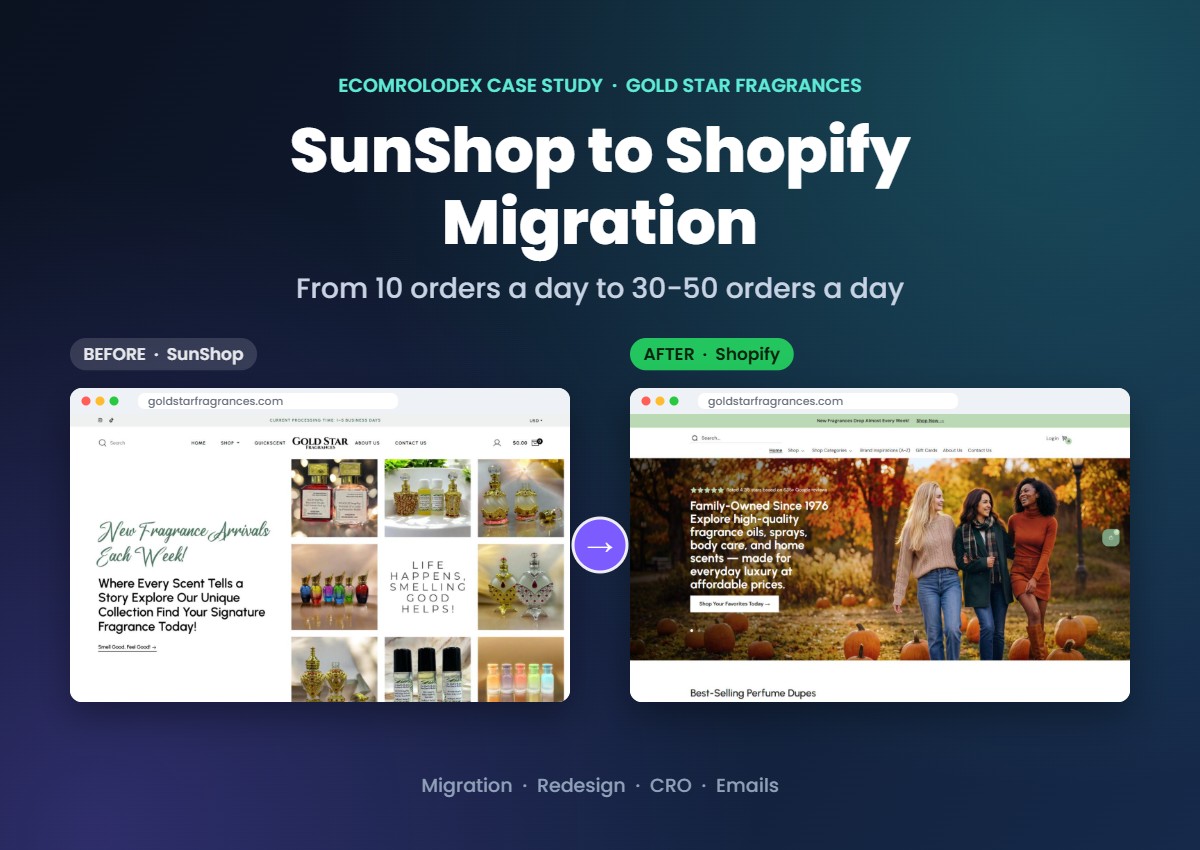
When they came to us in July 2025 their store was on SunShop. The business was solid, but the website was holding it back. They could not get past around 10 orders a day.
In about 6 weeks we moved them to Shopify and redesigned the store for conversion. Then we edited thousands of product images with AI, set up their emails and kept working with them after launch. One year later they get 30 to 50 orders every day, consistently.
In this article I'll show you the whole process step by step, how we kept their data and SEO safe, and answer the questions store owners usually ask before they move.
Quick overview
- Client: Gold Star Fragrances (goldstarfragrances.com)
- Industry: Fragrance oils, perfume dupes, bottles and body care
- Move: SunShop to Shopify
- Time to launch: about 6 weeks and 200 hours
- What we did: Figma redesign, data migration, Shopify build, redirects and SEO, AI product images, CRO, Omnisend emails, Facebook pixel and ads, and ongoing support
- Result: from around 10 orders a day to 30-50 orders a day, one year after we started
- Conversion rate: from around 1% on SunShop to 4-5% on Shopify
Where they started: SunShop
SunShop is an older shopping cart. It did the job for years, but it was not built for how people shop today, especially on mobile. When I did the first review of their store these were the main problems:
- Pages took around 17 seconds to load
- A lot of products showed a placeholder bottle icon instead of a real photo
- Some prices were hidden behind "Add to cart to see price"
- URLs looked like index.php?l=product_list&c=8, which is bad for SEO and for sharing
- Every small change needed a developer
- No real email setup, so visitors who didn't buy right away were gone
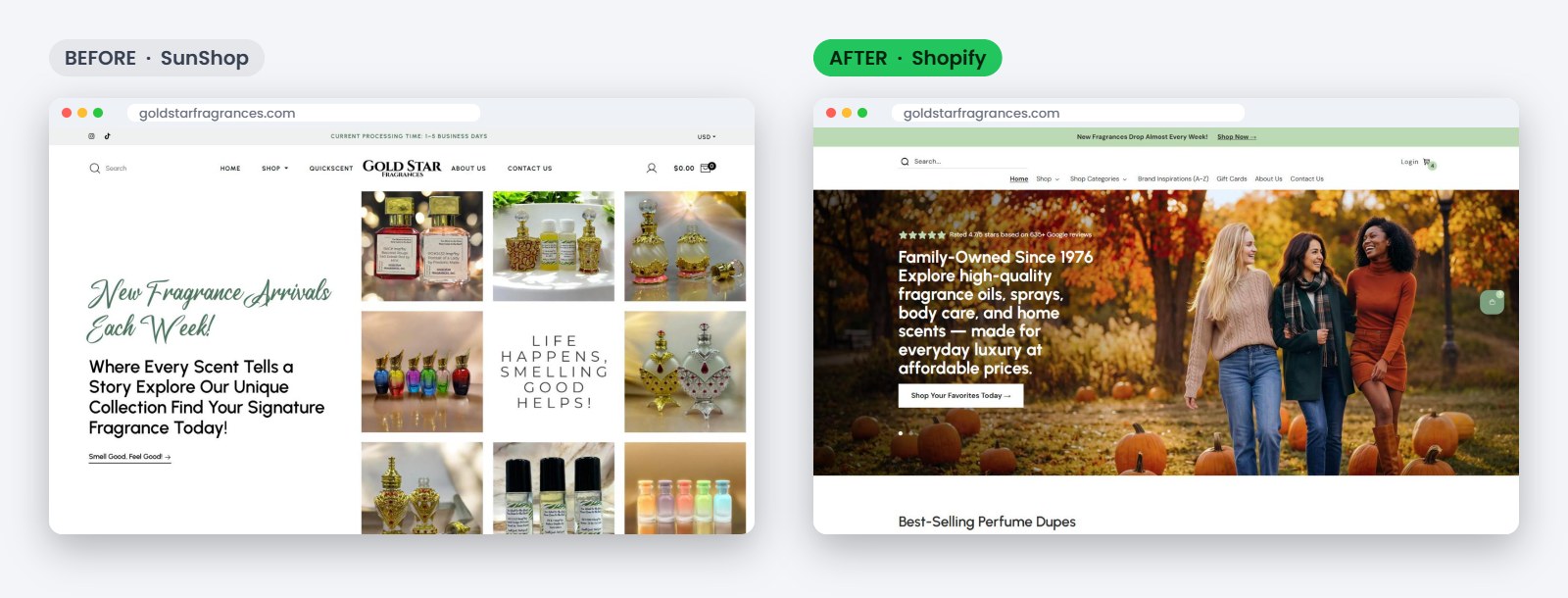
They had traffic and loyal customers. The website was the bottleneck.
How we planned the move
Before any design or code I sent a proposal with every task listed and estimated in hours: homepage, collection pages, product page, mobile, moving products, moving customers and orders, redirects, speed, legal pages, shipping and so on. We split it into milestones so the client knew what would be delivered and when.
From day one the client had:
- A Google Drive folder with all the files
- Full access to the Figma file to see and approve every design
- A dev sheet with every task numbered and a status
- A weekly call with me and WhatsApp for quick questions
- Daily updates while the project was active
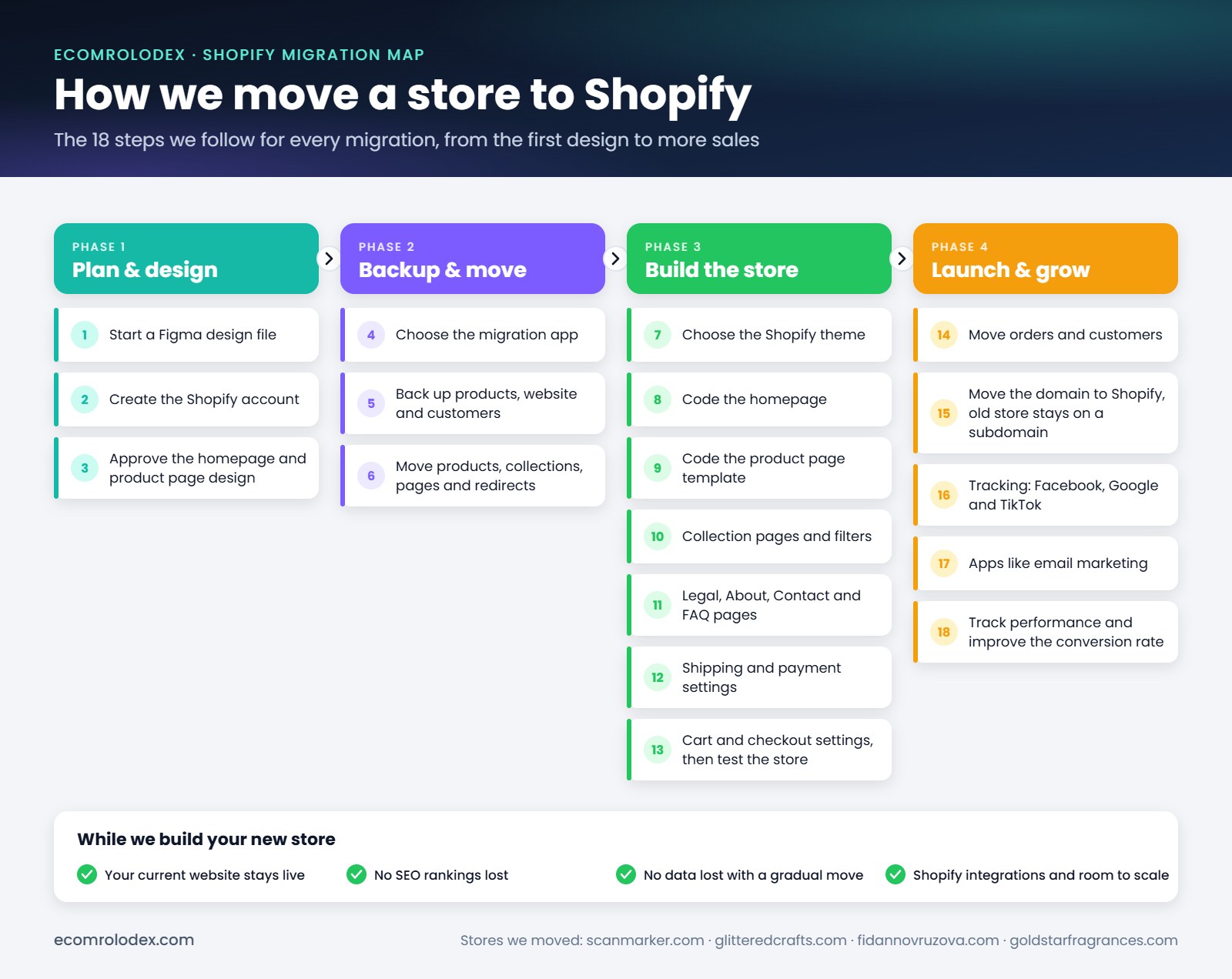
This is the map we follow for every store we move to Shopify. Every step becomes a task in the dev sheet, so nothing gets missed.
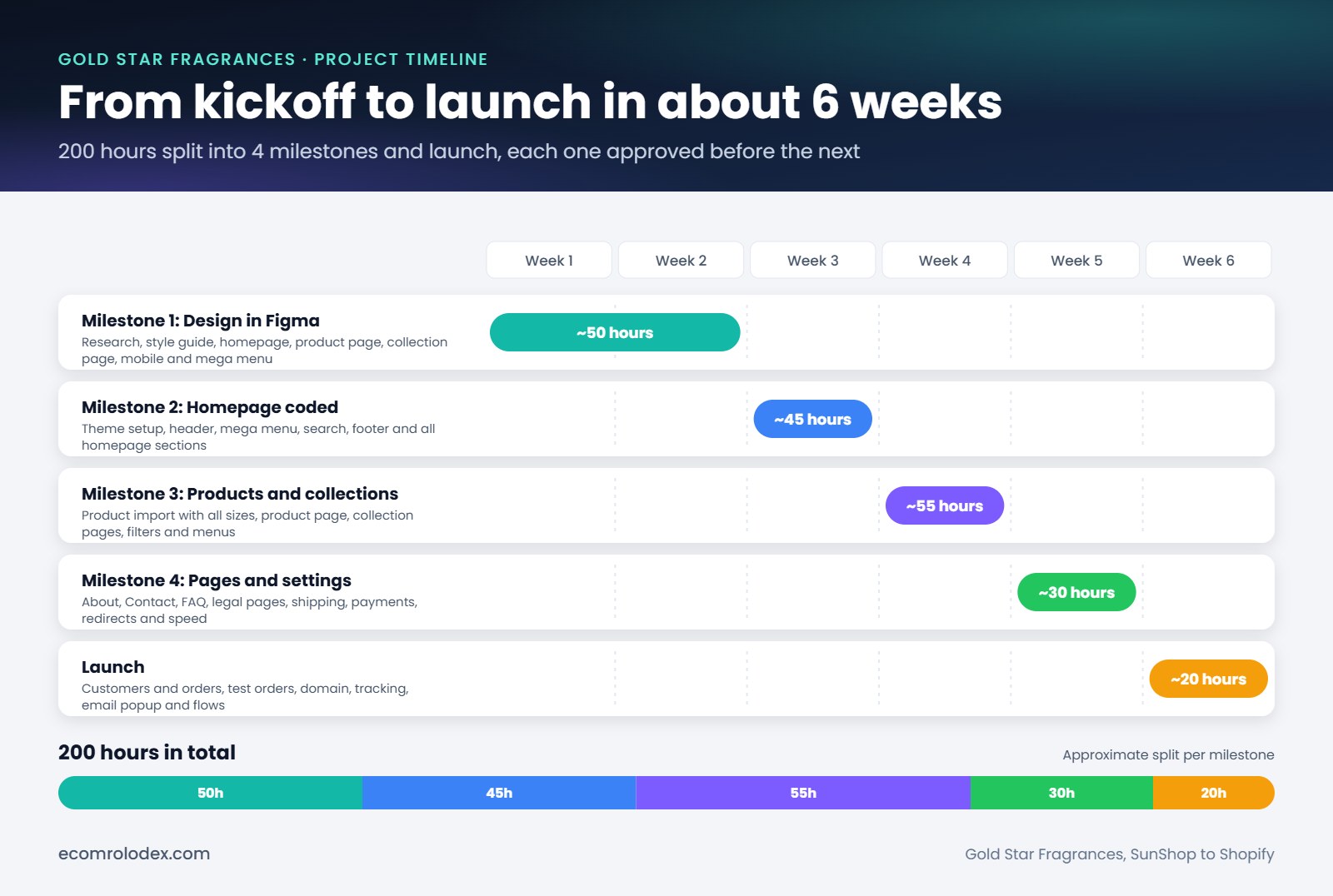
The timeline: 200 hours in about 6 weeks
We split the work into 4 milestones and the launch. The client approved each milestone before we started the next one, so there were no surprises. From kickoff to launch it took about 6 weeks and 200 hours.
Step 1: Redesign in Figma first
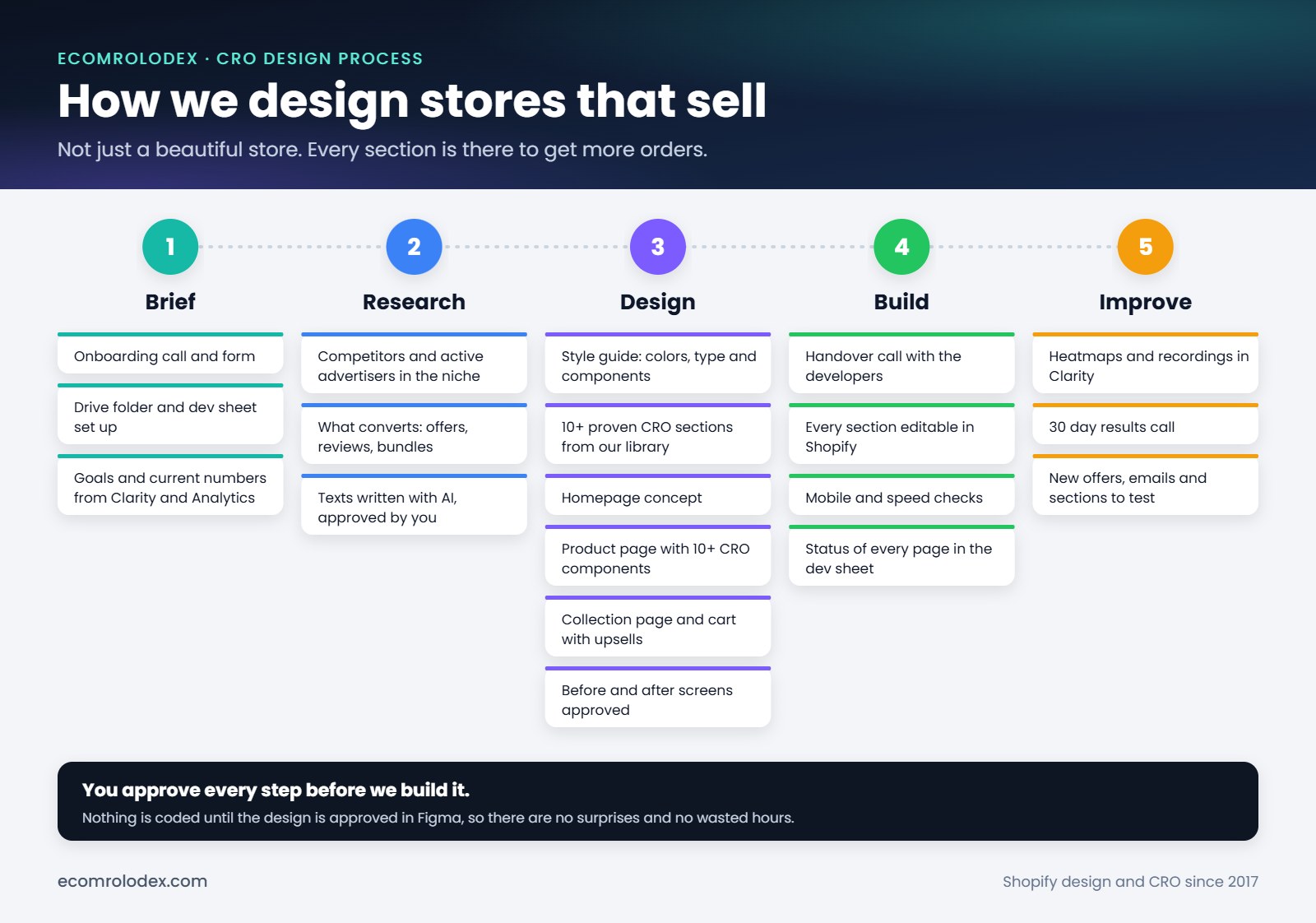
We don't start in code. We start with research and design so the client can see and approve everything before we build it.
This is the CRO design process we follow for every redesign:
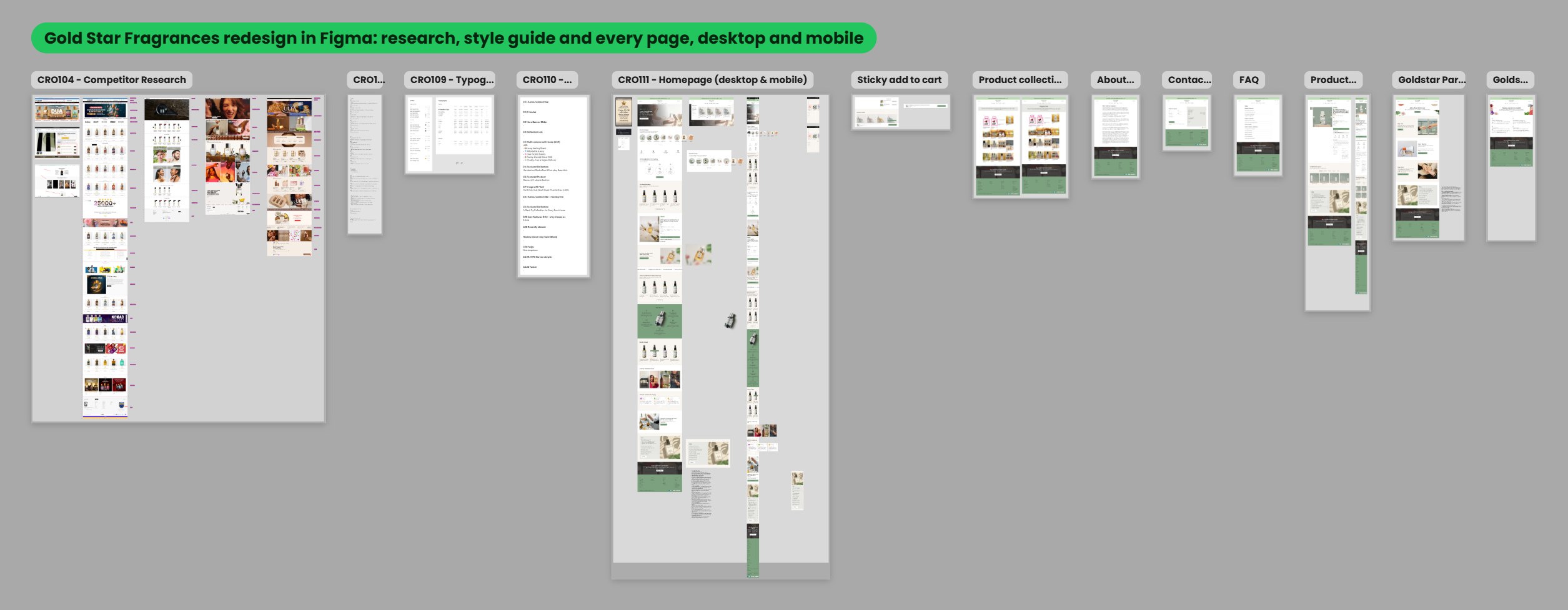
For Gold Star we:
- Looked at the top stores selling fragrance oils and perfume dupes and noted what works
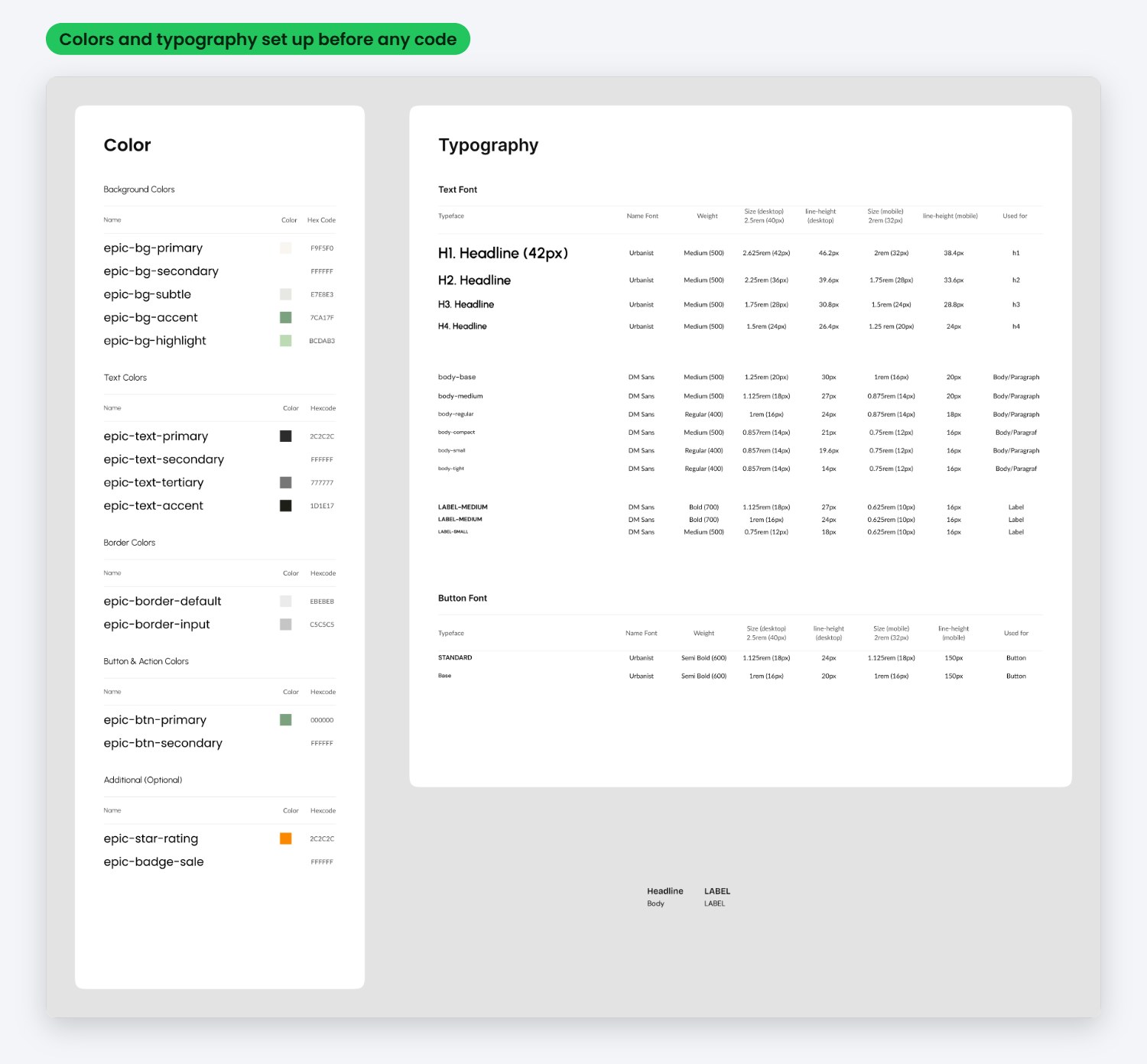
- Created a style guide with colors, typography and buttons
- Designed the homepage, collection pages, product page, About, Contact and FAQ pages
- Designed every page for mobile, because most of their visitors shop on the phone
- Designed a mega menu so customers can find a scent across all the categories
- Designed a cart with upsells
Step 2: Moving the data from SunShop to Shopify
This is the part most store owners worry about, and they should. Gold Star has thousands of products and most of them come in a lot of options: 1 oz, 4 oz, 8 oz and 16 oz fragrance oil, roll-ons, sprays, lotions and shower gels.
How we moved it:
- Exported all products, customers and orders from SunShop and kept a backup
- Cleaned the product data in a spreadsheet (titles, product codes, sizes, prices and images) so every size became a proper Shopify variant
- Imported products in batches and checked them against the old store
- Moved customers and order history with a migration tool
- Placed test orders and checked shipping, taxes and checkout before going live
The old SunShop store stayed live the whole time we were building. At launch we moved the domain to Shopify and kept the old store on a subdomain, so nothing was lost and the old data is always there to check.
More on this in the Q&A below.
Step 3: Building the store on Shopify
We built the store on the Epic theme and coded custom sections on top of it, so it looks like the design and not like a template.
Some of the things we built:
- Mega menu with all collections and a Shop Categories menu
- Predictive search that shows products while you type
- Collection pages with filters (price, in stock) and infinite scroll instead of pagination
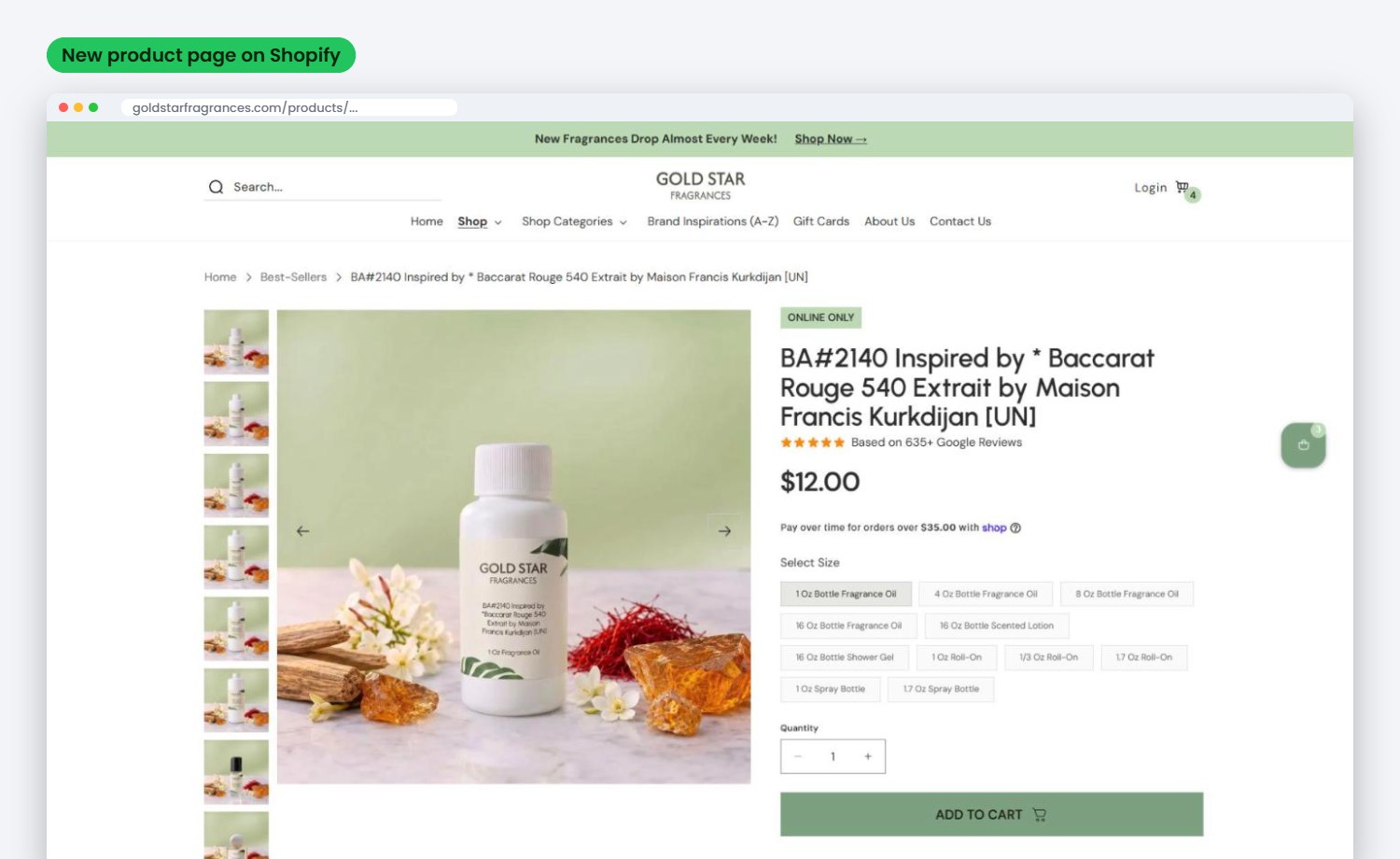
- Product pages with size and type selection, bottle images for each size, USPs, shipping info, FAQs and "Combined with" products
- Sticky add to cart on mobile
- Google reviews on the homepage and product pages (they have over 635 Google reviews, so we made them visible)
- Gift cards, About, Contact and FAQ pages
- Every section editable from the Shopify customizer, so their team can change texts, images and offers without a developer
Step 4: Keeping their SEO
When you move platforms every URL changes. If you don't redirect the old URLs, Google sends people to 404 pages and you lose rankings you built over years.
We made a list of the old URLs and their new Shopify URLs in the dev sheet and created redirects for thousands of pages: collections, products and info pages. For example the old Men collection was index.php?l=product_list&c=8 and now it opens /collections/men.
After launch we:
- Connected Google Search Console and watched for errors
- Did keyword research around the brands their scents are inspired by
- Created 200+ new collection pages for brand inspirations (Brand Inspirations A-Z), so they show up when people search for a dupe of a specific brand
- Rewrote descriptions for 2,700 products
- Set up the blog
Step 5: Thousands of product images edited with AI
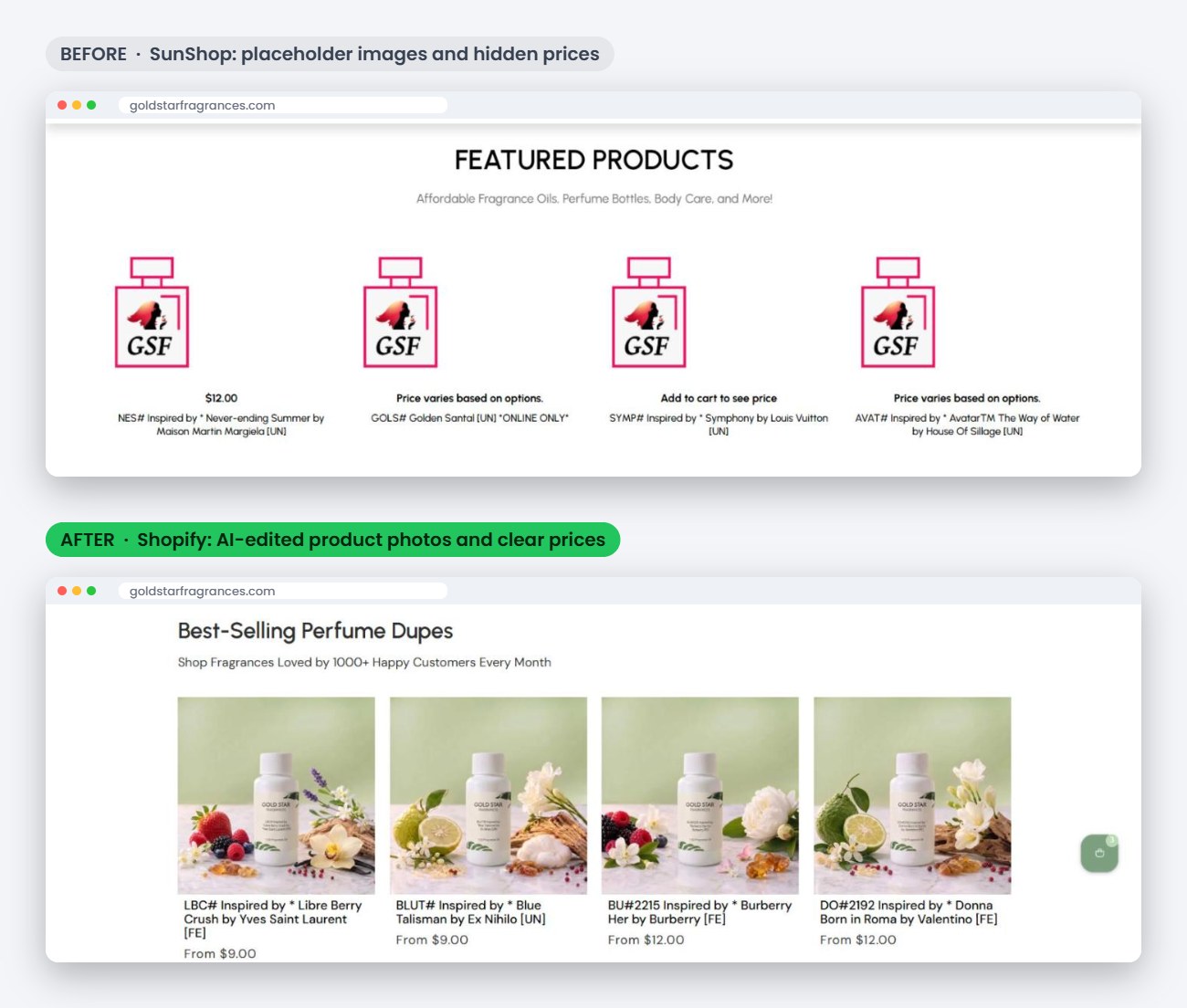
On SunShop a lot of products had no photo at all, only the GSF placeholder. That alone kills conversion. You can't sell a scent with an icon.
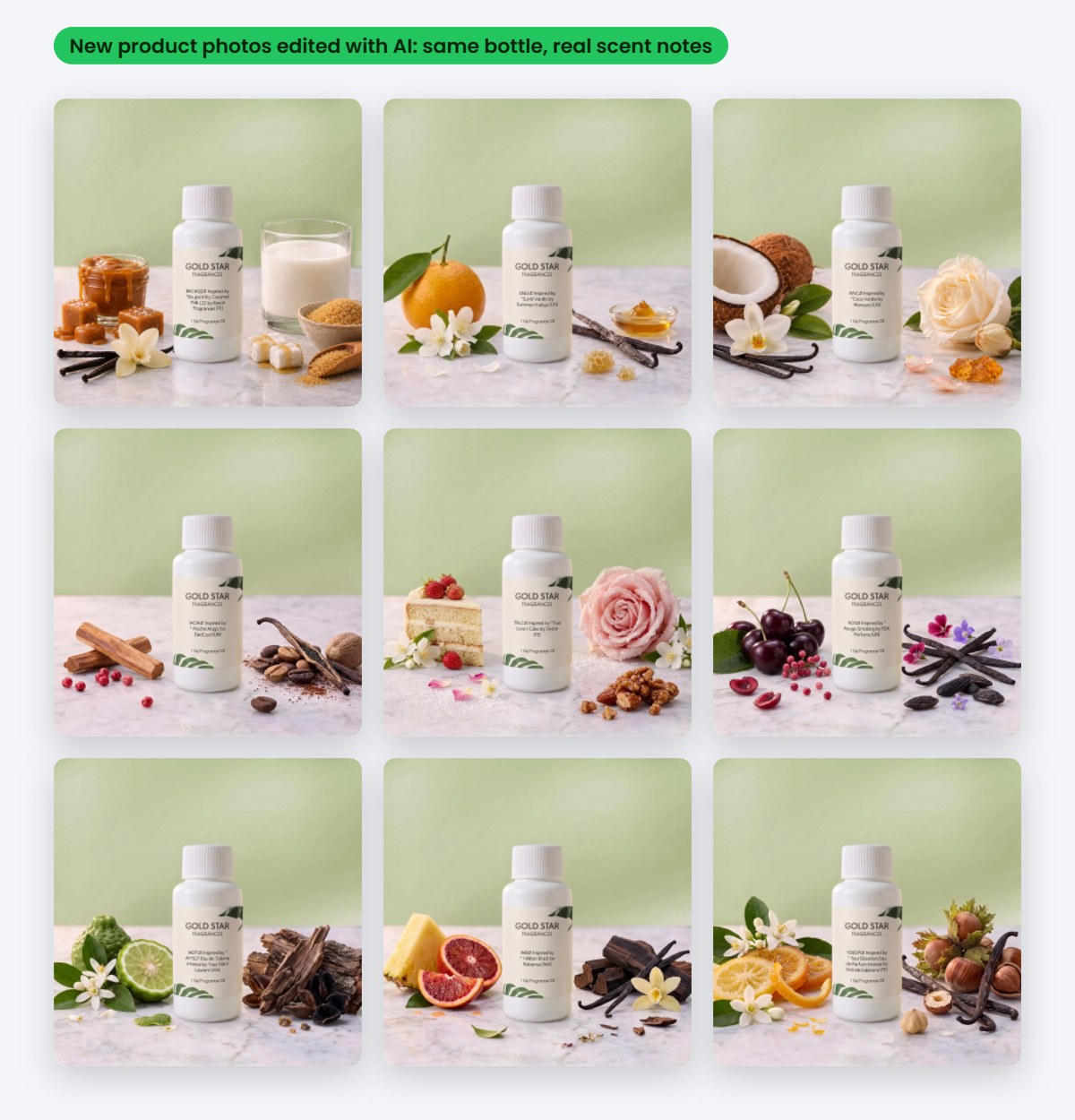
We created a new style for every product: their real bottle on marble with the scent notes of that fragrance around it (vanilla, citrus, rose, oud and so on). We edit the images with AI, check every one, optimize them for speed and match each image to its size in Shopify. It's thousands of images, so it runs as its own project with its own tracker.
Step 6: CRO, because a store has to sell
This is the main difference when you work with us. We don't just build beautiful stores, we build stores that sell. I've been doing conversion optimization on Shopify since 2017, and every section we add is there for a reason.
For Gold Star we added:
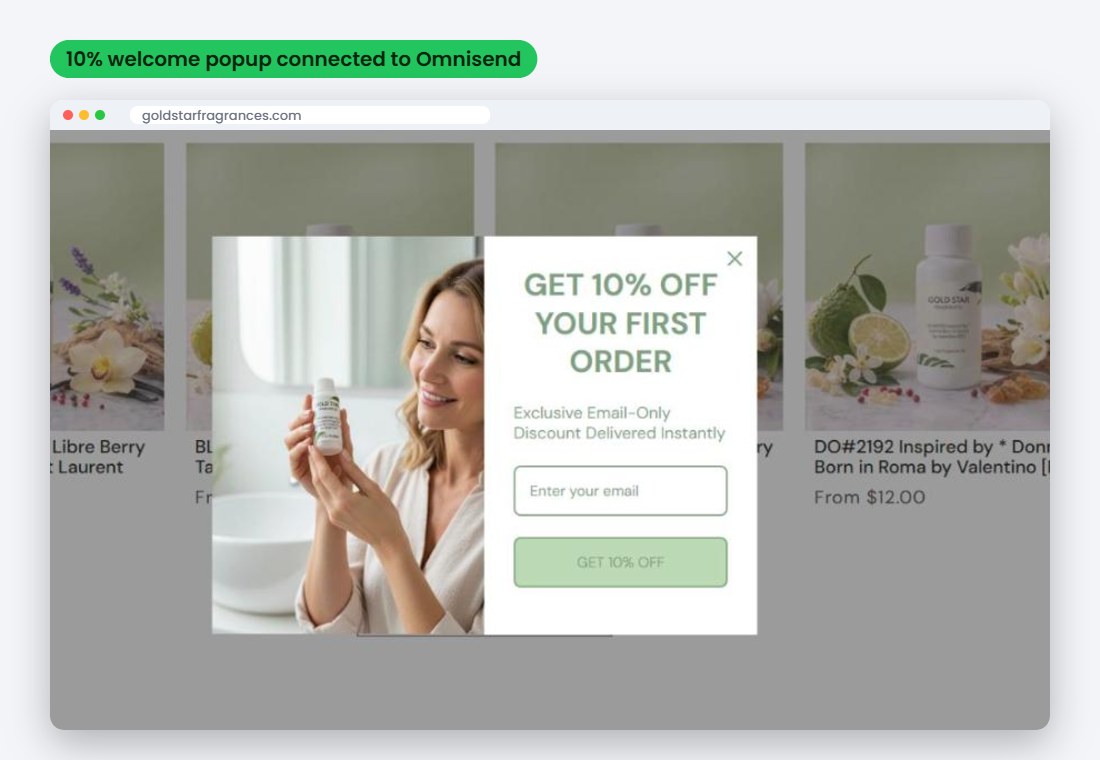
- A 10% welcome offer popup to capture emails
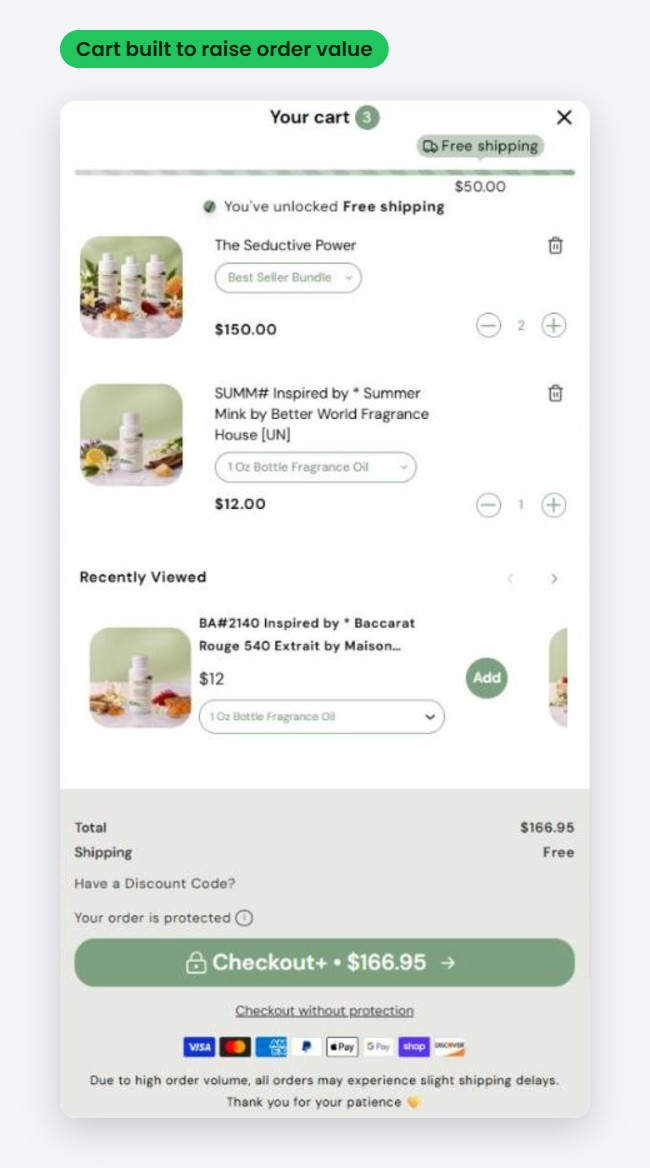
- A free shipping progress bar in the cart
- Tiered cart rewards: free shipping over $50, a free gift at $100 and 5% off over $150, plus in-cart only discounts on recommended products. In the first 30 days with these rewards the average order value went up 30%
- Bundles and Recently Viewed products inside the cart
- Reviews next to the add to cart button and on the hero banner
- Gift cards for people buying for someone else
- An affiliate code system so influencers can share a code and earn a commission
- Microsoft Clarity recordings and heatmaps so we can see where people get stuck
The offers change with the season, but the cart is always built to raise the order value.
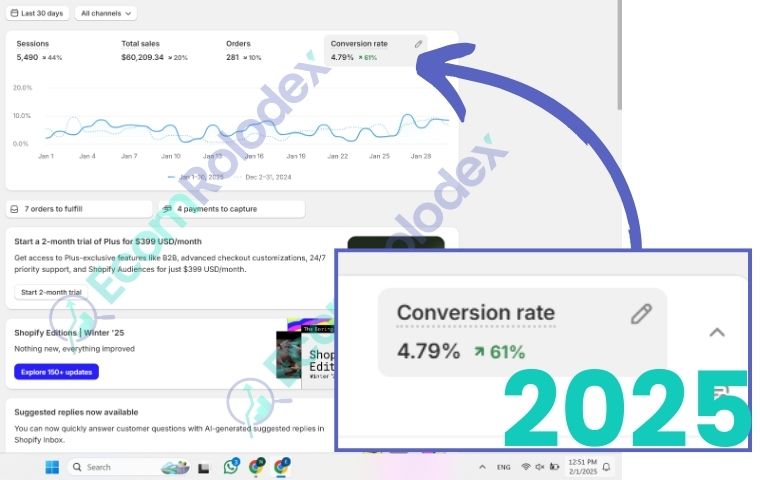
And CRO doesn't stop at launch. Every month we watch the recordings, test new sections and offers and fix what slows people down. On SunShop their conversion rate was around 1%. With this ongoing CRO it's now between 4% and 5%.
Step 7: Email marketing with Omnisend
Most visitors don't buy on their first visit. On SunShop there was nothing to bring them back.
We set up Omnisend and:
- Connected the 10% popup to a welcome email series
- Built abandoned cart and abandoned checkout flows
- Subscribed every new customer who places an order
- Imported their past customers in batches, verified the list and removed bounced emails to keep deliverability good
- Verified the sender domain and created segments
- Created 15 email templates so their team can send campaigns fast
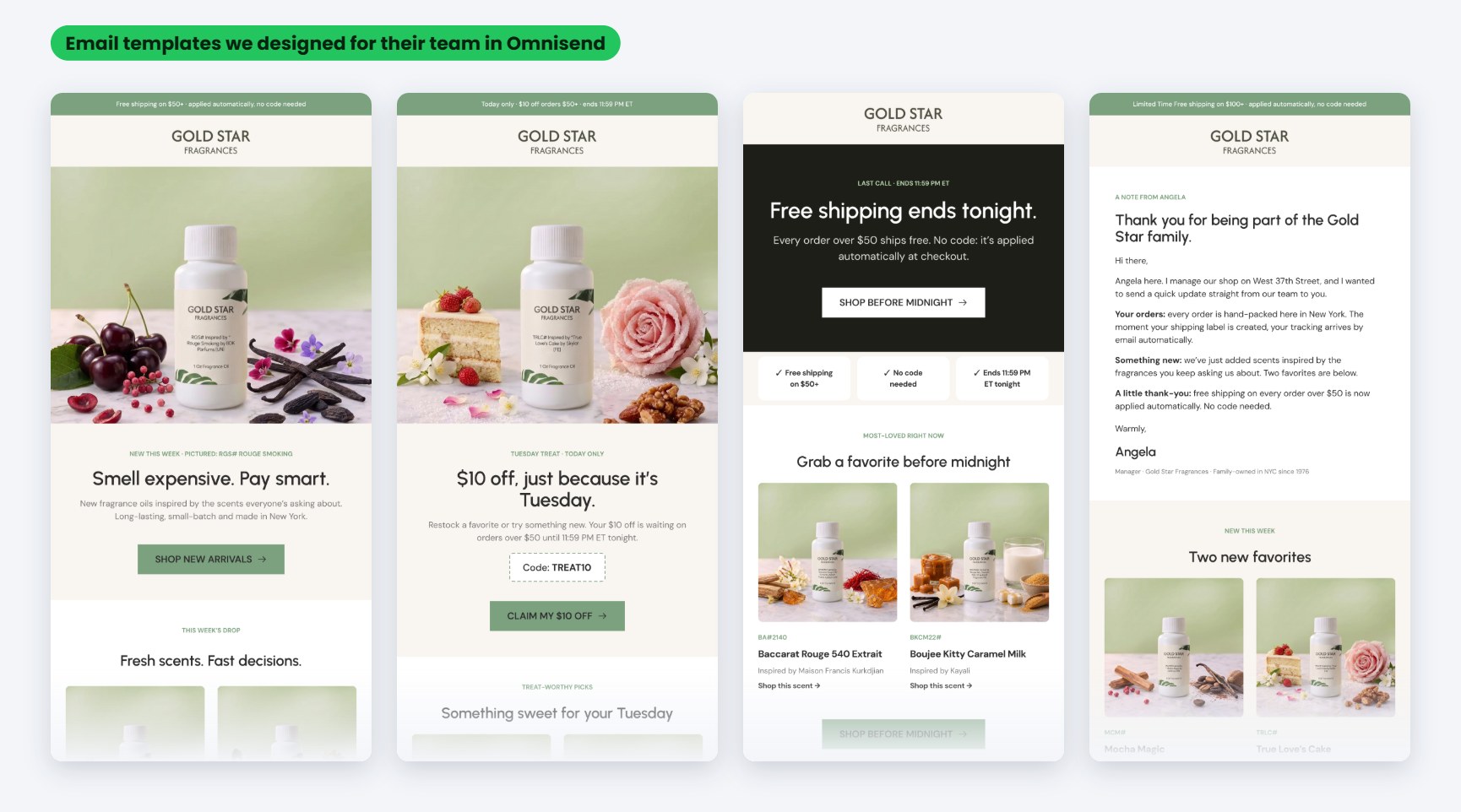
Today around 30% of their monthly revenue comes from email. We'll share the full email results in a separate article.
Step 8: Facebook pixel and Facebook ads
Once the store was converting, it made sense to send more traffic to it.
- Connected the Facebook pixel so every visit, add to cart and purchase is tracked
- Set up their Facebook business account and ad account
- Created and launched their Facebook ads
Because the pixel tracks every purchase, Facebook learns who buys and shows the ads to more people like them. And because the store now converts at 4-5%, the traffic from the ads turns into orders.
How we keep everything organized
A project like this has hundreds of tasks. If they live in WhatsApp messages, things get forgotten.
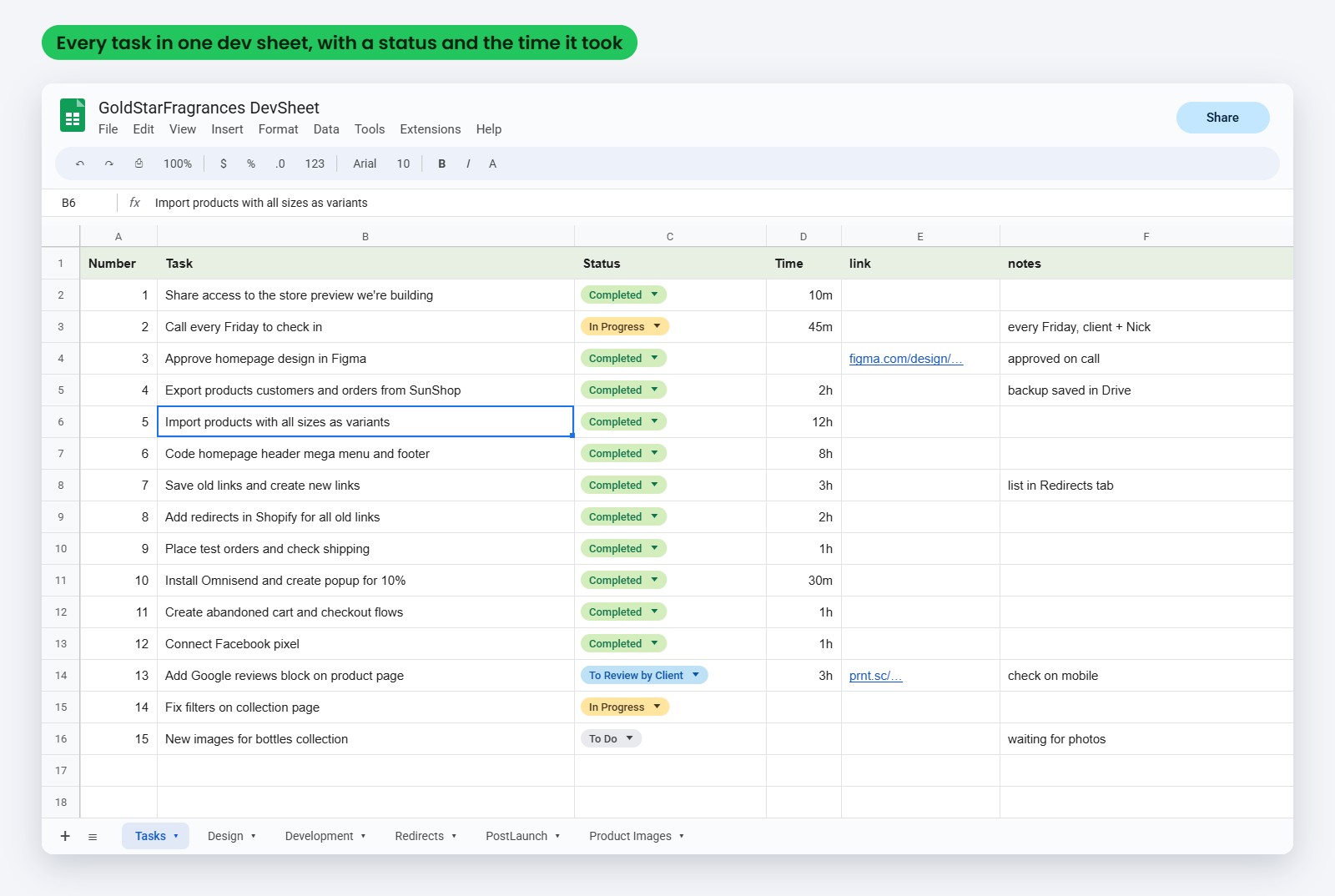
Everything goes in the dev sheet. Each task has a number, a short description, a status (To Do, In Progress, To Review by Client, Completed or On Hold) and the time it took. Design, development, redirects, post-launch work and product images each have their own tab. The client can open it anytime and see what's done, what's in progress and what's waiting on them. All files live in the Drive folder and all designs in Figma.
That's how we kept going after launch without losing anything, from gift cards to Valentine's bundles to holiday email templates.
The results one year later
Before the move they were stuck at about 10 orders a day. One year after we started working together they get 30 to 50 orders a day, consistently. We don't share our clients' revenue, but these numbers tell the story:
- Orders: from about 10 a day to 30-50 a day
- Conversion rate: from around 1% on SunShop to 4-5% on Shopify
- Email: around 30% of their monthly revenue
- Launch: about 6 weeks and 200 hours from kickoff
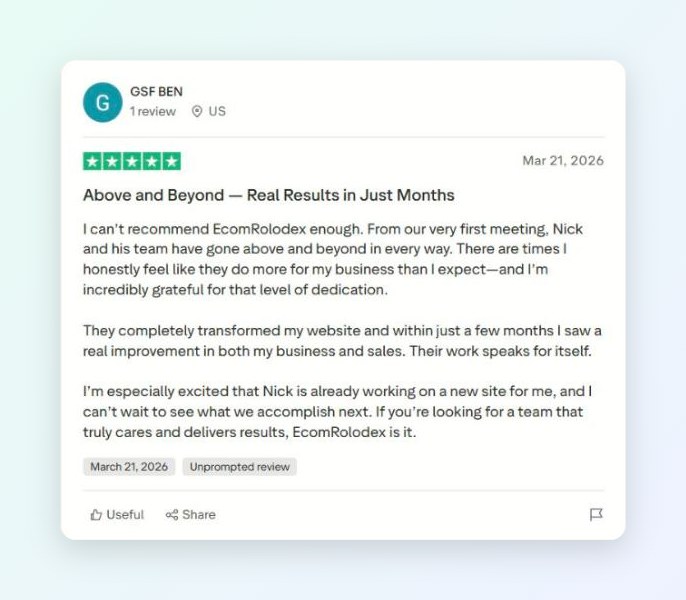
Ben from Gold Star Fragrances left us this review on Trustpilot:
After this we built a new store for them to expand the business, Scentbar. That project gets its own case study.
Questions store owners ask before moving to Shopify
How did you make sure all the data moved correctly?
We export everything first and keep a copy, so nothing gets lost even if an import goes wrong. Then we clean the data in a spreadsheet before importing, because most problems come from messy data, not from Shopify. After the import we compare the numbers between the old store and Shopify (products, variants, customers, orders), check products in every collection and place test orders. The old store stays live until everything is checked, so there's no downtime.
How did you keep their SEO?
Redirects. We mapped the old URLs to the new ones and created redirects for thousands of pages, so old links from Google, social media and old emails still open the right page. We kept the product names and codes customers search for, connected Search Console after launch and fixed errors as they showed up. Then we added new pages (brand inspirations, product descriptions, blog) to grow the traffic, not only keep it.
How long does a move like this take?
For Gold Star it took about 6 weeks and 200 hours to launch, and that includes the full redesign, thousands of products and the redirects. A smaller store with a simple catalog can move faster. You get a timeline with milestones and hours before we start.
Do my customers need to create new accounts?
Customer accounts move, but passwords can't be moved from any platform for security reasons. With Shopify's new customer accounts, customers log in with a one-time code sent to their email, so nobody has to reset a password.
Can my team manage the store without a developer?
Yes. Every section is editable from the Shopify customizer, and we record video instructions on how to manage products, collections, menus and offers.
What happens after launch?
You get 90 days of support for the code we built, and we have a call 30 days after launch to go through the recordings and heatmaps and see what to improve. With Gold Star we kept working on emails, images, SEO pages, offers and Facebook ads long after launch.
Do you only move stores from SunShop?
No. We've moved stores from WooCommerce, WordPress and other platforms. The process is the same: plan, design, move the data, redirects, launch, then grow.
If you're thinking about moving to Shopify
A few things I'd tell any store owner after doing this since 2017:
- Don't just copy the old store. The move is the best time to fix what doesn't convert.
- Make the list of old URLs before you launch, not after your rankings drop.
- Real product photos sell. If you have thousands of products, AI editing makes it possible.
- Have the email popup and flows ready on launch day.
- Keep one sheet with every task and a status.
Are you on SunShop, WooCommerce, or another platform and want to move to Shopify to grow?
Send me your store link and I'll tell you what the move would look like for your store.