


Most Shopify store owners I talk to started their emails on Klaviyo. It's a good tool, but the bill grows every time your list grows, and most stores pay for reports and features they never open.
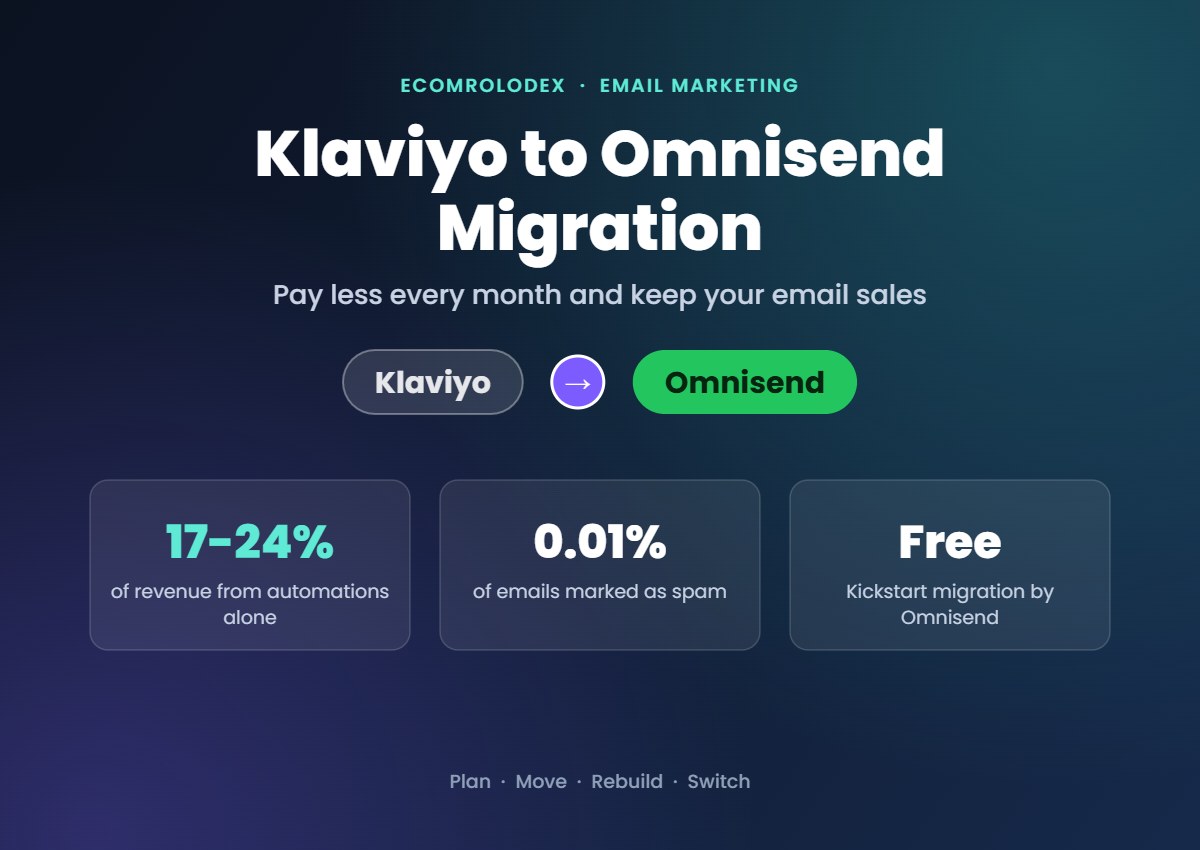
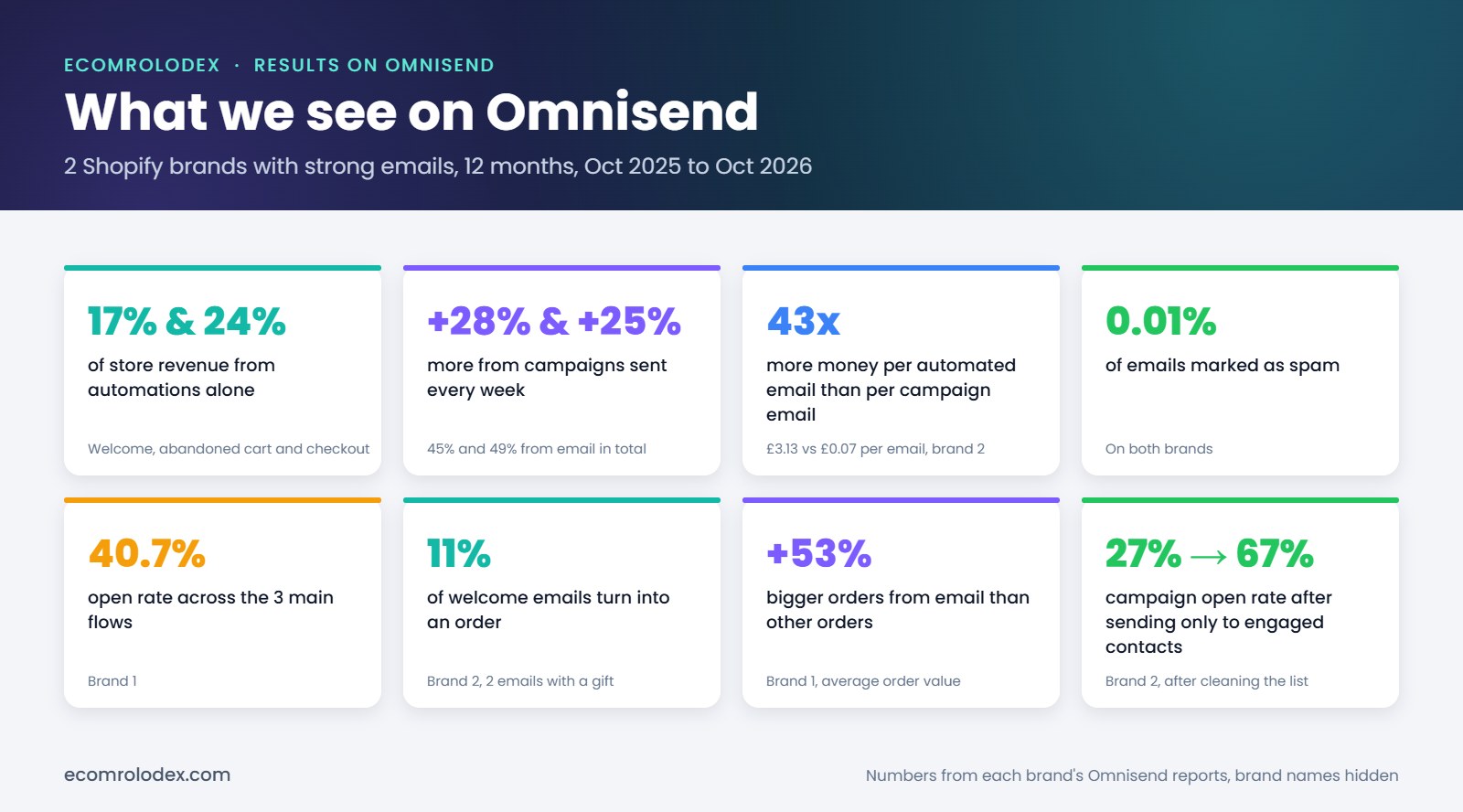
For most of our clients we build emails on Omnisend instead. On two Shopify brands we run on Omnisend, the 3 main automations alone bring 17% and 24% of all store revenue, and only 0.01% of emails get marked as spam.
In this article I'll show you why we recommend Omnisend, what it costs for a new or growing store, the plan we follow to move a store from Klaviyo without losing subscribers or sales, and how we keep track of every step in one Google Sheet.
Quick overview
- Who it's for: Shopify stores on Klaviyo that want to pay less, from new stores stuck on the free plan to brands with a big list
- What moves: subscribers, consent, custom properties, segments, signup forms, flows and templates
- How long: 3 to 5 business days for the account to move, then 2 to 4 weeks of warm-up
- The move itself: free with Omnisend's Kickstart migration (250+ contacts), or around 10 to 20 hours if you want us to do it with you
- What we see on Omnisend: 17% and 24% of store revenue from the automations alone, more with weekly campaigns, 0.01% spam
Why we recommend Omnisend over Klaviyo
I don't recommend a tool because it's popular. We recommend Omnisend because for most Shopify stores it does the same job for less money, and the store's own team can actually use it.
1. It costs less every month
This is the main reason store owners move, and it matters for small stores too.
Most stores I talk to aren't big brands yet. They're on Klaviyo's free plan with somewhere between 250 and 2,500 contacts, and a lot of them stopped sending emails because they hit the 250 contact limit. Both free plans stop at 250 contacts and 500 emails a month. The difference is that Omnisend's free plan comes with 24/7 live chat support, and on Klaviyo's free plan you only get email support for the first 60 days.
Once you grow past 250 contacts, here's what you pay each month:
| Contacts | Omnisend | Klaviyo | You save |
|---|---|---|---|
| Starting stores | |||
| 500 | $16 | $20 | $4 |
| 1,000 | $20 | $30 | $10 |
| 2,500 | $44 | $60 | $16 |
| Growing brands | |||
| 5,000 | $81 | $100 | $19 |
| 10,000 | $132 | $150 | $18 |
| 15,000 | $207 | $350 | $143 |
For a starting store that's $4 to $16 a month, so the bigger win there is live support and a plan you can afford to grow on. At 15,000 contacts it's $143 a month, or $1,716 a year, that stays in your business. And the gap gets bigger as your list grows.
2. Abandoned cart in 2 clicks
Omnisend comes with ready flows for welcome, abandoned cart, abandoned checkout and more. You pick the abandoned cart flow, turn it on, and it's live. 2 clicks. Then we adjust the timing and the emails to your brand.
3. Templates your team can actually use
Omnisend has 250+ email templates and a simple drag and drop editor. We design a set of templates in your brand and save them in your account, so your team builds a campaign by swapping the products and the text. For one brand we set up 15 templates and their team sends about 4 campaigns a week in minutes.
4. Live chat support 24/7, on every plan
When something breaks the day before a sale, you need an answer now, not tomorrow. Omnisend has 24/7 live chat and email support on every plan, even the free one, and when we message them someone usually answers in a few minutes. On Klaviyo the free plan only gets email support for the first 60 days, and live chat on the standard plans doesn't cover weekends.
5. Email, SMS and popups in one place
Popups, email, SMS and web push are all inside Omnisend, so you don't pay for extra apps. If you run more than one store, you can manage up to 500 stores from one account.
Where Klaviyo is still better
To be fair, Klaviyo goes deeper on data: predicted order dates, customer lifetime value, custom reports and more integrations. If you have a big list and a data team that uses those reports every week, Klaviyo can be worth the price. For most Shopify stores we work with, it isn't.
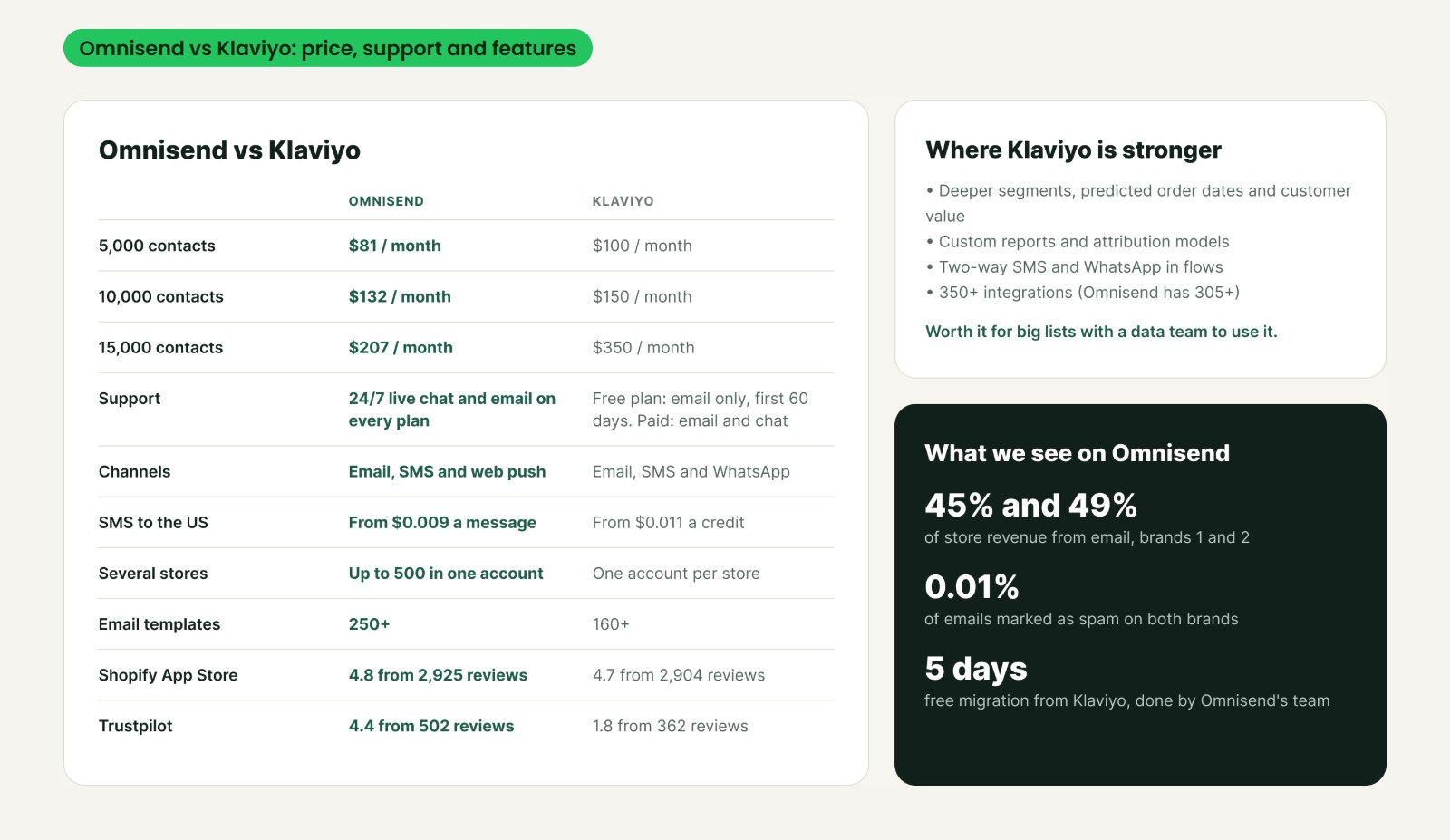
What we see on Omnisend
These numbers come from two Shopify brands we run on Omnisend, from October 2025 to October 2026. We set up the popup, the flows and the templates, and their teams send the campaigns.
These are two of our top brands. They have really good emails and they send a lot, so don't expect the same numbers on day one. Here's where the money comes from:
- Automations alone bring 17% and 24% of all store revenue. That's the welcome, abandoned cart and abandoned checkout flows. Once they're set up they run on their own.
- Campaigns add another 28% and 25%. One brand sends about 4 campaigns a week from our templates.
- Together that's 45% and 49% of store revenue from email. That's the top end, for brands with strong emails that send every week.
- 43x more money per automated email than per campaign email (£3.13 vs £0.07 per email sent)
- 40.7% open rate across the 3 main flows
- 11% of welcome emails turn into an order
- Orders from email are 53% bigger than other orders
- Campaign open rate went from 27% to 67% after sending only to engaged contacts
- 0.01% of emails marked as spam, on both brands
What to expect for your store
If you only set up the automations, they bring sales on autopilot. On our brands that's 17% to 24% of all revenue, and a store with a smaller list usually sees a bit less. Campaigns are what take it higher, if you send every week.
For most stores, 20% to 30% of revenue from email is a realistic goal. Here's what that looks like in money:
- A store doing $10,000 a month with 20% from email: $2,000 a month from email
- A store doing $100,000 a month with 30% from email: $30,000 a month from email
That's substantial revenue, and the automations part keeps coming in every month without you sending anything.
Most of this doesn't come from the platform alone. It comes from setting it up the right way, and that's what the plan below is for.
How we plan the move in Google Sheets
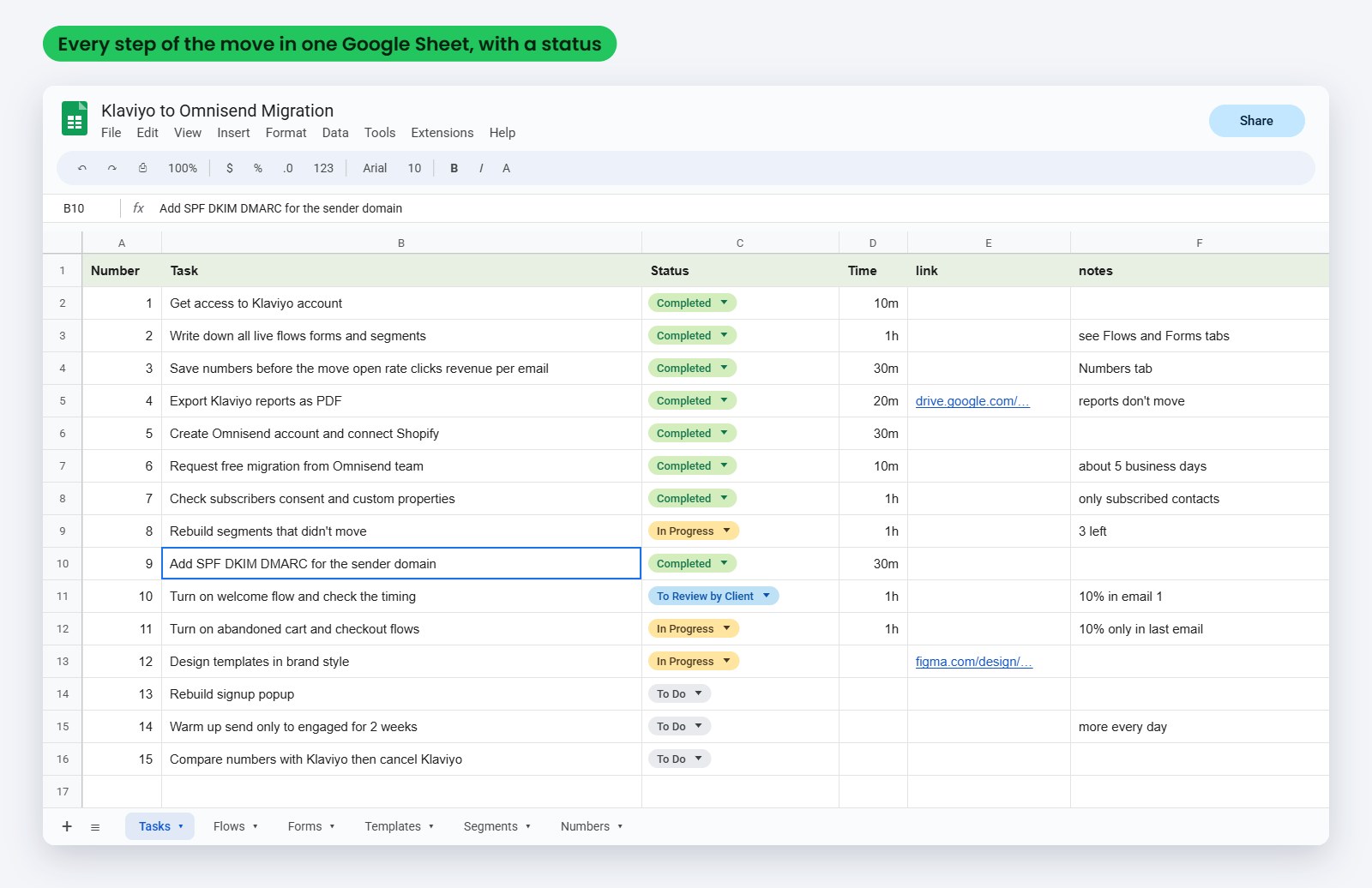
Before we touch anything, everything goes in one Google Sheet. Every flow, form, segment and template you have in Klaviyo gets a row with a status and the time it took. That way nothing gets forgotten and you can see where we are anytime.
The sheet has a tab for each part of the move:
- Tasks: every step of the move with a status
- Flows: every live flow in Klaviyo, its trigger and timing, and its status in Omnisend
- Forms: every popup and signup form
- Templates: the ones we keep and the ones we design new
- Segments: which ones moved and which ones we rebuild
- Numbers: open rate, clicks and revenue per email before the move, so we can compare after
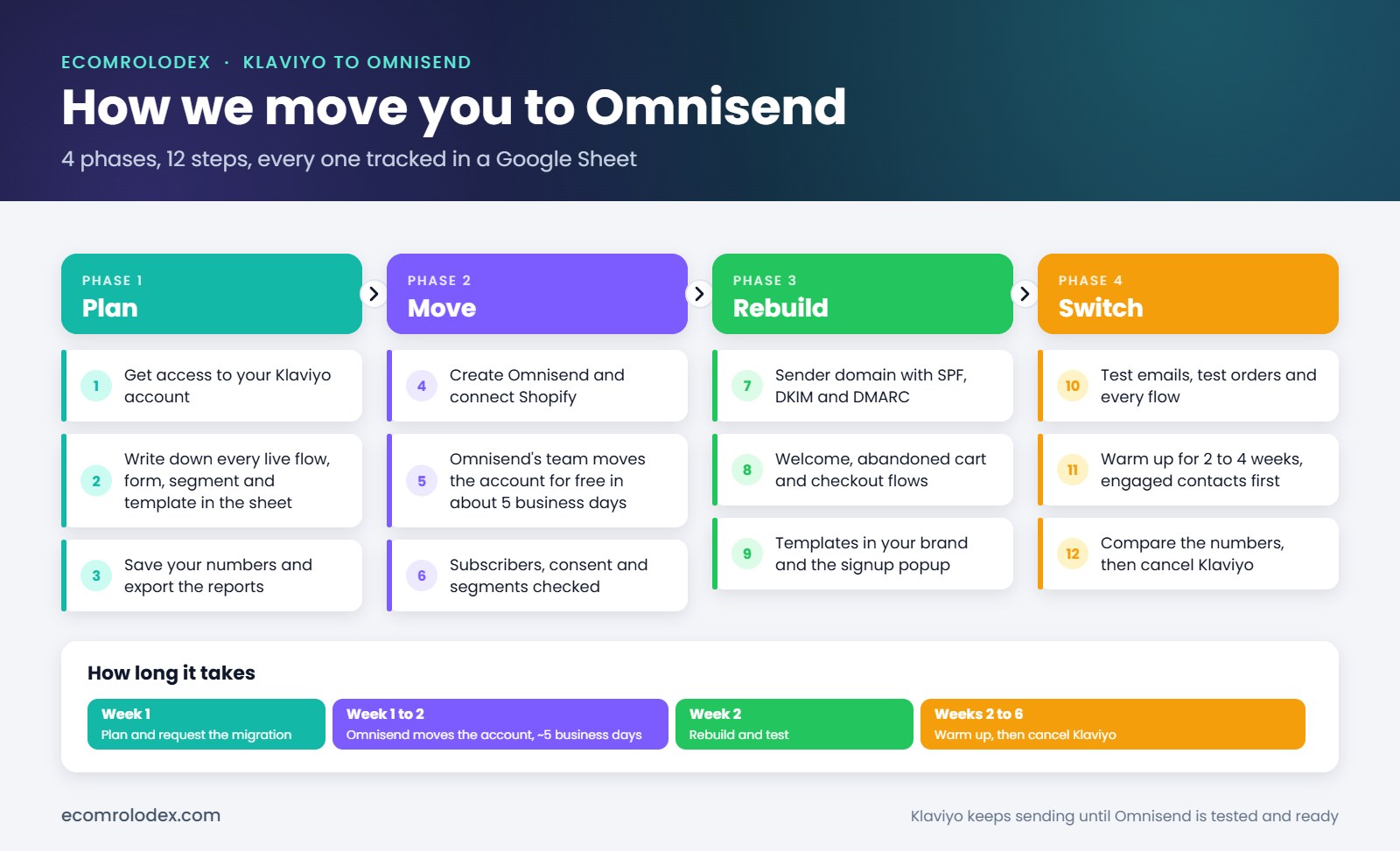
And this is the whole move on one page:
Step 1: Audit what you have in Klaviyo
We go through your Klaviyo account and write down everything that's live: flows, signup forms, segments, templates and integrations. We also save your numbers and export your reports as PDF, because reports and campaign history don't move to any new platform.
Step 2: Create Omnisend and connect Shopify
We create your Omnisend account, connect it to Shopify so products, orders and customers sync, and choose Klaviyo as the platform you're moving from. If you have 250 or more contacts, we request Omnisend's free Kickstart migration. Their team moves your contacts, verifies your sender email and rebuilds up to 4 flows, 5 segments, 5 signup forms and 1 master template. It takes 3 to 5 business days.
Your Klaviyo stays live and keeps sending the whole time, so you don't lose a single sale during the move.
Step 3: Move subscribers, consent and segments
Subscribers move with their consent, their subscription status and their custom properties. Most segments move too. The ones that use filters Omnisend doesn't have, we rebuild by hand and mark them in the sheet.
We also check who gets imported. Non-subscribed contacts still count toward your plan, so importing everyone can push you into a more expensive tier for no reason.
Step 4: Set up the sender domain and warm it up
A new sending domain starts with no reputation, so we add the SPF, DKIM and DMARC records and warm it up. For the first 2 to 4 weeks campaigns go only to your most engaged subscribers, and we send to more people every day. That's how our brands stay at 0.01% spam.
Step 5: Rebuild the flows
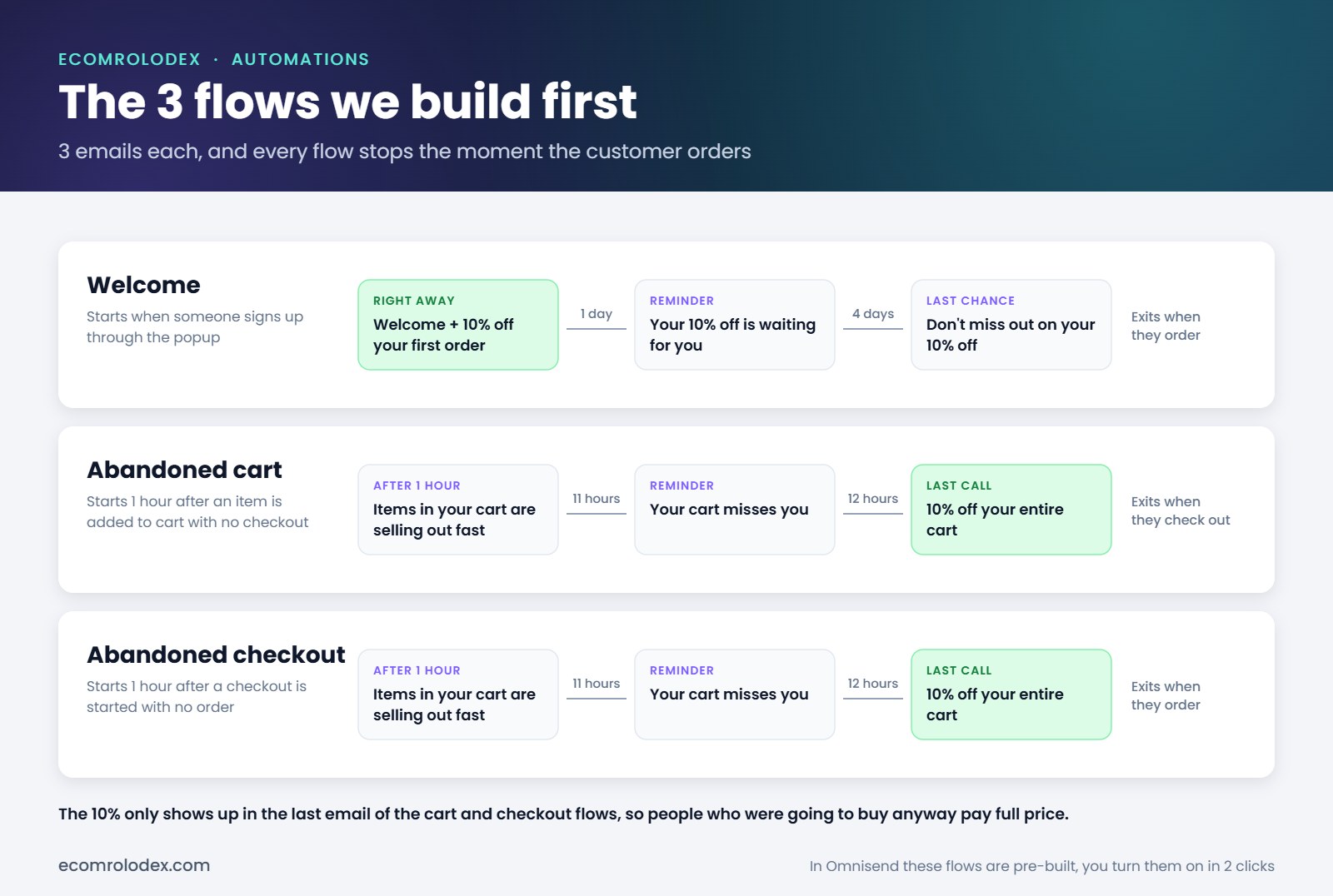
Omnisend's team recreates your live flows, and we check every trigger, delay and email. For most stores we start with the 3 flows that make the most money:
- Welcome: right away, after 1 day and after 4 days
- Abandoned cart: 1 hour after someone adds to cart, then 11 and 12 hours later
- Abandoned checkout: the same timing, when someone leaves the checkout
Every flow stops the moment the customer orders. In the cart and checkout flows the discount only shows up in the last email, so people who were going to buy anyway pay full price.
Step 6: Templates and the signup popup
We design a set of templates in your brand (new arrivals, best sellers, a sale, last chance, a note from the owner) and save them in Omnisend. Then we rebuild your signup popup. On one brand our multi-step popup signs up 6% of the people who see it.
Step 7: Test, compare and switch off Klaviyo
We send test emails, place test orders and check that every flow triggers. Then we compare the new numbers with your Klaviyo numbers in the sheet. Only when everything works do you cancel Klaviyo.
What doesn't move
- Reports and stats
- Campaign opens and clicks history
- Revenue history
Export these as PDF before you cancel Klaviyo. Some Klaviyo-only features or integrations may need a different setup, and we'll tell you about those in the audit.
Questions store owners ask before moving
Will I lose my subscribers?
No. Subscribers move with their consent and subscription status, and unsubscribed people stay unsubscribed.
Will my emails go to spam?
Not if the domain is set up and warmed up properly, that's what step 4 is for. Our brands sit at 0.01% spam.
Do I have to stop sending during the move?
No. Klaviyo keeps sending until Omnisend is tested and ready.
How long does it take?
3 to 5 business days for the account to move and a few days for us to rebuild and test. Then 2 to 4 weeks of warm-up while you're already sending from Omnisend.
How much does the move cost?
The move itself is free. If you have 250 or more contacts, Omnisend's Kickstart migration moves your account at no cost: your contacts, sender email verification, up to 4 flows with up to 3 emails each, up to 5 segments, up to 5 signup forms and popups, and 1 master template. It takes 3 to 5 business days.
If you want an assisted move where we do it with you (the plan in the sheet, the checks, the domain warm-up, the flows and templates in your brand), it's around 10 to 20 hours, depending on how many flows, contacts and templates you need moved.
Can I keep my email designs?
Yes. Your most recent templates move, and we can recreate any other ones you want to keep.
What about SMS?
SMS can move too, but the number has to be verified again and you need to check consent before you text anyone. A new US number takes about 5 business days to verify.
If you're thinking about moving
A few things I'd tell any store owner before moving:
- Don't cancel Klaviyo until every flow is tested in Omnisend
- Export your reports first, they don't move
- Only import people who are subscribed
- Warm up the domain and start with your most engaged people
- Start with the 3 flows that make the most money, then add more
- If you have 250+ contacts, use Omnisend's free Kickstart migration
Still on Klaviyo? Let's move you to Omnisend.
If we worked together before, just send me a message. I'll look at your Klaviyo account and tell you how much you'd save, and if the free Kickstart migration is enough or you'd want our help.
Prices, support and ratings from Omnisend's comparison, data as of August 2026 (Omnisend Standard vs Klaviyo Email plan). Results from 2 Shopify brands we run on Omnisend, October 2025 to October 2026, as reported by Omnisend, brand names hidden. Free migration details from Omnisend's Kickstart page, October 2026. We're an Omnisend partner.