



If you're here you've probably decided to move your store to Shopify, and now you want someone to do it without losing products, customers or Google traffic. This page shows what you get when you hire us for a Shopify migration: our real prices, the hours our last moves took, what moves and what doesn't, and the 6 steps we follow on every launch.
I'm Nick Ursu. I've worked only on Shopify for 9+ years, and my team has done 1,300+ Shopify projects since 2017. We moved Gold Star Fragrances from SunShop in about 6 weeks and Futureface from WooCommerce in 3 weeks. The numbers below come from those projects, not from a pricing calculator.
Bonus: get our free migration plan. It's the 8 page checklist we use on our own moves: what to export, where every product, customer and order goes, the redirect sheet and the launch day checklist.
Quick overview
- Prices: $1,350 (30 hours), $2,800 (80 hours) or $4,500 (150 hours)
- Time: our last two moves took 3 weeks and about 6 weeks from kickoff to launch
- What moves: products and variants, customers, order history, reviews, pages and blog posts
- What doesn't: the design, your plugins and customer passwords
- Google: every old link gets a redirect to its new Shopify page
- After launch: 90 days of support, with video instructions for your team
Want to know which package fits your store? Send me the link and I'll tell you what moves, what needs a rebuild and how many hours it takes.
What you get with our Shopify migration service
A migration is two jobs. One is moving the data: products, customers, orders. The other is rebuilding the store so it sells on Shopify. Migration apps only do the first one, and a store that keeps the same weak product page just gets the same sales on a new platform.
So every move we do includes:
- A free review of your current store and a written scope: every product type, page, plugin and feature you have now, and what replaces it on Shopify
- One project sheet for the whole move, where you see every task, its status and the time it took
- The design in Figma first. You approve it, then we code it
- A native Shopify theme with no page builder, so you can change text and images yourself
- Products, variants, customers, order history and reviews moved and checked against the old store
- A redirect for every old link that matters: products, collections, pages and blog posts
- Test orders, shipping, taxes and payments checked before the domain switch
- 90 days of support after launch, with short video instructions for your team
The team behind it: 2 designers, 2 developers, an email marketing specialist and 2 conversion experts. I lead the strategy and the conversion side, and every design starts in Figma.
Shopify migration prices
We price by the hour, and the rate goes down as the move gets bigger. These are our 3 packages, next to the real move that comes closest to each one.
| Package | Hours | Rate | Price | Closest real move |
|---|---|---|---|---|
| Small move | 30 | $45/h | $1,350 | Scanmarker, WordPress to Shopify, about 35 hours |
| Standard move | 80 | $35/h | $2,800 | Futureface, WooCommerce to Shopify, 80 hours in 3 weeks |
| Large move | 150 | $30/h | $4,500 | Gold Star Fragrances went past this: about 200 hours, with a full redesign and thousands of products |
What decides the hours, in the order it usually matters:
- Products and variants. Gold Star has thousands of products, most of them in 1 oz, 4 oz, 8 oz and 16 oz sizes, plus roll-ons, sprays and lotions. Importing every size as a proper Shopify variant took 12 hours on its own.
- The design. Moving data is the fast part. Rebuilding the pages so they sell is where most hours go. On Gold Star the Figma design was about 50 hours and coding the homepage about 45.
- Custom features. Subscriptions, bundles, product options, currency conversion, B2B order forms.
- Links that rank on Google. Each one needs a redirect and a check after launch.
- Plugins. Every plugin on the old store needs a Shopify app or a bit of theme code to replace it.
For the hour by hour split of each move, and what a DIY move costs with today's app prices, read how much a Shopify migration costs.
Your Shopify plan and any paid apps are separate: you pay those to Shopify and the app makers directly, not to us.
Not sure which package fits? The free plan has the 7 phases of a move and a real 3 week timeline, so you can size your store before we talk.
From our projects
Futureface: WooCommerce to Shopify in 3 weeks
Futureface is a Canadian skin nutrition brand. Their WooCommerce store had separate plugins for reviews, subscriptions and currency conversion, and each one needed a Shopify replacement. We split 80 hours into 3 milestones: the homepage and menus first, the product pages second, the remaining pages and optimizations last. Reviews moved to Judge.me, subscriptions went to Appstle, and all 20 old links got a redirect. They had sales on the first day after launch. Read the Futureface case study.
Platforms we move to Shopify
The plan is the same from any platform. What changes is how the data comes out and what the old links look like. Our real moves came from WooCommerce, WordPress and SunShop.
| Moving from | What takes the most time | Our guide |
|---|---|---|
| WooCommerce | Plugins that each need a Shopify app (subscriptions, reviews, currencies) and /product/ links that change | WooCommerce to Shopify |
| WordPress | Page builder layouts that have to be rebuilt, blog posts and their links | WordPress to Shopify |
| Wix | Nothing from the Wix design moves, so the theme is a rebuild | Wix to Shopify |
| SunShop and older carts | Old links like index.php?l=product_list&c=8 and sizes that aren't real variants | GoldStar case study |
| Squarespace, BigCommerce, Magento | The same 6 steps, with that platform's own export and link format | Ask me on a call |
How we move a store to Shopify: our 6 steps
Step 1: Free review and a written scope
I go through your store page by page and list everything it has: product types, options, pages, plugins, forms, subscriptions, the links Google sends traffic to. You get a scope with the hours before anything is paid, so the price doesn't change halfway.
Step 2: One project sheet for the whole move
Every task goes in one sheet with a status and the time it took. This is part of the Gold Star sheet: exporting products, customers and orders from SunShop took 2 hours (with a backup saved in Drive), importing products with all sizes as variants took 12 hours, saving the old links and creating the new ones took 3 hours, and adding the redirects took 2. We also had a 45 minute call with the client every Friday.
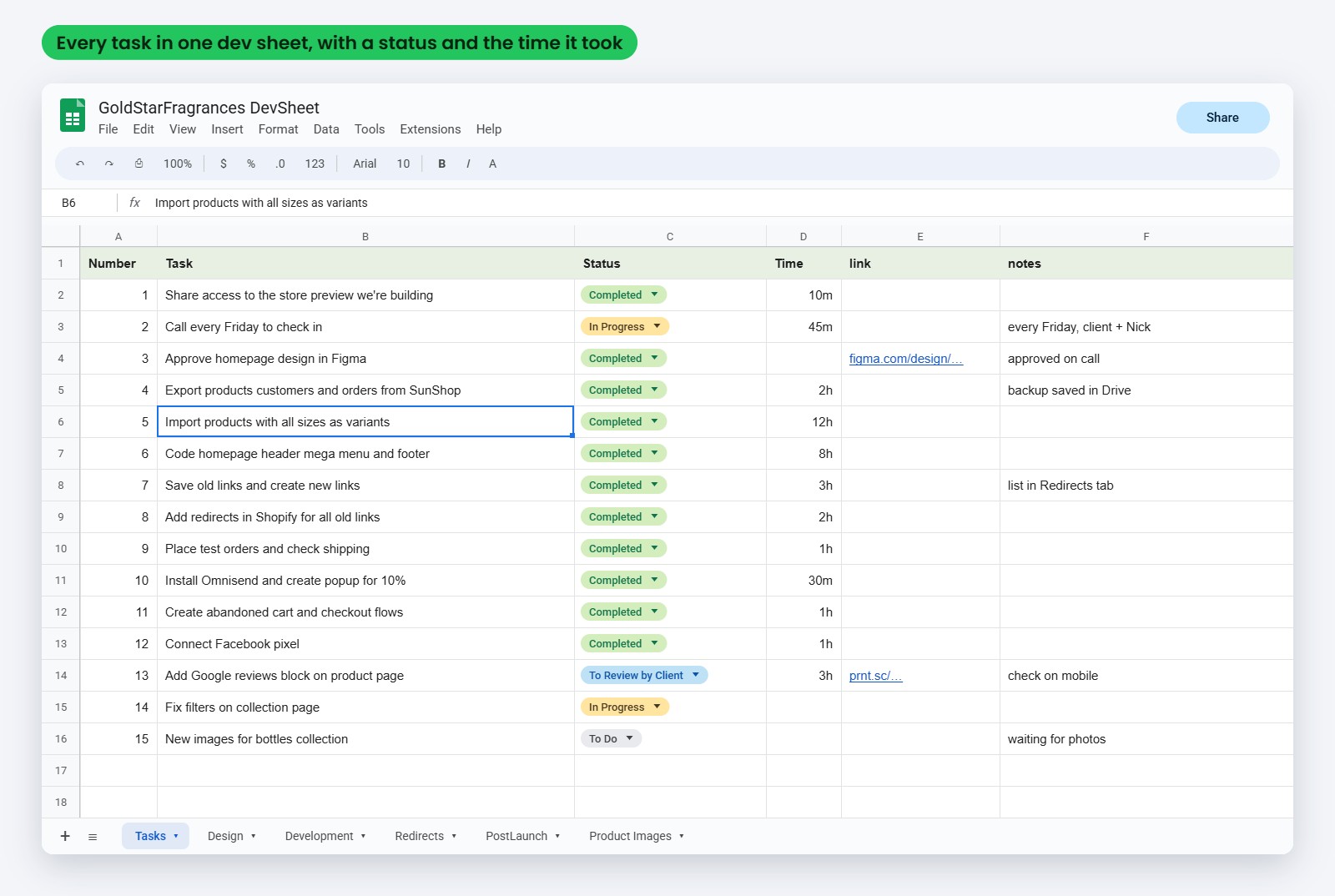
Part of the Gold Star project sheet: every migration task with its status and the time it took
Step 3: Design in Figma, approved before code
We don't copy the old store pixel by pixel. We redesign the homepage, the product page, the collection page and the mobile menu in Figma, you approve them, then we code. It's cheaper to change a design than to change code, and it's the best chance you'll get to fix the pages that weren't selling.
Step 4: Build in native Shopify code and move the data
Your old store stays live the whole time. We export everything and keep a backup, clean the product data in a spreadsheet (titles, codes, sizes, prices, images), import in batches and check each batch against the old store. Customers and order history move with a migration tool. The theme is native Shopify code, so you can edit text and images later without calling a developer.
Step 5: Redirect every old link
When you change platforms every link changes. Each old link goes in the sheet next to its new Shopify link, then into Shopify's URL redirects. That's how old Google results, ads and links from other websites keep landing on a real page.
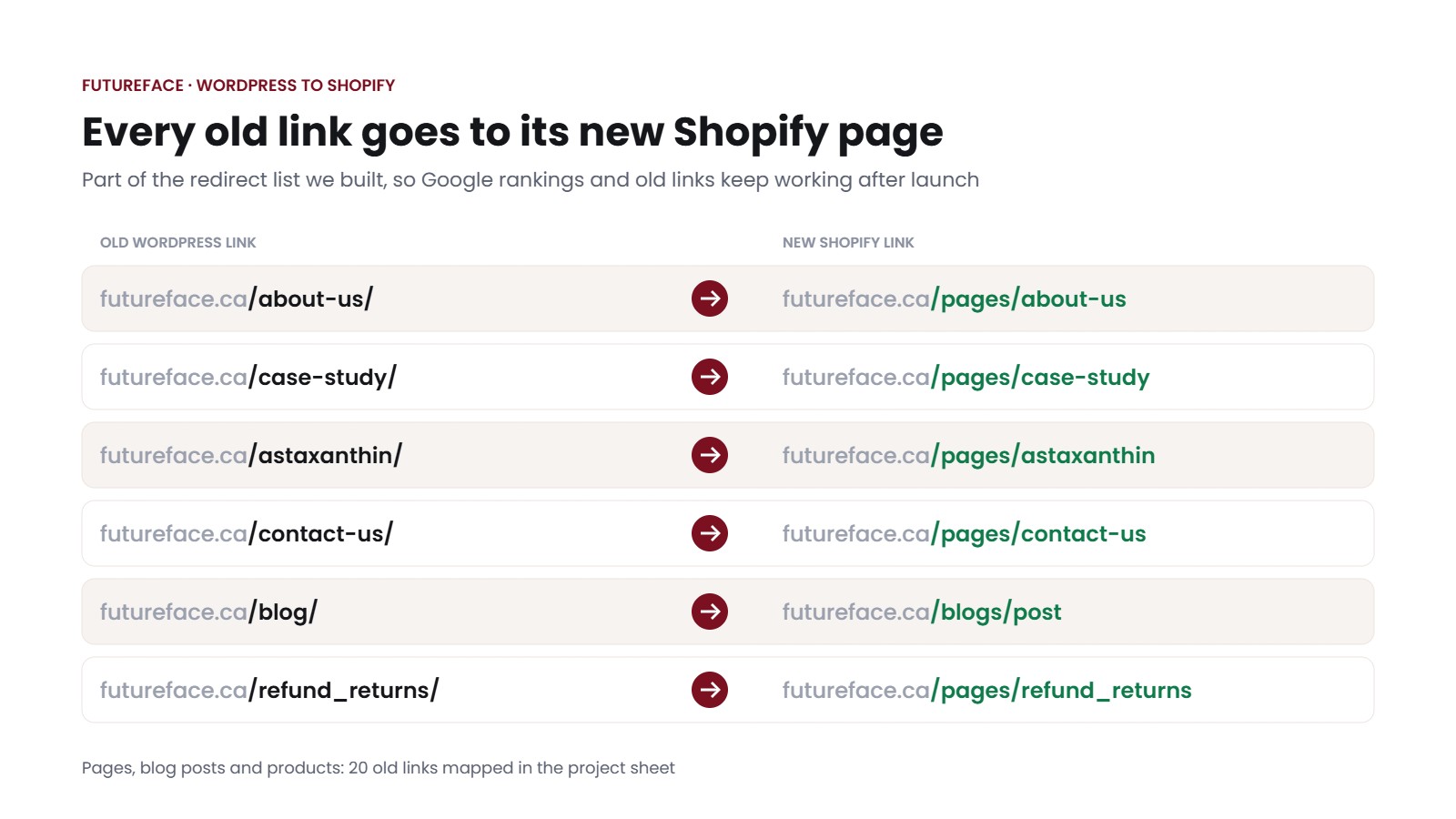
Futureface: part of the redirect list, 20 old links mapped to their new Shopify pages
Step 6: Test orders, the domain switch and 90 days of support
Before launch we place test orders and check shipping, taxes, payments and the emails customers get. Then we switch the domain. On Gold Star we kept the old SunShop store on a subdomain, so the old data is always there to check. After launch we stay on for 90 days and record short videos so your team knows how to add products, edit pages and run sales.
How long a Shopify migration takes
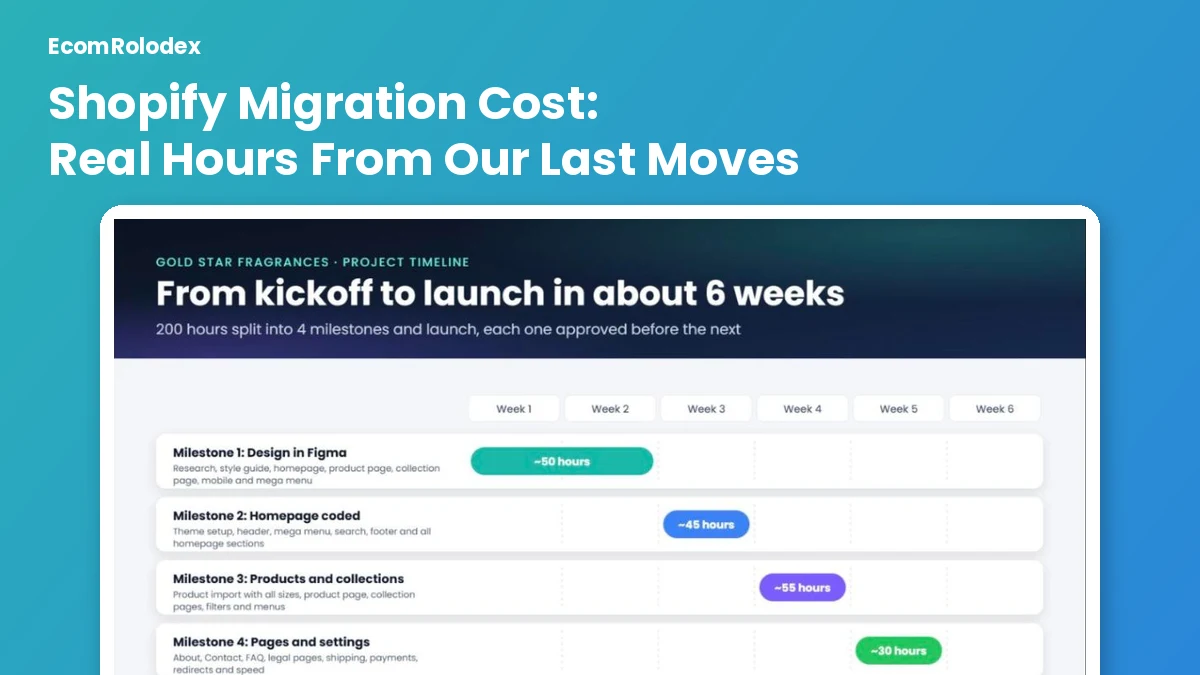
Our last two moves took 3 weeks (Futureface, 80 hours) and about 6 weeks (Gold Star, about 200 hours). The split below is the Gold Star project: 4 milestones and the launch, each one approved before the next.
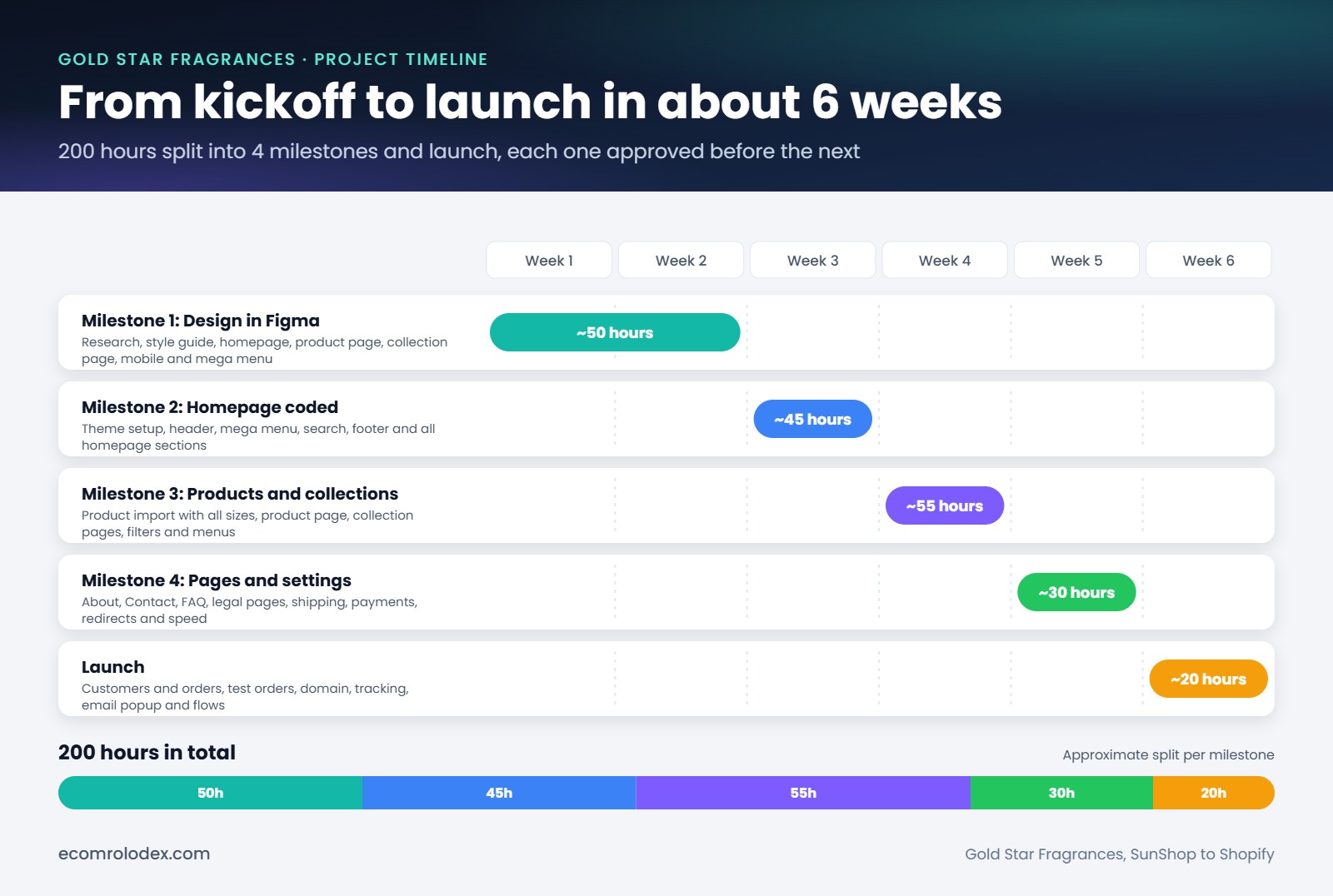
Gold Star: design about 50 hours, homepage about 45, products and collections about 55, pages and settings about 30, launch about 20
What moves the date most is approvals. If a design waits a week for feedback, the launch moves a week. That's one reason we had a check-in call every Friday on Gold Star.
What moves to Shopify and what doesn't
| What | Moves? | How we handle it |
|---|---|---|
| Products and variants | Yes | Cleaned in a spreadsheet, imported in batches, checked against the old store |
| Customers | Yes | Names, emails and addresses move. Passwords never do, so customers sign in again on Shopify |
| Order history | Yes | With a migration tool, so repeat customers see their past orders |
| Reviews | Yes | Into a review app (Futureface went to Judge.me) |
| Pages and blog posts | Yes | Moved and checked on mobile before you review them |
| Subscriptions | Set up again | In a Shopify subscription app (Appstle on Futureface) |
| Design and theme | No | Rebuilt in Shopify from the approved Figma design |
| Plugins | No | Replaced with a Shopify app or theme code |
| Old links | No | They change, so each one gets a redirect |
How we keep your Google rankings
If the old links don't redirect, Google sends people to error pages and you lose rankings you built over years. Google's own guide to moving a site asks for the same thing we do: a map of every old URL to its new one, with permanent redirects.
On every move we:
- Pull the old links from the sitemap and from the pages that get Google clicks
- Map each one to its new Shopify link in the project sheet
- Add the redirects in Shopify before the domain switch
- Connect Google Search Console on launch day and fix any error page it reports
Gold Star had thousands of these. The old Men collection was index.php?l=product_list&c=8 and now it opens /collections/men. After the launch we kept going: 200+ new collection pages for the brands their scents are inspired by, and new descriptions for 2,700 products.
From our projects
Gold Star Fragrances: SunShop to Shopify, 10 to 30-50 orders a day
Gold Star is a family-owned fragrance oil brand from New York, around since 1976. On SunShop their pages took about 17 seconds to load and they couldn't get past about 10 orders a day. A lot of products had no photo at all, only a placeholder, so during the move we edited thousands of product images. The move took about 200 hours in 6 weeks. One year later they get 30 to 50 orders a day, and conversion went from about 1% to 4-5%. Read the Gold Star case study.

Ben from Gold Star Fragrances: "They completely transformed my website." More on our reviews page
Do it yourself or hire us?
You can move a store yourself, and for some stores it's the right call. The tools:
- Shopify's Store Migration app is free and imports products and customers from WooCommerce, Wix, Etsy, Square, Amazon, eBay and a few more. When I checked today it had a 3.1 rating from 77 reviews, so check every product after the import.
- Matrixify handles bigger imports and redirects from a spreadsheet: a free demo for 10 items, $20 per 30 days for up to 5,000 products per job, $50 for up to 50,000, $200 with no limit.
Do it yourself when the catalog is small with simple options, a free theme is fine for now, and Google doesn't bring you many sales yet.
Hire us when you have lots of variants, Google brings real sales, you run subscriptions or custom features, or you want the new store to sell more than the old one, not just look the same.
My take after a lot of these: the import is the easy part, an app does most of it. Where I see moves go wrong is the redirects and the design. A store can move perfectly and still sell the same, because the product page is the same.
If your store sounds like the "hire us" list, book a call or message me on WhatsApp with your store link and I'll go through it with you.
Frequently asked questions
How much does a Shopify migration cost?
With us, $1,350 for a small move (30 hours), $2,800 for a standard move (80 hours) or $4,500 for a large one (150 hours). Your Shopify plan and paid apps are separate. Doing it yourself costs $0 with Shopify's free migration app, or $20 to $50 for 30 days of Matrixify on bigger catalogs, plus your own time.
How long does it take to move a store to Shopify?
Our last two moves took 3 weeks (80 hours) and about 6 weeks (about 200 hours with a full redesign). The biggest thing that changes the date is how fast designs get approved.
Will I lose my Google rankings?
Not if every old link that gets traffic redirects to its new page. We map them all before launch and watch Google Search Console after it.
Do customer passwords move to Shopify?
No. No platform hands over passwords. Names, emails, addresses and order history move, and customers sign in again on the new store.
Can my old store stay live during the move?
Yes. We build on Shopify while the old store keeps selling, and only switch the domain on launch day. On Gold Star we kept the old store on a subdomain after launch.
Can I keep my domain?
Yes. We connect your domain to Shopify on launch day, so customers type the same address.
Can you redesign the store during the move?
That's how we do most moves. The design is done in Figma first, you approve it, then we build it in Shopify.
What do you need from me to start?
Your store link, access to the old store's admin (or the exports), collaborator access to your Shopify store and a first call to go through the scope.
After the move: what we usually do next
A new Shopify store is the best moment to fix speed, conversion and emails, because nothing is set in stone yet. Here is where we can help once the new store is live.
Speed optimization
Gold Star's collection page went from 82 to 95 on Google PageSpeed (desktop) in about 5 hours, with the same design.
Conversion optimization
Monthly CRO, from 20 hours a month. IceBathTubs' conversion went up 59% in 90 days.
Email marketing
Flows and monthly campaigns on your new store. Email automations brought Gold Star and Honey Heaven 35% more revenue.
Moving your store to Shopify?
Send me your store link. I'll tell you which package fits, what moves and how long it takes.
Not ready to talk yet? Get the 8 page checklist from our own moves: the free migration plan.