



Home / Services / Shopify subscription product page
Shopify Subscription Product Page Setup
We set up subscriptions on Shopify and design the product page around them: subscribe and save options, delivery frequencies, the savings next to the price and a clear skip, pause or cancel promise. You get the subscription app that fits your numbers, and a product page that turns first orders into repeat orders.
- 1,300+ Shopify projects since 2017
- Shopify Partner
- Plan picker coded into your theme
- We pick the app by total cost
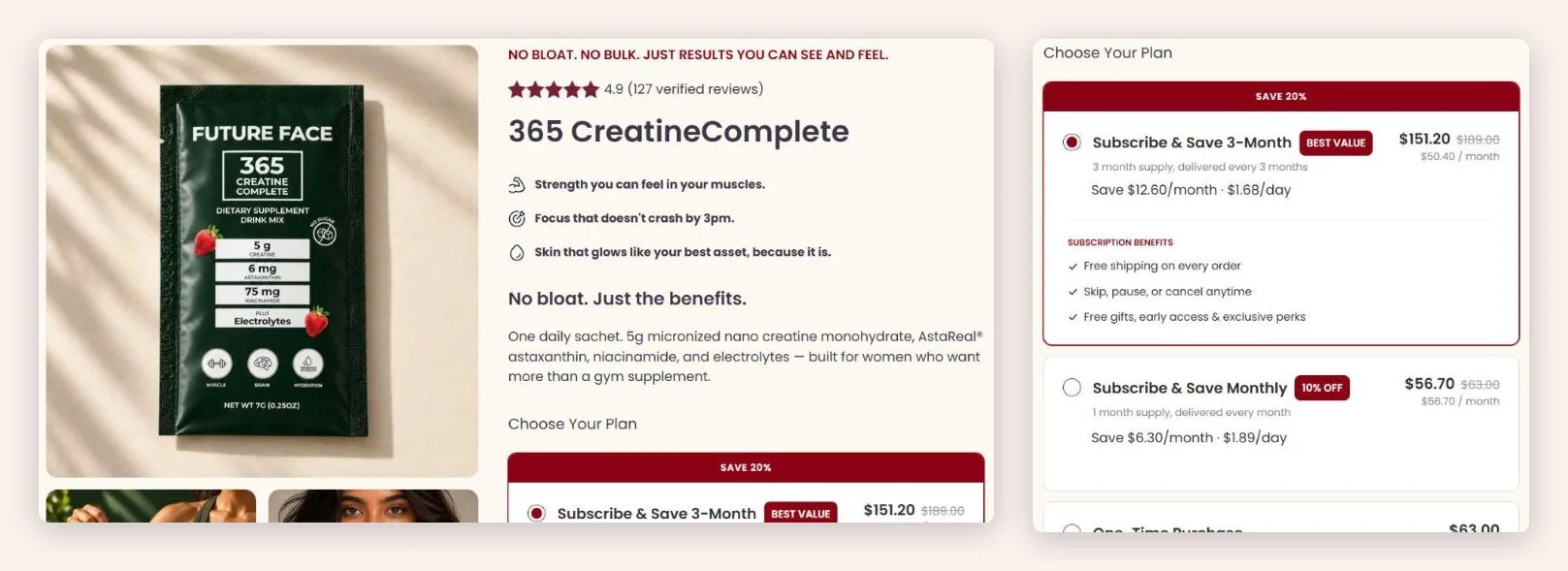
What a Shopify subscription product page needs
Installing a subscription app is the easy part. The app adds a default widget, and most stores leave it there: a small radio button under the price that shoppers skip. The page is what sells the subscription. These are the parts we build on every subscription product page:
- The plan picker right under the price. Not hidden below the description, and styled like part of the page, not a widget added on top.
- The best value plan selected first. For a product people use every day, the subscription is the default choice.
- Savings people understand. The percentage off, the saving per month and the price per day.
- The frequency in plain words. "3 month supply, delivered every 3 months" says more than "every 90 days".
- The benefits next to the button. Free shipping, skip, pause or cancel anytime, and any perks for subscribers.
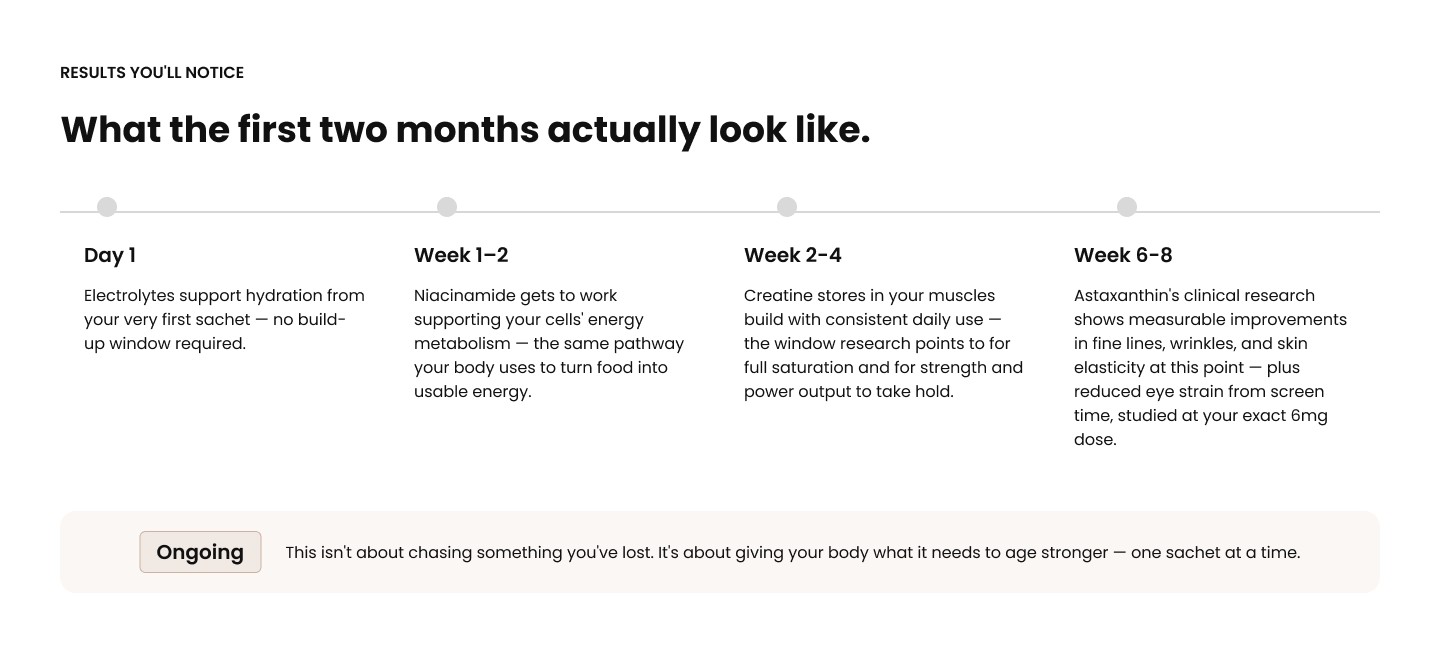
- What happens after they buy. A short timeline of the first weeks, so a subscription feels safe.
- Proof before checkout. Reviews, a comparison with the alternatives and answers to the questions people ask.
Two subscription product pages we built
Different products, different offers, the same idea: make the subscription the obvious choice.
Futureface: 3 plans, the best value first
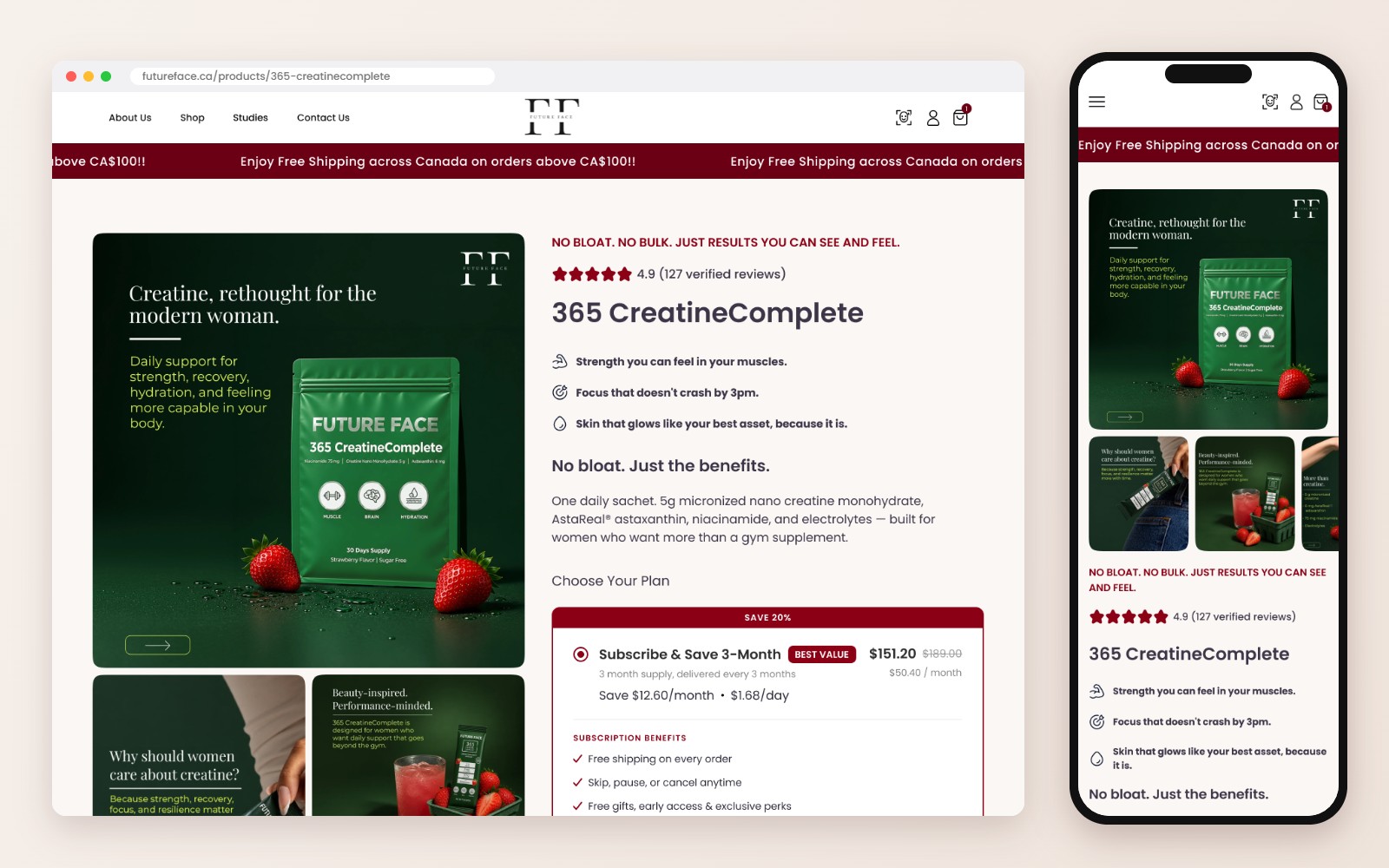
Futureface is a Canadian skin nutrition brand. We moved their store from WordPress to Shopify in 3 weeks and redesigned their best seller, 365 CreatineComplete, for subscriptions.
- Subscribe and Save 3-Month is selected first, marked Best Value and Save 20%, with the price per month and per day.
- Monthly at 10% off for people who want to start smaller.
- One-time purchase is still there, at the full price.
- The subscriber benefits sit inside the plan: free shipping, skip, pause or cancel anytime, free gifts and early access.
The plan picker runs on Appstle and is styled to look like part of the page. Read the full Futureface case study.
Mega Bump: subscribe and save on every flavor
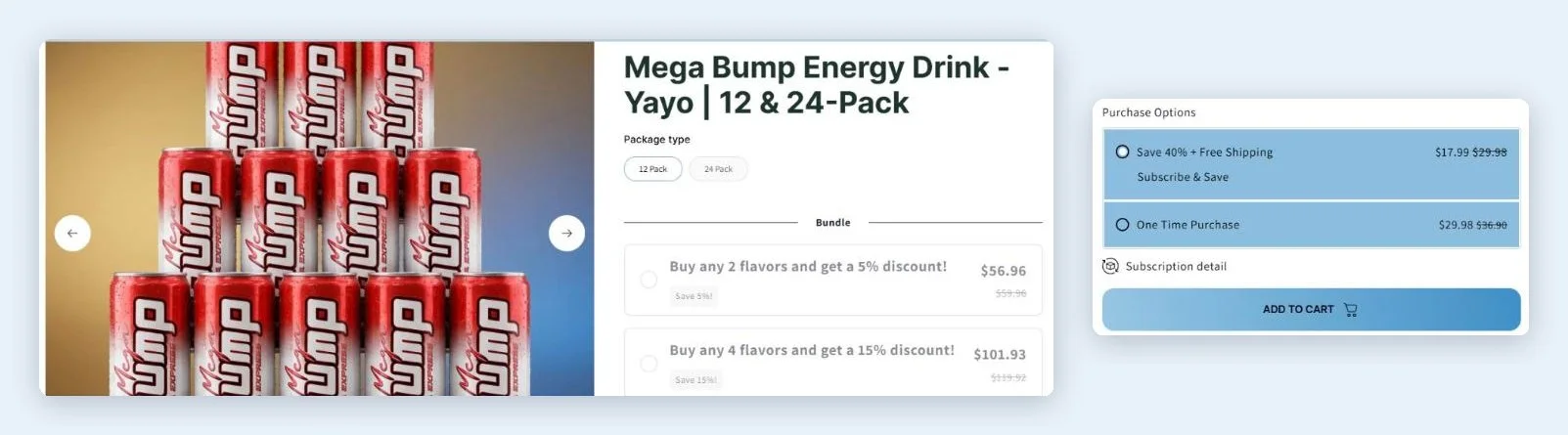
Mega Bump is an energy drink brand from the USA. We built their Shopify store with a product page for every flavor and an easy way to buy packs.
- Pack size first (12 or 24), then the purchase options.
- Subscribe and save shows the deal in the label: Save 40% + Free Shipping, next to the one-time price.
- Bundles for mixing flavors: 5% off any 2 flavors, 15% off any 4.
- A free hat with the first subscription order gives one more reason to subscribe.
Subscriptions and bundles both run on Appstle, so one app covers the whole buy box.
The sections under the plan picker
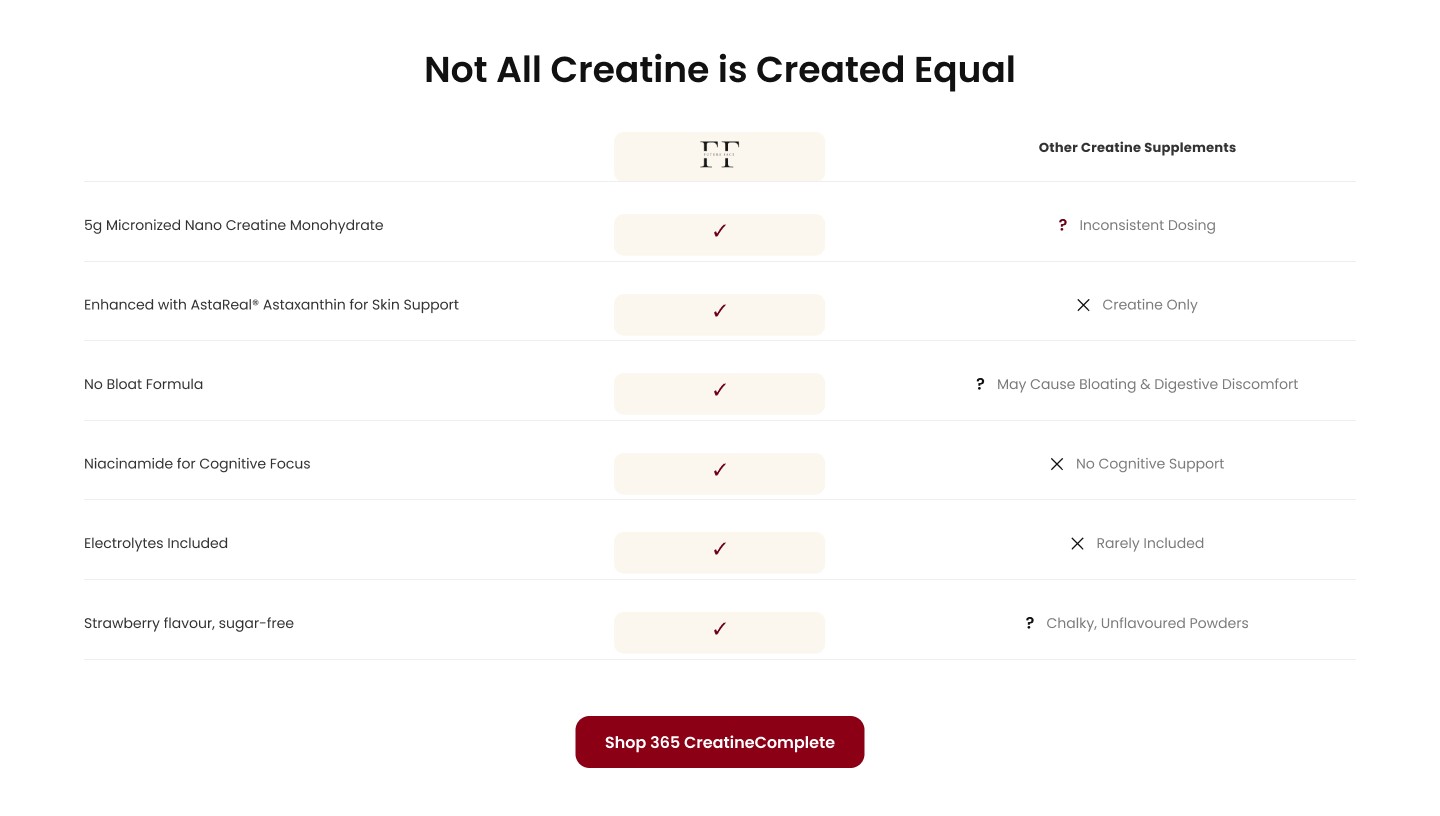
A subscription is a bigger decision than one order, so the rest of the page answers the doubts. On Futureface we added a timeline of what the first two months look like, a comparison table that answers "why not just buy regular creatine?", the ingredients explained in plain words, customer videos, reviews and FAQs.
Every section was designed for mobile too, because that's where most supplement shoppers buy.
Recharge vs Appstle vs Shopify Subscriptions
These are the three apps we're asked about most. They all add subscribe and save to your product pages and run on Shopify's checkout. The big difference is what they cost as your subscriptions grow.
| Recharge | Appstle Subscriptions | Shopify Subscriptions | |
|---|---|---|---|
| Monthly price | Starter $149, Scale $499 | Free up to $500/month in subscriptions, then $10, $30 or $100 | Free |
| Transaction fee | 1.50% + 20¢ (Starter), 1.25% + 20¢ (Scale) | 0% on paid plans | None from the app |
| Trial | 60 days on Starter | Free plan | Free |
| Shopify App Store rating | 4.8 (3,156 reviews) | 5.0 (9,226 reviews) | 3.8 (896 reviews) |
| Best for | Big subscription brands that need its integrations and analytics | Most growing brands: subscriptions, prepaid plans and bundles | Simple subscriptions on a small catalog |
Prices and ratings from the Shopify App Store and the Recharge pricing page, November 2026. Your payment processing fees are the same with all three.
What that means at $10,000 a month in subscriptions
Say you bill $10,000 a month across 250 subscription orders. Here is what you'd pay the app every month:
That's about $3,800 a year between Recharge and Appstle at this size, and the gap grows with your revenue because Recharge takes a percentage of every order. It's why we recommended Appstle to Futureface instead of Recharge.
Recharge still makes sense for big subscription brands that rely on its integrations and analytics. We look at your numbers and your tools, then recommend one app with the math behind it.
How we set up subscriptions on your Shopify store
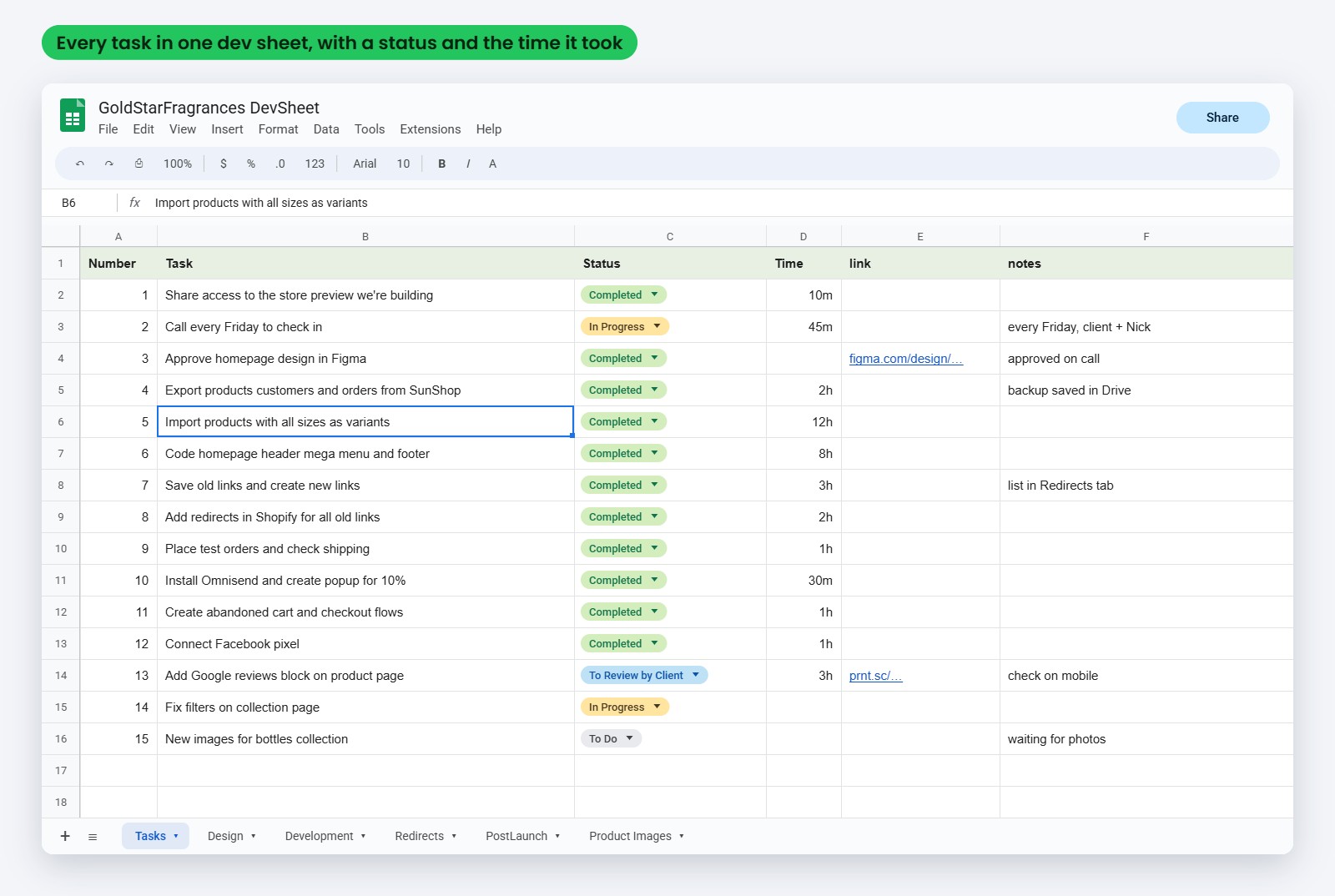
The same 6 steps on every subscription project, tracked in one project sheet you can see.
Pick the offer and the app
We look at your products, margins and how often people reorder, then decide the plans: the discount, the frequencies, a prepaid option and any perks. Then we pick the app by total cost and features, not by name.
Design the product page in Figma
We design the plan picker, the benefits, the timeline and the proof sections for desktop and mobile. You approve every section before we code it.
If the page needs a full redesign, see our custom product page design service.
Set up the plans and code the picker
We create the selling plans in the app, then style the plan picker into your theme so it matches your brand. Every section has its own settings, so your team can change text and images without a developer.
We also set the customer portal and emails: order reminders, skip, pause, swap and cancel.

Test, launch and measure
We place test subscription orders, check the portal and the emails, and check every page on a phone. After launch we track how many buyers choose the subscription and adjust the offer or the page if it's low.
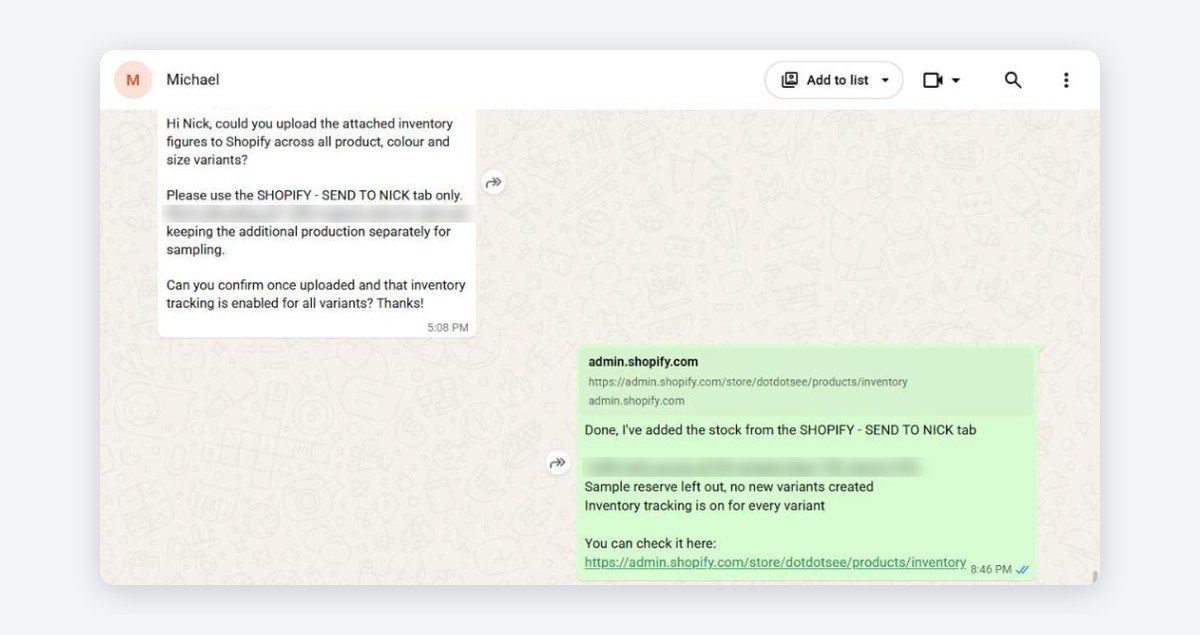
You get video instructions for managing plans and products, and quick answers on WhatsApp.
Subscription offers that work on Shopify
The offer matters as much as the design. These are offers our clients run today:
| Offer | How it works | Used by |
|---|---|---|
| Prepaid 3 months, best value | Bigger discount for a longer plan, selected first, price shown per month and per day | Futureface (save 20%) |
| Monthly subscribe and save | A smaller discount for people who want to try it first | Futureface (10% off) |
| Big saving + free shipping | The deal written in the plan label itself | Mega Bump (save 40% + free shipping) |
| Free gift with the first subscription | A branded gift that only subscribers get | Mega Bump (free hat) |
| Mix and match bundles | A discount for buying more flavors or products together | Mega Bump (5% for 2, 15% for 4) |
A few rules we follow: show the saving in percent and per day, keep "skip, pause or cancel anytime" right next to the button, and only pre-select the subscription on products people use up and reorder. On a one-off purchase, a pre-selected subscription annoys people more than it helps.
Moving subscribers from WooCommerce or another app
If you already have subscribers on WooCommerce Subscriptions, Recharge or another app, they can move. Active subscriptions are planned early with your payment provider, so they keep billing on the same dates after the switch, and customers get a short email about the new portal.
Moving the whole store from WordPress? See our WordPress to Shopify migration service, where subscriptions are part of the plan.
Timeline and cost
| Project | What's included | Typical time |
|---|---|---|
| Subscriptions on one product page | App setup, plans, plan picker styled into your theme, portal and emails, test orders | From about 15 hours, 5 to 7 days |
| Subscription product page redesign | Everything above plus a new product page designed in Figma: benefits, timeline, comparison and proof sections | Quoted after a free review |
| Subscriptions as part of a new store or migration | Planned with the rest of the store, like Futureface | Futureface: 80 hours, 3 weeks for the whole store |
You get a fixed scope with the hours for every part before we start, then pay a deposit and the rest in milestones. The subscription app is paid to the app maker directly.
What store owners say
"I cannot recommend Nick and his team at EcomRolodex enough! They have been absolutely excellent to work with from start to finish. Their professionalism, attention to detail, and dedication to their clients are truly outstanding."
AngelaGoldStar Fragrances, New York. Verified review on the Shopify Partner Directory
"We are huge fans of Nick and his team! Being new to Shopify, we needed some help. We also got ourselves in a bad place by hiring experts who were not really experts. But Nick and his team are the real deal."
John VieiraGlittered Crafts
Questions about Shopify subscriptions
How do I add subscriptions to a Shopify product page?
Install a subscription app (Shopify Subscriptions, Appstle or Recharge), create a plan with a discount and delivery frequency, add your products to it, then add the app's block to your product template. To sell well, style the plan picker into the page and show the savings and benefits next to the price.
Is Shopify Subscriptions free?
Yes, Shopify's own Subscriptions app is free and covers simple subscribe and save plans with skip, pause and cancel. Brands that need prepaid plans, bundles, a richer customer portal or more design control usually move to a paid app like Appstle.
Recharge or Appstle?
Both work. Recharge charges a monthly fee plus a percentage and 20 cents on every order, while Appstle's paid plans have 0% transaction fees. For most growing brands Appstle costs a lot less. We look at your numbers and recommend the one that fits.
Can I offer subscriptions on only some products?
Yes. You choose which products are in each subscription plan. Products that people use up and reorder, like supplements, coffee, drinks or skincare, are the best fit. The rest of the catalog stays one-time only.
Can customers skip, pause or cancel?
Yes. All three apps give customers a portal to skip, pause, change the frequency or cancel. We put that promise right next to the add to cart button, because it's the main worry people have before they subscribe.
Should the subscription be selected by default?
On products people use every day, yes: Futureface pre-selects the 3 month plan as Best Value. On one-off products, no. Pre-selecting a subscription there feels pushy and can cost you trust.
Will a subscription app slow down my store?
The app loads a widget on product pages. We keep the store fast by using one app for subscriptions and bundles where possible, and by styling the plan picker in the theme instead of adding a page builder on top.
Can you move my subscribers from another app or WooCommerce?
Yes. We plan the move with your payment provider so active subscribers keep billing, and set up the new portal and emails before the switch. It's often part of a WordPress to Shopify migration.
How much does it cost to set up?
Subscriptions on one product page start from about 15 hours, done in 5 to 7 days. A full subscription product page redesign is quoted after a free review. You get the hours for every part before we start.

Nick Ursu, 9+ years Shopify Conversion Expert
I've worked on Shopify stores since 2017, with 1,300+ projects since then. My team and I build product pages that sell, set up subscriptions and upsells, and move stores to Shopify.
Last updated November 2026. App prices from the Shopify App Store and Recharge's pricing page, examples from our client projects.
Want subscriptions on your store?
Send me your store link. I'll tell you which app fits your numbers and what I'd change on your product page.