



A free shipping bar is one of the first things we add to a Shopify cart, because it does two jobs at once: it tells people shipping can be free, and it shows them how close they are. Done right, it makes customers add one more product instead of leaving.
I have been building and optimizing Shopify stores for 9+ years (1,300+ projects since 2017). This guide shows how to offer free shipping on Shopify, how to add a free shipping bar or banner, how to pick the right amount, and how we used it on Gold Star Fragrances, where tiered cart rewards raised the average order value by 30% in the first 30 days.
Quick overview
- Free shipping itself: a $0 shipping rate with a minimum order price, or a free shipping discount (code or automatic). No app needed
- Free shipping banner: your theme's announcement bar, set up in the theme editor
- Free shipping progress bar: a bar in the cart that says "You're $12 away from free shipping". Some themes have it, otherwise an app or a small code change
- The amount: set it a little above your average order, where one more product gets people there
- The rule that matters most: the bar and the real shipping rule must use the same amount, or customers see "unlocked" and still pay shipping
| Where it shows | What it says | How to add it | |
|---|---|---|---|
| Free shipping banner | Top of every page | "Free shipping on orders over $50" | Theme announcement bar, no app |
| Free shipping progress bar | Cart drawer or cart page | "You're $12 away from free shipping" | Built into some themes, otherwise an app or code |
| Product page line | Under the add to cart button | "Free shipping over $50, arrives in 3 to 5 days" | A text block in the theme editor |
The banner gets people into the store. The product page line answers "how much is shipping?" before they ask. The progress bar is the one that raises the order value, because it shows up at the moment they decide whether to add more.
How to offer free shipping on Shopify
There are three ways, and none of them need an app:
| Method | Best for | Watch out for |
|---|---|---|
| $0 shipping rate with a minimum order price | Always-on free shipping over a set amount | You set it per shipping zone, so check every country you ship to |
| Automatic free shipping discount | Promotions with dates, like a holiday weekend | It makes every rate free, including express, unless you exclude rates over an amount |
| Free shipping discount code | Emails, influencers, a welcome offer | Customers have to type it, and codes get shared on coupon sites |
Free shipping over a set amount (shipping rate)
- Go to Settings > Shipping and delivery and open your shipping profile.
- In the shipping zone, add a rate and call it something clear, like "Free shipping".
- Set the price to 0.
- Add a condition based on order price and enter the minimum, like $50.
- Keep your normal paid rate for orders under that amount, then save.
- Repeat it for every zone where you want free shipping.
If you use carrier-calculated rates, customers over the amount will see both the free rate and the carrier rates, which is fine as long as "Free shipping" is the first option.
Automatic free shipping discount
- Go to Discounts, create a discount and pick Free shipping.
- Choose Automatic discount and give it a title customers will see, like "Free shipping over $50".
- Pick the countries.
- Tick Exclude shipping rates over a certain amount so express shipping doesn't become free too.
- Set the minimum purchase amount.
- Decide which product and order discounts it can combine with, add the dates, and save.
For a code, the steps are the same but you choose Discount code and type the code. Test both with one cart above the amount and one below before you announce anything.
Every recent Shopify theme has an announcement bar. Go to Online Store > Themes > Customize, click the announcement bar at the top, and type your message. Link it to your best sellers, not your homepage.
Keep it short and specific. "Free shipping on orders over $50" works better than "Free shipping on qualifying orders", because nobody knows what qualifies. If you ship worldwide with different amounts, say the main market and put the rest on your shipping page.
How to add a free shipping progress bar to your cart
A progress bar reads the cart total and shows how much is left. You have three options:
- Your theme. Some paid themes have a free shipping bar in the cart settings. Check the cart drawer section in the theme editor first.
- A cart app. Most cart drawer apps include a progress bar, and many add more steps (free gift, discount).
- Custom code. A few lines of Liquid and JavaScript in the cart drawer, which keeps the store faster than adding another app. It's our pick when a store already runs a lot of apps.
Here's one we built for More Than Lips, a Canadian store selling vegan lip balms. The cart says "You are $5.02 CAD away from Free Canadian Shipping!", so one more lip balm gets the customer there. We built it with our Flex Upsell Cart app, with cart offers and 1-click upsells in the same cart.
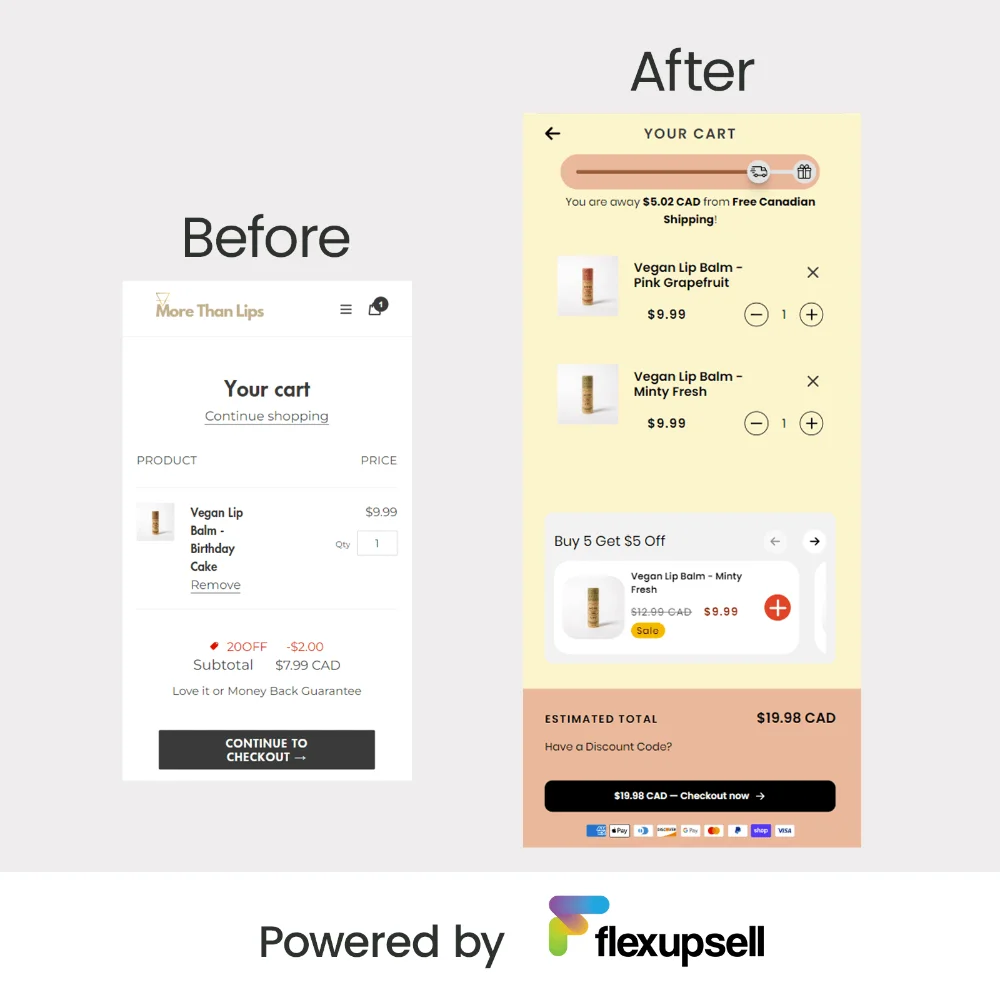
It's also the standard now: in our study of 100 scaling Shopify stores, 95 of 99 use a cart drawer instead of a cart page.
Three things to get right:
- Same amount everywhere. The bar, the banner and the shipping rule must use the same number. If the bar says "unlocked" at $50 and the rate starts at $55, you lose trust right at checkout.
- Same rule for discounts. Decide if the amount counts before or after discount codes, make the bar follow that rule, and test it with a code.
- Every currency. If you sell in local currencies, the bar needs the right amount for each one, matching your local shipping rates.
Also keep things like shipping protection out of the total. On one store where we added a shipping protection checkbox in the cart, we made sure it doesn't count toward free shipping or rewards, so nobody unlocks free shipping by paying for protection.
How to pick your free shipping amount
Too low and you pay shipping on orders that would have happened anyway. Too high and nobody tries to reach it. This is the method we use:
- Find your average order value in Shopify Analytics for the last 90 days.
- Look at your cheapest popular products. The best amount is one where adding one of them gets most carts over the line.
- Start a little above your average order, often 15% to 30% above it.
- Check the money. The extra profit from the added product should be more than the shipping you now pay.
- Watch it for 30 days and compare the average order value with the 30 days before.
Here's a simple example for a store with a $42 average order and $7 shipping:
| Free shipping amount | What happens |
|---|---|
| $35 | Most orders already qualify, so you pay $7 on almost every order and nobody adds anything |
| $50 | A $42 cart is $8 away. One small product gets it there, so the order grows and the extra profit pays for shipping |
| $90 | Too far for most carts. People ignore the bar or leave when they see shipping |
Not sure what your numbers can do? Our ecommerce revenue calculator shows how much a higher average order adds to your monthly sales.
Go further with tiered cart rewards
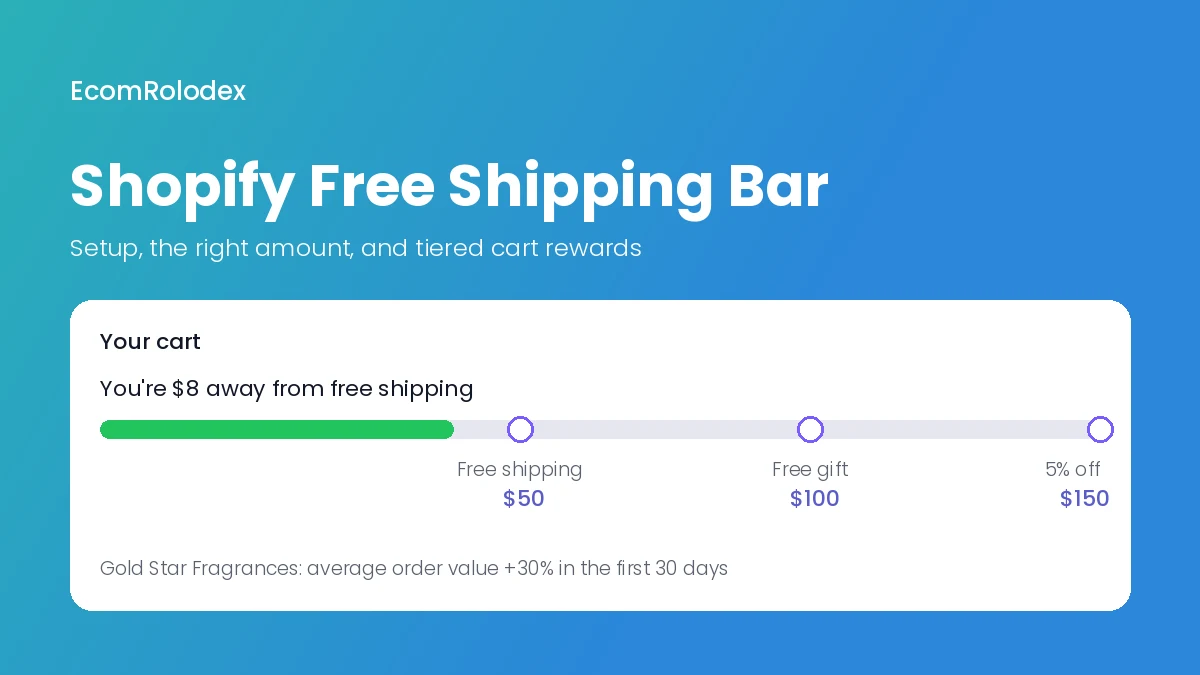
Free shipping is the first step. Once people reach it, the bar can show the next reward. When we moved Gold Star Fragrances from SunShop to Shopify, we built the cart around it:
- A free shipping progress bar in the cart
- Free shipping over $50
- A free gift at $100
- 5% off over $150
- In-cart only discounts on recommended products, plus bundles and recently viewed products inside the cart
In the first 30 days with these rewards, their average order value went up 30%. The offers change with the season, but the cart is always built to raise the order value.
If you want the same setup without building it yourself, we offer it as a cart design and upsell service, and we also built our own cart app, Flex Upsell Cart.
Shopify free shipping not working? Check these
| Problem | Likely cause | Fix |
|---|---|---|
| Bar says unlocked, checkout charges shipping | The bar and the shipping rule use different amounts or rules | Use one amount and test with and without a discount code |
| Express shipping is free too | A free shipping discount applies to every rate | Exclude shipping rates over a certain amount, or use a $0 rate instead |
| Free shipping works in one country only | The $0 rate was only added to one zone | Add it to every zone, with a local amount if needed |
| Shipping is charged twice on a mixed cart | Products are in different shipping profiles, and Shopify adds the rates together | Add a free rate to each profile, or move products into one profile |
| Free shipping code doesn't combine | Combinations are turned off on one of the discounts | Allow it to combine with product or order discounts |
| Free shipping applies to orders under the amount | An old $0 rate with no condition is still active | Find it in Shipping and delivery and add the minimum, or delete it |
Frequently asked questions
Do I need an app for a free shipping bar on Shopify?
Not for a banner: your theme's announcement bar does it. For a progress bar in the cart, you need a theme that has one, an app, or a small code change.
How do I offer free shipping over a certain amount on Shopify?
In Settings > Shipping and delivery, add a rate with a price of 0 to your shipping zone and add a condition based on order price with your minimum, like $50. Or create an automatic free shipping discount with a minimum purchase amount.
What's a good free shipping threshold?
A little above your average order value, often 15% to 30% above it, at a point where adding one popular product gets the customer there. Then check the numbers after 30 days.
Can I offer free shipping only on standard shipping?
With a free shipping discount, tick "Exclude shipping rates over a certain amount" and enter an amount just above your standard rate. With a $0 shipping rate, only that rate is free and express keeps its price.
Can I offer free shipping on some products only?
Yes. Put those products in their own shipping profile and give that profile a $0 rate.
Should the free shipping bar count discounts?
Pick one rule and use it everywhere. If the bar counts the total before discounts but the shipping rule uses the total after, customers will see free shipping in the cart and pay for it at checkout.
Want a cart that raises your order value?
Send me your store link. I'll look at your average order, your shipping and your cart, and tell you which free shipping amount and rewards to test first.