



Moving from Wix to Shopify is mostly a data job and a design job. The data part (products, customers, orders) follows clear steps. The design part is a rebuild, and it's the best chance you'll get to fix the pages that weren't selling.
I've been moving stores to Shopify for 9+ years: from WooCommerce (Futureface, 3 weeks), from SunShop (Gold Star Fragrances, about 6 weeks) and from custom builds. A Wix move follows the same plan, with a few Wix-specific steps. This guide uses Shopify's own Wix migration steps plus what we check on every launch.
Quick overview
- Products: export a CSV from Wix, then import it with Shopify's free Store Migration app or a cleaned up CSV
- Customers: export a CSV from Wix (up to 50,000 contacts at a time) and import it with Shopify's headings
- Orders: export from Wix, import with a migration app (Cart2Cart, LitExtension or EZ Importer)
- What doesn't move: your Wix design, reviews (Wix can't export them), digital products and customer passwords
- The step that protects your Google rankings: redirect every Wix product link (/product-page/...) to its new Shopify link (/products/...)
What moves from Wix to Shopify (and what doesn't)
| Data | How it moves | Watch out for |
|---|---|---|
| Physical products | Wix CSV export, then Store Migration app or CSV import | Max 5,000 rows per Wix file, max 3 options per Shopify product |
| Product images | Shopify downloads them from the Wix image links during import | Import before you close your Wix site |
| Digital products | Added by hand | Wix can't export them |
| Customers | Wix contacts CSV, edited to Shopify's headings | Passwords don't move; customers log in again |
| Order history | Wix orders CSV, imported with a migration app | Wix order times are in UTC |
| Reviews | Can't be exported from Wix | Re-add them through a review app like Judge.me, Loox or Yotpo |
| Design and pages | Rebuilt in a Shopify theme | Copy the text, not the layout |
How to move from Wix to Shopify, step by step
Your Wix store stays live the whole time. Customers only notice the move on the day you connect the domain to Shopify.
Step 1: List everything your Wix store has
Write down your products, categories, pages, blog posts, apps and your 20 most visited pages (from your analytics). The list tells you what to rebuild, and the top pages are the ones whose redirects matter most.
Step 2: Export your products from Wix
In your Wix dashboard, open your store products, click More Actions and Export. Name the file WixProductDownload.csv. One file holds up to 5,000 rows, so a big catalog needs more than one export.
Step 3: Import with the Store Migration app (the easy way)
Shopify's free Store Migration app takes the Wix CSV as it is, with no editing. Three things to know: products with 4 or more Wix options come in as single products with no variants, every product comes in as a draft, and your Wix collections and ribbons become product tags. You then build collections from those tags.
Step 3b: Or clean the CSV yourself
If you want full control, paste your Wix data into Shopify's product CSV template. The main changes:
| Wix column | Shopify column | What to change |
|---|---|---|
| handleId | URL handle | Letters, numbers and dashes only |
| name / description | Title / Description | Move any "additional info" text into the description |
| productImageUrl | Product image URL | One image per row; extra images go on new rows with the same handle |
| productOptionName1-3 | Option1-3 name and value | Delete options 4 to 6; for colors keep only the color name |
| price + surcharge | Price | Add the surcharge to the price |
| discountMode / discountValue | Compare-at price and Price | Original price in Compare-at price, sale price in Price |
| inventory | Inventory quantity | Replace InStock / OutOfStock with numbers |
| weight | Weight value (grams) | kg x 1,000 or lb x 453.592, rounded |
| visible | Published on online store | TRUE / FALSE in lowercase |
Also combine each Wix product row with its first variant row, delete the fieldType column, and remove columns Shopify doesn't use (ribbon, customTextField). Then import in Products > Import. The file has to be under 15 MB.
Step 4: Check every product after import
Look for products that didn't publish, missing descriptions and variants that failed (a product missing an option value won't import, so add it by hand). Then create your collections and set inventory.
Step 5: Move your customers
Export your Wix contacts as a regular CSV (only the site owner can, up to 50,000 at a time). Shopify doesn't map customer columns for you, so rename them to Shopify's headings: First Name, Last Name, Email, Phone, and the address as Default Address fields with a two letter country code. Then import in Customers > Import.
Only mark people as email subscribers if they actually subscribed on Wix. Mailing everyone you've ever had sends you to spam.
Step 6: Bring back your reviews
Wix can't export reviews. If they matter (they usually do), copy them into a review app's import file. We use Judge.me on most client stores; Loox and Yotpo can import too. A product page that drops from 80 reviews to zero sells less than the old one did.
Step 7: Move your order history (optional)
Export orders from Wix and import them with Cart2Cart, LitExtension or EZ Importer. It's worth it if customers ask about past orders or you want lifetime value in Shopify. Remember Wix records order times in UTC.
Step 8: Rebuild the design in a Shopify theme
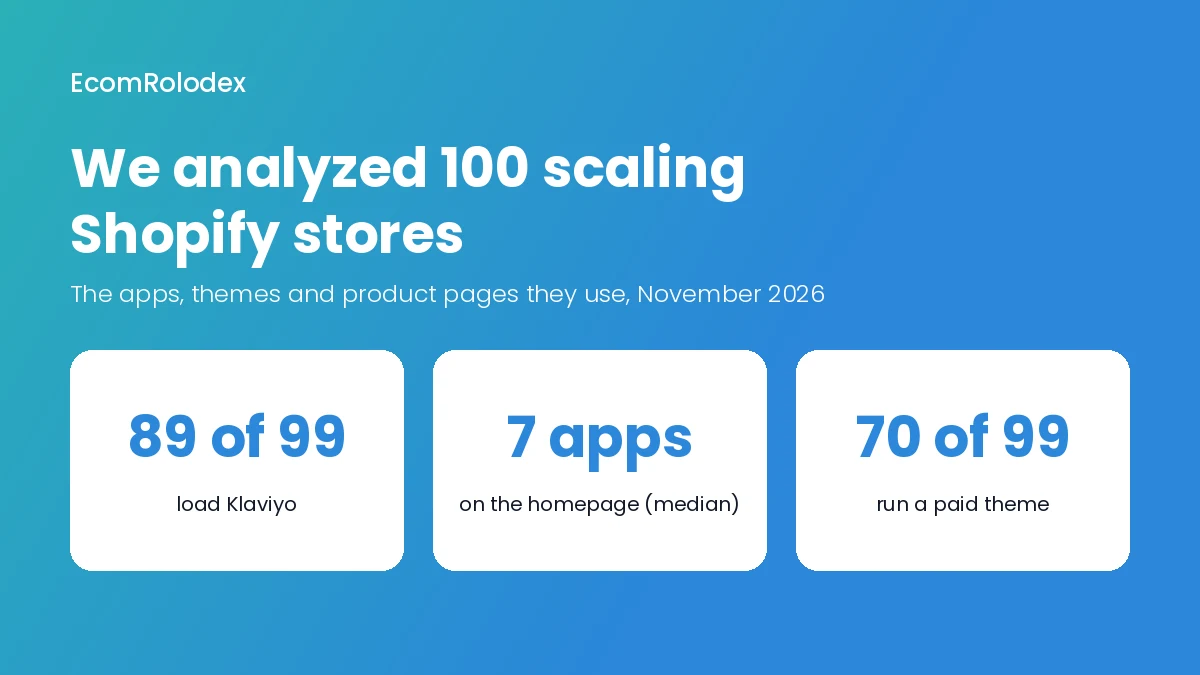
Nothing from the Wix design moves. Pick a Shopify theme and rebuild, starting with your best seller's product page, not the homepage. In our study of 100 scaling Shopify stores, almost all had the same product page base: a cart drawer, a guarantee near the button, a crossed-out price and a sticky add to cart on mobile.
Step 9: Set up shipping, taxes and payments, then test
Create your shipping zones and rates, check taxes, connect Shopify Payments (or another provider) and place test orders: a paid one, a failed payment, a refund and a cancellation. One broken shipping rate on launch day costs more than a day of testing.
Step 10: Redirect every old Wix link
This is the step that keeps your Google traffic. Wix product links look like /product-page/your-product and Shopify's look like /products/your-product. Pages change too (for example /pages/shipping-policy on Shopify). Create a redirect for each old link in Shopify (Content > Menus > URL Redirects), or import them all with a CSV. Start with the top 20 pages from Step 1.
Step 11: Connect your domain and launch
Disconnect your domain from Wix first, then connect it to Shopify, or you can get SSL errors. After launch, click through your old top links to check the redirects work, and submit Shopify's sitemap (yourstore.com/sitemap.xml) in Google Search Console.
Mistakes to avoid
- Closing Wix too early. Shopify pulls your product images from Wix during import.
- Skipping redirects. Old links end on an error page and Google traffic drops.
- Losing variants. Products with more than 3 options need a plan before import.
- Leaving reviews behind. They have to be moved by hand or through an app.
- Copying the Wix layout 1:1. The move is the cheapest time to fix your best seller's page.
- Adding apps you don't need. The median scaling store in our study loads 7 apps on its homepage. Start lean.
Should you do it yourself or hire someone?
Do it yourself if you have a small catalog with simple variants, few pages and little Google traffic. The Store Migration app, a free theme and a redirect list will get you there.
Get help if you have hundreds of products, products with many options, years of customers and orders, or Google traffic you can't afford to lose. That's the work we do: 1,300+ Shopify projects since 2017, including migrations from WooCommerce, WordPress, SunShop and custom builds. See how we handle it on our migration page, or check your new store with our free Store Analyzer before launch.
Frequently asked questions
Can I move from Wix to Shopify for free?
The products, yes: Wix's CSV export and Shopify's Store Migration app are both free. Order history needs a paid migration app, and you pay for your Shopify plan and any paid theme.
Will I lose my Google rankings?
Not if you redirect every old Wix link to its new Shopify link and keep your page titles and descriptions. Rankings can move for a few weeks while Google picks up the new store.
Can I keep my domain?
Yes. Disconnect it from Wix, then connect it to Shopify. You can keep it registered where it is or transfer it.
Do customer passwords move from Wix to Shopify?
No. Customers come over with their details, and they log in again on Shopify.
How long does a Wix to Shopify migration take?
A small store can move in a few days. A store with a new design, many products and order history takes a few weeks. For comparison, our WooCommerce move for Futureface took 3 weeks, and a bigger custom store like Gold Star Fragrances took about 6 weeks.
Moving from Wix to Shopify?
Send me your Wix store link. I'll tell you what moves, what needs a rebuild and how long it takes.