


Updated November 2026 for 2027. Every method here is free and still works.
Before I redesign a Shopify store, the first thing I do is look at who the store is really competing with. Not the big brands you already know, the other Shopify stores selling the same kind of product to the same people. After working on 1,000+ Shopify stores since 2017, this is the simple process I use. It takes about an hour and costs nothing.
1. Google your product the way a customer would
Type what your customer types, for example "vegan lip balm" or "custom metal business cards". Look at the first 2 pages, the ads at the top and the Shopping tab.
- Open every store that sells something close to yours.
- To check if a store runs on Shopify, right click, View page source and search for cdn.shopify.com. Or install the free Wappalyzer extension and it tells you in one click.
- Write down the stores in a simple Google Sheet: link, main product, price, offer.
2. Check the Meta Ad Library
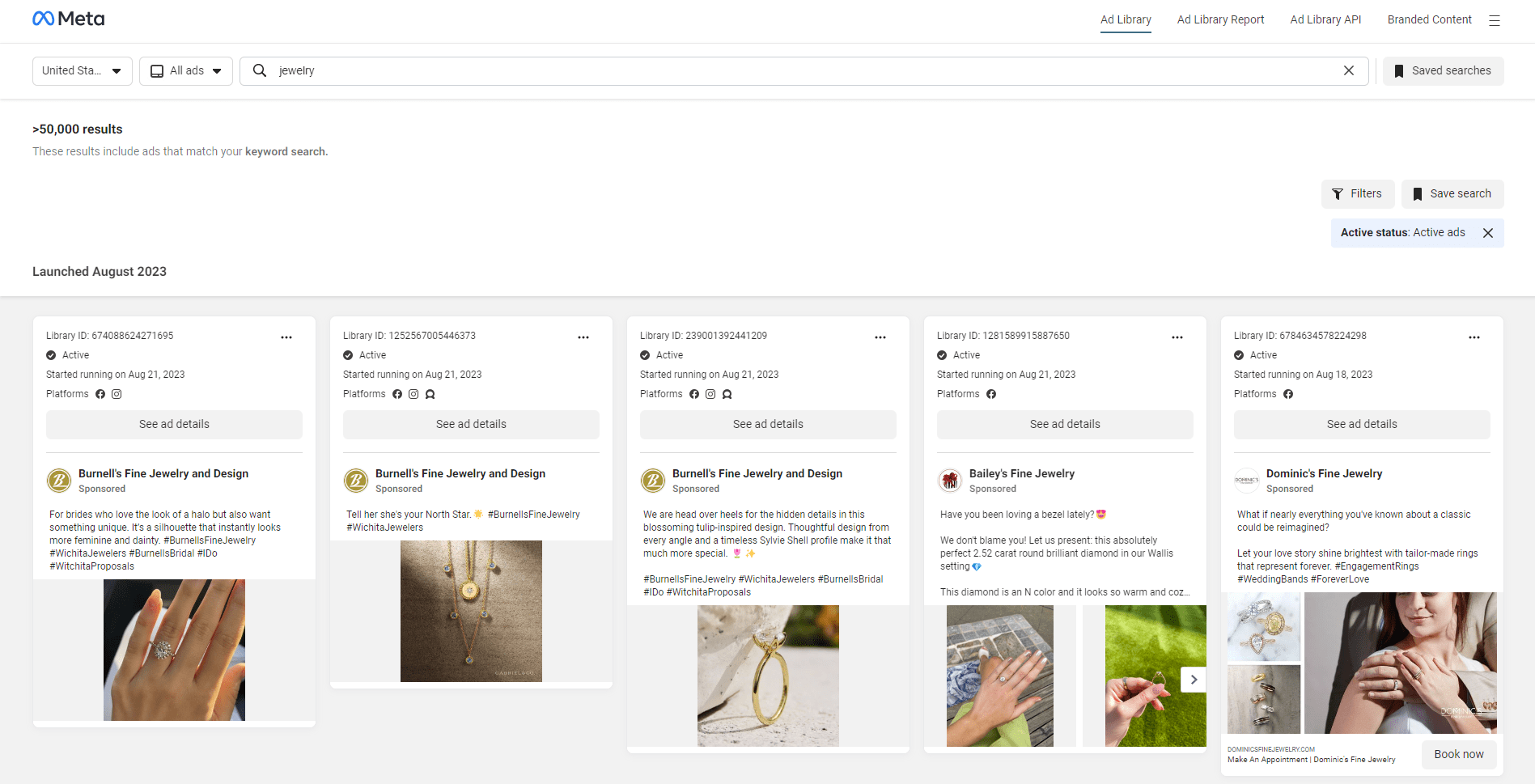
The Meta Ad Library is free and shows every ad running on Facebook and Instagram. Search your product keyword, set the country, and look for ads that have been running for weeks. An ad that keeps running is usually making money, so open the landing page and see what they are doing on it.
3. Search TikTok and Instagram
Search your product on TikTok and Instagram, then open the profiles of the stores that show up. Many fast growing Shopify stores get most of their traffic from short videos, so you also see which angles and hooks work in your niche. The free TikTok Creative Center shows top ads by industry too.

4. Use Similarweb (free version)
Put one competitor into Similarweb. The free version shows rough traffic, where the traffic comes from and a list of similar sites. Those similar sites are often more competitors you did not know about.
5. Search inside the Shop app
Shopify's own Shop app lists products from Shopify stores. Search your product there and you will find smaller stores that don't show on page 1 of Google yet. These are good to watch because they are often testing new offers.
What to look at once you have your list
Finding competitors is the easy part. What makes the difference is what you copy and what you do better. On each store I check:
- The first screen on mobile: what you see before scrolling on the homepage and product page. Most sales are on phones.
- The offer: bundles, free shipping threshold, discount on first order, guarantee.
- Price and reviews: how many reviews, and are they shown near the add to cart button.
- Delivery promise: do they show a delivery date near the button. Missing this loses sales, especially in Europe.
- The cart: upsells, progress bar to free shipping, payment icons.
- Speed: run the store through PageSpeed Insights and compare with yours.
Put it all in your sheet and you will quickly see 3 to 5 things to fix on your own store first.
Want us to do it for you?
This competitor check is part of every store analysis and redesign we do. See how it turned into real results in our case studies, or look at our Shopify CRO service and packages.