


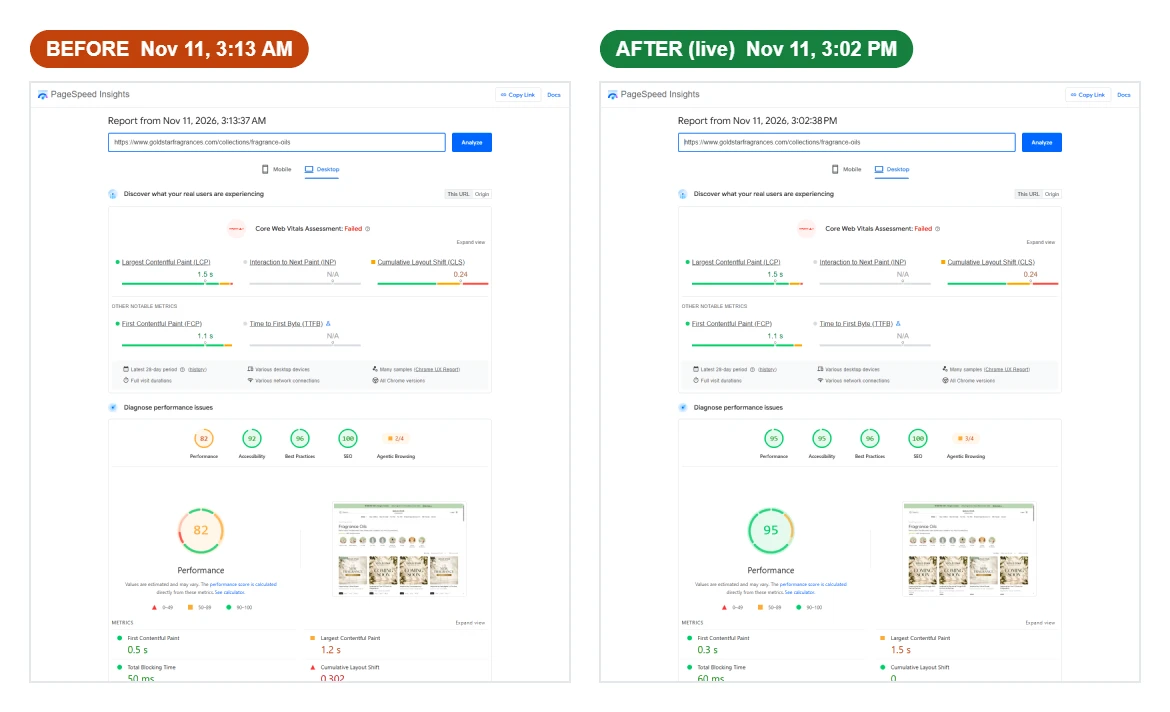
GoldStar Fragrances, Nov 11, 2026: about 5 hours of speed work, same design. Google's desktop score on their best collection went from 82 to 95 the same day
Black Friday is this Friday, November 27, and Cyber Monday is November 30. It's too late for a redesign. It's not too late to fix the things that quietly lose sales on the busiest weekend of the year.
Every fix below fits in one day or less, most of them in an hour. They're not from a generic list. They're what my team and I checked and fixed on client stores this fall, with the real numbers and screenshots. I'm Nick Ursu, 9+ years Shopify Conversion Expert, 1,300+ Shopify projects since 2017.
Bonus: run your store through our free Store Analyzer before you start. It checks your product pages, cart and checkout and shows you which of these fixes your store needs first.
Quick overview
- Time left: 3 days to Black Friday (Nov 27), 6 to Cyber Monday (Nov 30)
- First 2 jobs: buy something on your own phone, then test every discount at checkout. That's where we found real problems on client stores this month
- Biggest money fix: one cart offer. A $4.95 checkbox made one US store $22,494 in 202 days
- Biggest speed fix: stop the phone loading what nobody sees. About 5 hours, no design change
- Don't: switch themes, install 5 new apps or email your whole old list this week
Shopify stores sold $14.6 billion over last year's Black Friday weekend, 27% more than the year before, and at the peak, 12:01 p.m. EST on Friday, it was $5.1 million a minute (Shopify's BFCM 2025 numbers). The traffic will come. This list is about not wasting it.
The 12 fixes at a glance
| # | Fix | Time | What it saves |
|---|---|---|---|
| 1 | Buy something on your phone, start to finish | 30 min | Orders lost to a broken checkout or payment |
| 2 | Test every discount and free shipping rule | 30 min | Angry customers and abandoned checkouts |
| 3 | Cap your discount on big orders | 20 min | Your margin |
| 4 | Put the offer on the first screen of your phone homepage | 1 to 2 hours | Visitors who never see the deal |
| 5 | Cut what the phone loads first | About 5 hours | Visitors who leave before the page loads |
| 6 | Add one cart offer | 1 to 3 hours | Money on every order |
| 7 | Show free shipping progress in the cart | 1 hour | Smaller orders |
| 8 | Fix the product page basics on mobile | 2 to 4 hours | Add to carts |
| 9 | Check the popup and the welcome email | 1 hour | Email signups that never buy |
| 10 | Verify your email domain, send to a warm list first | 1 to 2 hours | Your Black Friday emails landing in spam |
| 11 | Move sold out products out of the way | 30 min | Clicks on things nobody can buy |
| 12 | Write your shipping cut-off and returns where people look | 30 min | Support emails and late gift orders |
Before you touch anything: work on a copy
One rule we keep on every client store, and it matters most this week: we duplicate the live theme, make the change on the copy, test it on a phone and a laptop, and only then publish. Nothing gets tested on the live theme the week of Black Friday.
In Shopify that's Online Store > Themes > the three dots next to your live theme > Duplicate. Name it with today's date so you can roll back in one click if something breaks on Friday morning.
And pick a freeze time, like Thursday night. After that, only fixes for things that are actually broken.
1. Buy something on your phone, start to finish (30 minutes)
This is the first thing we do on any store before a big sale, and the one owners skip most. Open your store on your phone, not on your laptop, find your best seller, add it to the cart, apply your Black Friday code and go all the way to payment.
- Does Shop Pay show? Apple Pay on an iPhone, Google Pay on Android?
- Does the discount show in the cart, or only at checkout? People get nervous when they can't see it
- Does the shipping price at checkout match what the product page promised?
- Do you get the order confirmation email, and does it look right on a phone?
Then open Settings > Payments in your Shopify admin and look for any yellow or red message. This week, on a store we just started working on, Shopify Payments showed "Payment methods limited" until the owner finished verifying the business details. Only the store owner can fix that one, so do it today, not on Friday.
2. Test every discount and free shipping rule (30 minutes)
Write down every offer you're running: the automatic discount, the codes in your emails, the influencer codes, free shipping. Then test each one at checkout.
Shopify only stacks two discounts when each discount allows the other one's type. A customer can use up to 5 product or order codes and 1 shipping code on the same order, and you can have up to 25 automatic discounts active, app discounts included (Shopify Help Center, combining discounts). If your subscriber code "doesn't work" on Friday, it's usually this setting.
Here's the Black Friday setup we planned with a small skincare store this month. The 25% is an automatic discount, so every visitor gets it at checkout without a code. The 5% is a code for email subscribers that combines with it, so subscribers get 30% in total. For that to work, both discounts need the combine box ticked for the other one's type. That's the whole trick.
Free shipping needs the same test. On one store we look after, the product pages said free shipping over $50, but checkout was charging $10.95. The free shipping discount behind that message had simply expired. Nobody noticed until we placed a test order. Black Friday is the worst weekend to find that out from a customer email.
3. Cap your discount on big orders (20 minutes)
If your products are expensive, a straight percentage off can cost you more than you think. For a high-ticket jewellery client this month I suggested a fixed maximum, like $500: if someone buys a $10,000 piece, 20% off shouldn't turn into a $2,000 cost.
Shopify's built-in percentage discounts don't have a cap, so we do it with spend tiers instead: a fixed amount off over one spend, a bigger fixed amount over the next. Customers still see a clear deal, and your biggest orders keep their margin.
4. Put the offer on the first screen of your phone homepage (1 to 2 hours)
Most Black Friday traffic lands on a phone. If the deal is in a banner that only shows after two scrolls, a lot of people never see it.
- Announcement bar: one short message at a time with "shop now" on it. On the skincare store above we made it 1 line that rotates, with arrows and "shop now" on every message
- Banner button: a real button in the first screen, not text on a photo
- The offer in plain words: "30% off everything until Monday" beats a clever headline
- An end date: a real one. Don't run a fake countdown that restarts
Then look at it on your own phone, not in the theme editor preview.
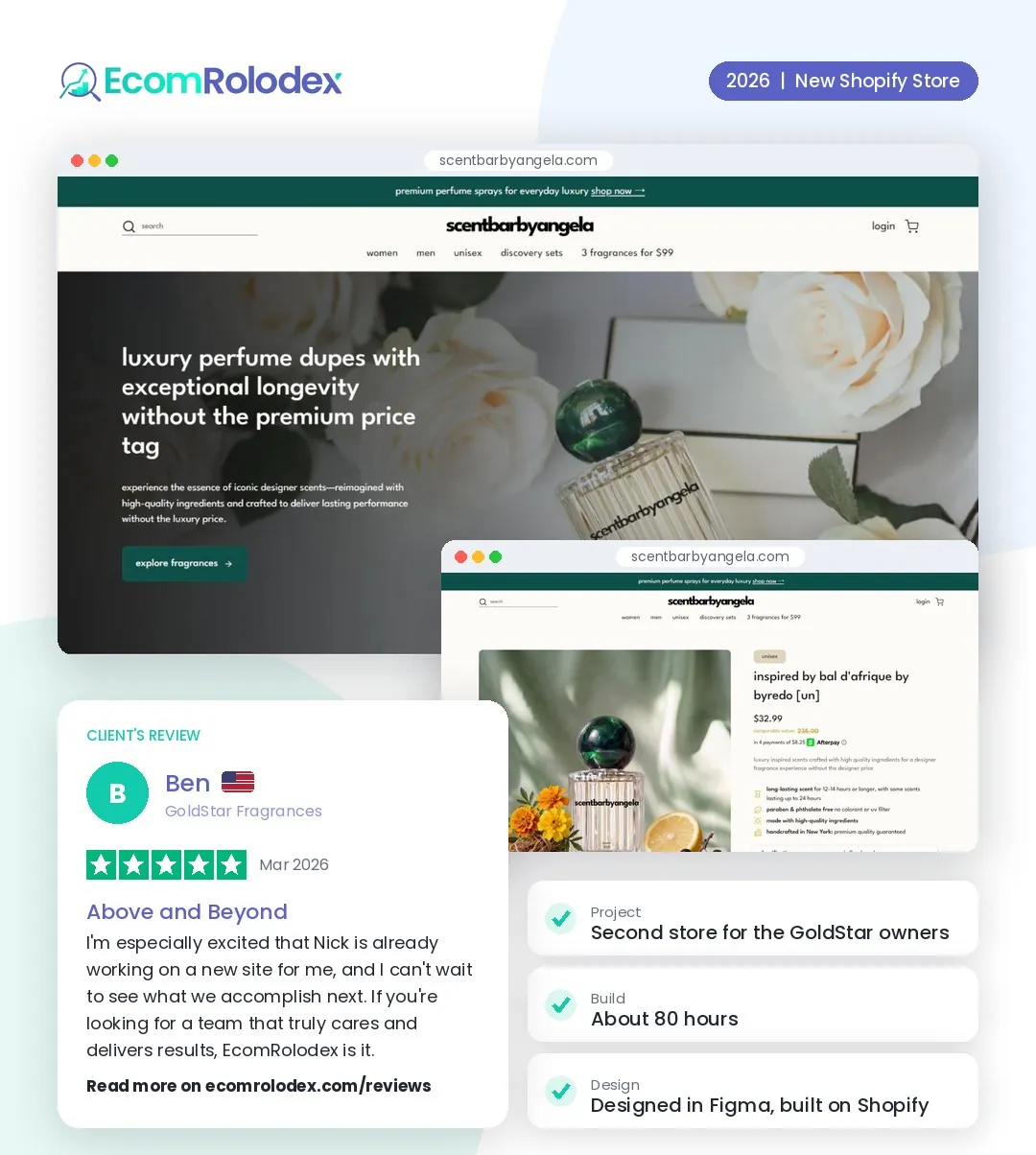
Ben from GoldStar Fragrances, after we built their second store, Scent Bar
5. Cut what the phone loads first (about 5 hours)
You don't need a perfect Google score. I tell clients a 95+ score is possible but usually not worth the budget. What you need is the first screen and the main photo showing up fast, especially when your ads start sending cold traffic on Friday.
Here's exactly what we did on GoldStar Fragrances on November 11, in about 5 hours, without changing how anything looks.
Step 1: count what the page builds
Their homepage had 11,600 page elements. Google's test flags pages over 1,400. Two things made most of it: 3 hidden collection tabs (about 3,400 elements) and a 237 country picker printed twice (about 3,400 more). Both were built when the page loaded, even though nobody sees them until they tap.
Same products, same country list, they're just built when someone opens them. The homepage went from 11,600 elements to 4,650.
The big banner photo was set as a background image, so the phone found it last. We preloaded the same file for phone and desktop.
Step 4: load fonts and scripts once, from the store
Fonts were loading twice (from Shopify and from Google Fonts) and two slider libraries were loading from an outside site, one of them not used anywhere. We served the same fonts and the slider from the store and removed the unused one.
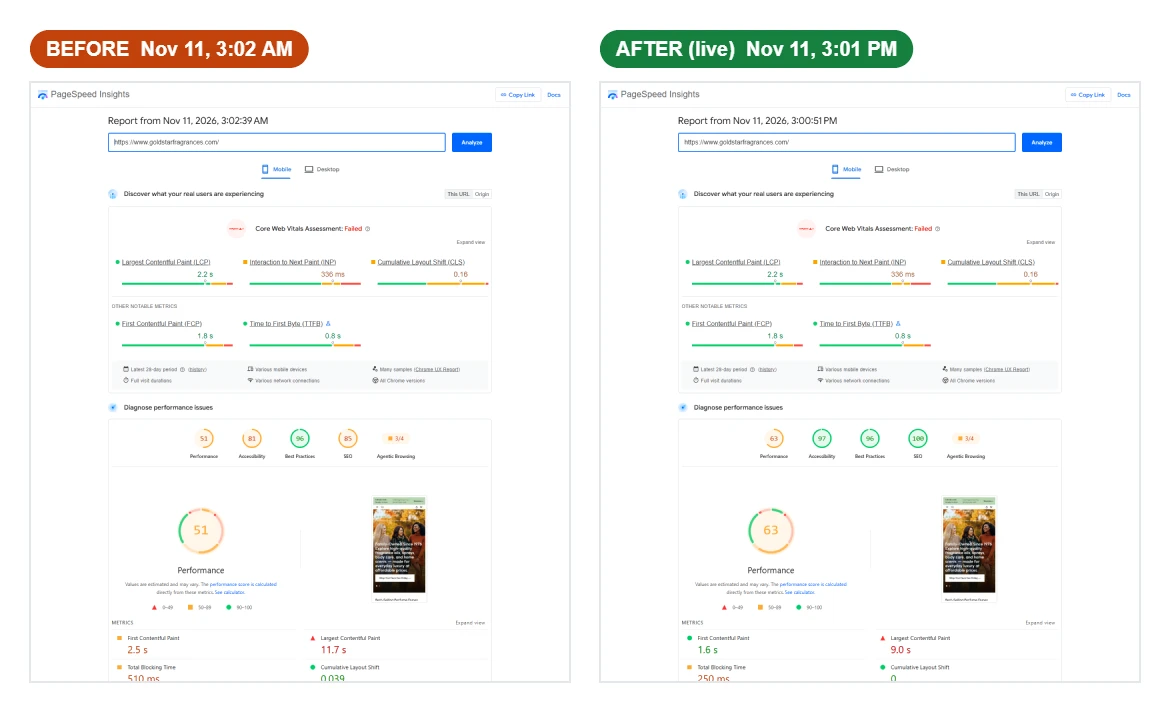
The GoldStar homepage on a phone, same day: 51 before, 63 after. First paint 2.5 s to 1.6 s
From our projects: GoldStar, 5 hours, same design
Google PageSpeed, November 11, before and after it went live: the Fragrance Oils collection on desktop went from 82 to 95 (97 on a second run) and its layout shift from 0.30 to 0. The homepage on a phone went from 51 to 63, the first paint from 2.5 s to 1.6 s, and the main image from 11.7 s to 9.0 s. SEO went from 85 to 100. We compared full page screenshots before and after: the design is the same.
One thing we tried and dropped: loading the slider later. It made the top bar jump when the slider started, which Google counts against you, so we put it back.
Being honest about the rest: the phone isn't at 90, because what's left is app and tracking scripts, and those need the owner's OK to change. And Google's "real shoppers" check uses the last 28 days, so it still showed the old numbers right after the fix. Speed work you do this week shows in that report about 4 weeks later, but your shoppers feel it on Friday.
If you'd rather hand this one over, that's our Shopify speed optimization service: we work on a copy of your theme and you see the before and after scores.
6. Add one cart offer (1 to 3 hours)
About 70% of carts are abandoned, on average (Baymard Institute, 70.22%). The ones that do check out on Black Friday are your best customers of the year. One small, useful offer in the cart is the fastest money fix on this list.
For a New Zealand brand, one upsell app we installed in a few hours brought about $13,000 extra in 3 months. And for our clients we install the Flex Upsell cart for free, where a cart offer fits the store. Offers that work in a Black Friday cart:
- A small add-on that goes with what's in the cart (a refill, a travel size, a gift box)
- Gift wrap, if you sell gifts
- Shipping protection, if you ship physical products (more on that below)
- "Add 1 more for X% off", if your discount already rewards bigger orders
The one that surprised us most is shipping protection. On a US store we work with, we added a $4.95 shipping protection checkbox to the cart (the Flex Upsell Checkbox app, in its Checkout+ mode). In 202 days, 5,082 orders added it: $22,494 of extra revenue and a 79% offer conversion in the cart. That's about $111 a day from one checkbox. The full numbers are in our shipping protection case study.
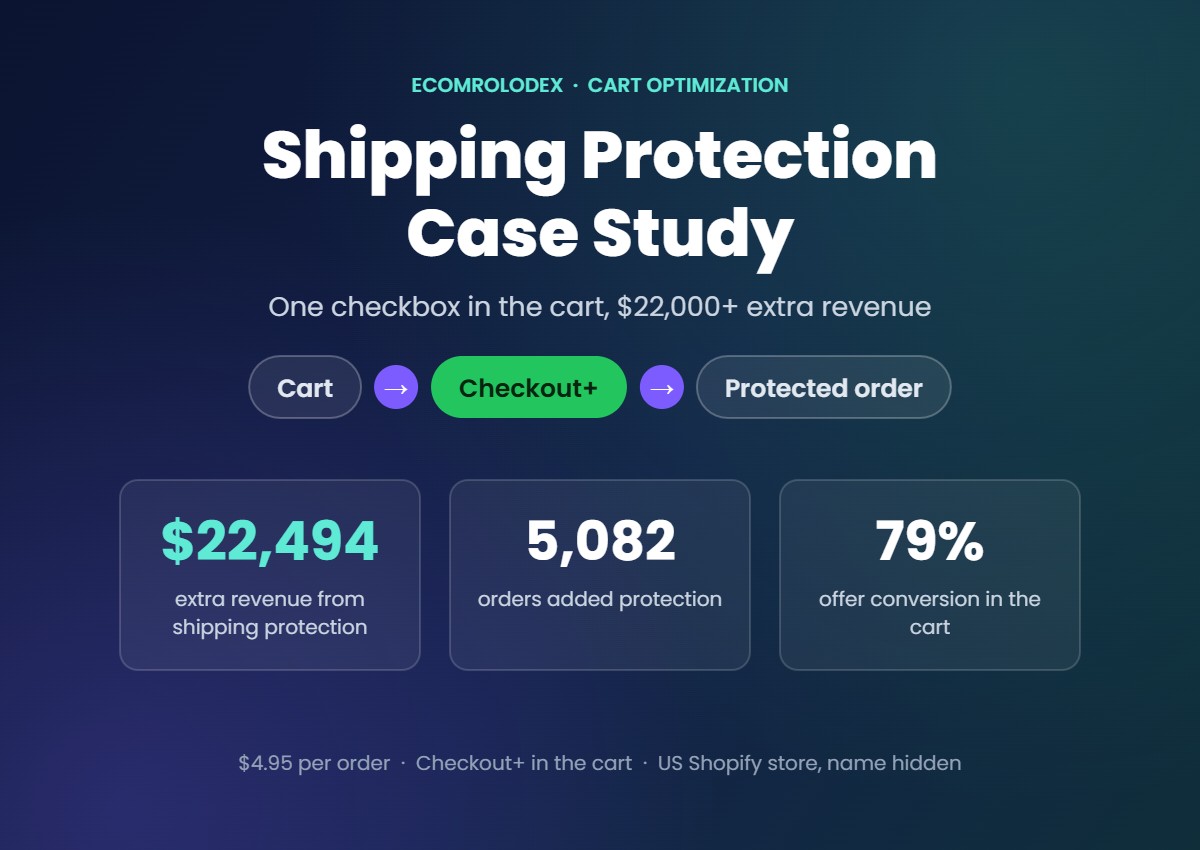
One checkbox in the cart: $22,494 in 202 days on a US Shopify store (name hidden)
Pick one. Three popups and four upsells in the same cart slow people down. If you want the bigger picture on order value, I wrote about how we raise AOV on Shopify.

Cart drawers we've set up on Shopify stores, each matched to the store's own design
Cart work keeps paying after the holidays too. On More Than Lips, cart optimization was the core of the work behind their conversion going up 54% in 90 days.
Not sure if your cart is the problem? Our free Store Analyzer checks your cart and checkout.
Check my cart for free
7. Show free shipping progress in the cart (1 hour)
If you offer free shipping over an amount, show it in the cart as a bar or one line: "You're $12 away from free shipping". Then people add something instead of guessing.
Pick the amount from your own orders, not from a blog. Look at your average order value in Shopify Analytics and set the threshold a bit above it, so a lot of people are one product away. And after you set it, place a test order (see fix 2), because the bar and the checkout have to agree.
8. Fix the product page basics on mobile (2 to 4 hours)
You won't redesign a product page this week, but a few small changes add up. These are the ones we made on that small Canadian skincare store, all on mobile:
- The price on every size, with a "best value" tag on the bigger one
- Star rating right under the product name
- A full width add to cart button with the price on it, and Shop Pay under it
- A sticky add to cart button that follows the scroll on phones
- A short guarantee line where the share icons used to be
- Square photos you can swipe, with a counter (1 of 5)
From our projects: 12 hours on a small skincare store
At the end of October we spent 12 paid hours on a small Canadian skincare store: the product page changes above, a free shipping bar in the cart, and new emails (popup, 3 welcome emails, 3 abandoned cart emails). Conversion went from 0.59% in the 90 days before to 3.02% in the first 11 days.
To be fair about it: the owner ran her own 15% flash sale in those days, and it brought 6 of the 8 orders in the first week. Without the sale days, conversion was 2.74%. Still more than 4 times what it was, from 12 hours of work.
9. Check the popup and the welcome email (1 hour)
Sign up to your own popup with a new email address and see what happens.
- The code: in a $49 store review this month, a UK brand's popup gave a discount code, but the first welcome email didn't include it. Anyone who didn't copy the code from the popup had nothing to come back to. Put the code in the email too
- How often it shows: on an education store we work on, a clearance popup was showing every 3 minutes. We changed it to once every 7 days. A popup that keeps coming back on Black Friday is a reason to leave
- On the phone: can you close it with your thumb? Is the close button visible?
10. Verify your email domain and send to a warm list first (1 to 2 hours)
Your Black Friday emails only make money if they reach the inbox. Two things to check before you schedule anything.
Your sending domain. In your email app (Omnisend, Klaviyo, Mailchimp, they all have it), check that your own domain is verified with its DNS records (SPF, DKIM, DMARC). On the skincare store, two flash sale emails went out from the app's shared domain before the records were in, and opens dropped from 20% to 12%. DNS records can take hours to start working, so this one can't wait for Thursday.
Who you send to first. Don't send your first Black Friday email to an old list you haven't emailed in months. Send to the people who bought or visited recently, then widen it. If you're on Klaviyo, its free plan is fine to start, but Omnisend can save you on fees as your list grows and has 24/7 support. Here's how we do a Klaviyo to Omnisend migration, after the holidays, not this week.
From our projects: one email to the right 1,824 people
An education store we work with moved to Omnisend this fall with a big old list. In the first weeks, one send had 12,783 bounces, and we asked them to stop sending right away. We cleaned the list and built a warm segment instead: past buyers, people who visited the store in the last 60 days, and the first batch of the old list, only those subscribed to email.
Then my team designed and built one Christmas email for their gift box, and it went out on November 20 to that segment of 1,824 people. It made $2,987 in sales with a 2.4% click rate. For comparison, we normally see around 1% clicks on our other clients' campaigns.
11. Move sold out products out of the way (30 minutes)
Black Friday sells out your best sellers first. On one client's collection page this month, a sold out product sat in the second spot because the collection was sorted A to Z.
- Sort your main collections by best selling, and send sold out products to the end (many themes have this setting, an app can do it if yours doesn't)
- Hide items you'll never restock. For an education store's Christmas page we set 15 sold items to draft
- If you will restock, add a "notify me" form so the visit isn't wasted
12. Write your shipping cut-off and returns where people look (30 minutes)
"Will it arrive before Christmas?" is the question behind a lot of Black Friday carts. It's one of the first things we asked our clients this month: what's your last order date for Christmas delivery?
- Put the last order date in the announcement bar from Cyber Monday on
- Add one delivery line near the add to cart button (like "Order by December 15 for Christmas delivery", with your own date)
- Check that your refund and shipping policies are linked in the footer and in checkout
- Set an auto-reply for your support inbox that answers the 3 most common questions
What not to do this week
- Don't switch themes. A new theme the week of Black Friday means new bugs on your busiest days
- Don't install 5 new apps. Every app adds scripts to your pages. One cart offer, yes. A new reviews app, a new popup and a new countdown, no
- Don't email your whole old list at once. See fix 10
If you want ideas for the offer itself (store credit, cashback, cart rewards), read 5 Shopify Black Friday ideas. This checklist is about making sure the store can take the orders.
Do it yourself or have us do it?
Most of this list you can do yourself in an afternoon: the test order, the discounts, the popup, the shipping line, the sold out products. You don't need an agency for those.
The ones where help saves you time are the speed work (fix 5), the cart offer (fix 6) and the email list and domain (fix 10), because they need code, DNS records or a list clean-up. Me and my team (2 designers, 2 developers, an email marketing specialist and 2 conversion experts) are working every day through these weeks, and we always test on a copy of your theme first.
If you're not sure where your store leaks, the quickest step is our $49 store review: I go through your store mobile first and you get the list of what to fix first, in order.
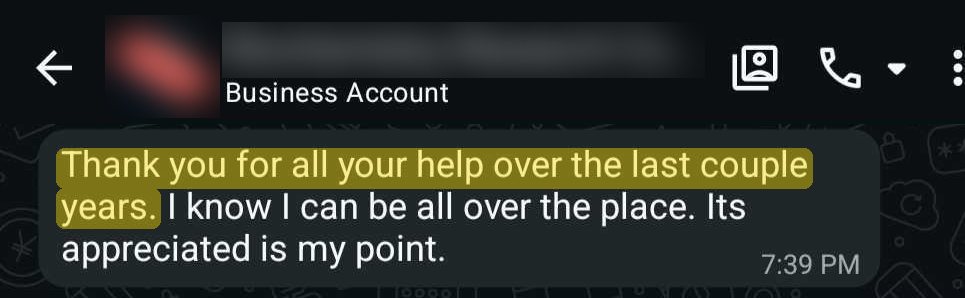
A client's message after two years of working with us
FAQ
Is it too late to prepare my Shopify store for Black Friday?
Not for fixes. It's too late for a redesign, a new theme or a migration. It's not too late for a test order, your discounts, one cart offer, your popup, your shipping line and the speed of your first screen. Every fix on this list fits in a day or less.
When is Black Friday 2026?
Friday, November 27, 2026. Cyber Monday is Monday, November 30, so the Black Friday weekend runs from Friday to Monday night.
How many discount codes can a customer use on Shopify?
Up to 5 product or order codes and 1 shipping code on one order, and only when each discount is set to combine with the other's type.
Should I put my whole store on sale?
It depends on your margins. Many stores do one store-wide discount and add an extra for email subscribers, like the 25% + 5% setup above. If you sell expensive products, cap the discount on big orders with spend tiers so one large order doesn't eat your margin.
Should I install new apps before Black Friday?
At most one, and only if it makes money on every order, like a cart offer. Install it early in the week, not on Thursday, and test a full order with it.
Does store speed matter for Black Friday?
Yes, for the first screen and the main photo on a phone, especially for cold traffic from ads. You don't need a 100 score. See fix 5 for what 5 hours did on GoldStar.
Want these fixes done before Friday?
Me and my team check your store on a phone, fix what loses orders on a copy of your theme, and you approve before anything goes live.
Not ready for a call? Run your store through our free Store Analyzer and see which of these 12 fixes it needs first.