



Shopify checkout optimization in 2027 is mostly about removing small doubts: fields people don't need to fill, labels that don't say why you ask, a checkout that doesn't look like your store, and payment buttons that are missing. Most of it takes about an hour in your Shopify settings. No apps and no code.
Back in 2019 I learned a few quick checkout tweaks from a paid ecommerce challenge, and I used them on client stores for years. Since then Shopify rebuilt the whole checkout. Menus moved, checkout.liquid is gone, Shopify Scripts stopped running in June 2026 and the old Thank you page was switched off in August 2026. So I went through my old notes and redid every step in the Shopify admin as it looks now, with fresh screenshots.
I'm Nick Ursu. I've worked only on Shopify for 9+ years, and my team has done 1,300+ Shopify projects since 2017. These are the checkout settings I look at first on every store we take over.
Bonus: want to see where your store loses buyers before they even get to the checkout? Run it through our free Store Analyzer. It checks your theme, apps, speed, reviews, cart, product page and SEO, and gives you 20+ tips in about 30 seconds.
Quick overview
- Fields: hide the company name, make the phone optional, don't force people to log in
- Text: rewrite the email and phone labels so people know why you ask
- Trust: your logo, your colors and a support line in the checkout header
- Faster paying: Shop Pay, Apple Pay, Google Pay and PayPal as express buttons
- After the order: check the new Thank you page, your tracking and your email checkbox
- Plus only: apps inside the checkout steps and Shopify Functions
What changed in the Shopify checkout since 2023
If you set up your checkout a few years ago, some of it may not work the way you think anymore. Here's what Shopify changed, in order:
| When | What changed | Which stores |
|---|---|---|
| 2023 | One-page checkout becomes the default (you can still switch to three pages) | All plans |
| Aug 13, 2024 | checkout.liquid stops working on the Information, Shipping and Payment steps | Shopify Plus |
| Aug 28, 2025 | Thank you and Order status pages have to be on the new system | Shopify Plus |
| Apr 15, 2026 | Shopify Scripts can't be edited or published anymore | Shopify Plus |
| Jun 30, 2026 | Shopify Scripts stop running, Shopify Functions replace them | Shopify Plus |
| Aug 26, 2026 | Old Thank you and Order status pages, Additional scripts and script tags are switched off, stores get moved automatically | Basic, Shopify, Advanced |
The short version: on Basic, Shopify and Advanced you can change the branding, the fields, the text and the Thank you and Order status pages. Apps inside the Information, Shipping and Payment steps are still Shopify Plus only. That's why on non Plus stores we do most upsells in the cart, not in the checkout.
10 quick Shopify checkout fixes (2027 steps)
All of these are in your Shopify admin. Make one change, place a test order on your phone, then move to the next one.
1. Hide the company name field
Most stores sell to people, not companies. A Company field makes the buyer stop and think "do I need to fill this?" and a pause like that is exactly what you don't want at checkout.
Go to Settings > Checkout, scroll to Customer information and set Company name to Don't include. Click Save.
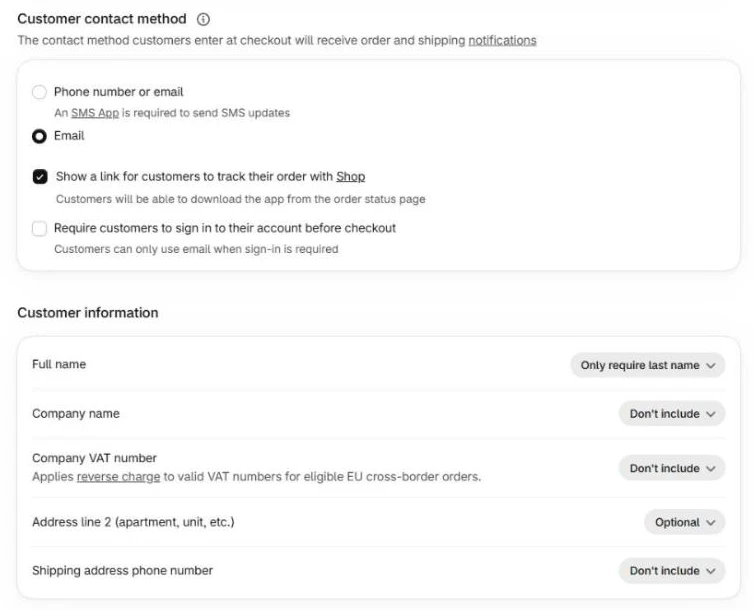
Settings > Checkout in 2027: Company name set to Don't include. The phone number setting is at the bottom of the same box.
Two things to know. If you sell to businesses, keep it Optional, never Required. Shopify says that when the company name is required, people paying with Apple Pay or Google Pay have to type a company name if their wallet doesn't have one. And the new Company VAT number field is for stores selling to businesses in the EU, so leave it off otherwise.
2. Make the phone number optional (or hide it)
A required phone number makes a lot of people stop at the shipping address. Many buyers don't want calls or texts from a store they just found.
In the same Customer information box, set Shipping address phone number to Optional. Only make it Required if your courier really needs it, for example on some international deliveries. If you don't send SMS updates, keep the Customer contact method on Email. The "Phone number or email" option needs an SMS app to send the updates.
3. Don't force people to log in
Under Customer contact method there's a checkbox called Require customers to sign in to their account before checkout. Leave it off. Guest checkout should always be there unless you run a wholesale or members only store. Returning customers can still sign in, and Shop Pay remembers their details anyway.
4. Rewrite the email and phone labels
This was one of the original 2019 tricks and it still works. The default labels just say Email and Phone (optional). Add a few words so people know why you ask.
Go to Settings > Checkout, scroll down to Checkout language and click Edit checkout content. It opens your theme content on the Checkout & system tab. Click the search icon, type phone or email, change the text and Save.
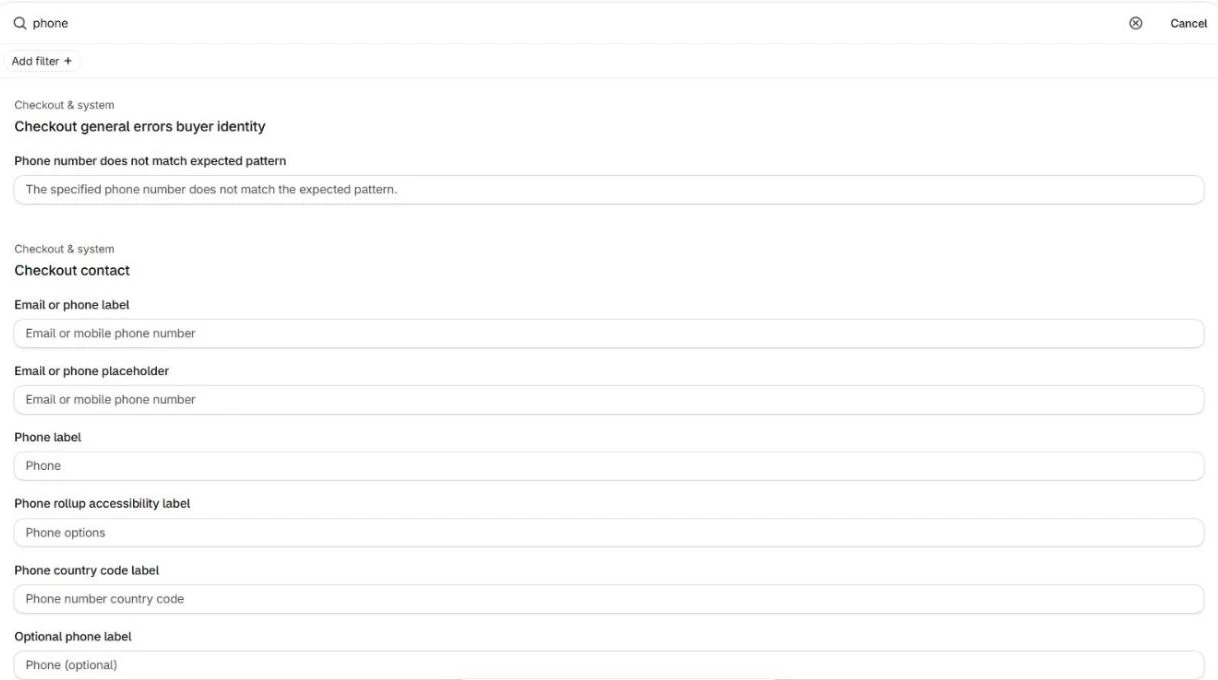
Edit checkout content opens the theme content editor. Search "phone" to find the Phone label and the Optional phone label.
Examples we use:
- Optional phone label: Phone (optional, only for delivery updates)
- Email label: Email (for your order confirmation and tracking)
Keep them short. On the one-page checkout the label sits inside the field, so a long label gets cut on small phones. Check it on your own phone after you save. If you sell in more than one language, change each language.
5. Put your logo and a support line in the checkout header
People pay where they trust. A blurry logo, the store name in plain text or a logo that's way too small makes the checkout look like a different site.
In 2027 it's here: Settings > Checkout, in Configurations click Edit next to your active checkout. In the checkout editor click the gear icon to open Settings. Under Logo add your image and pick the alignment.
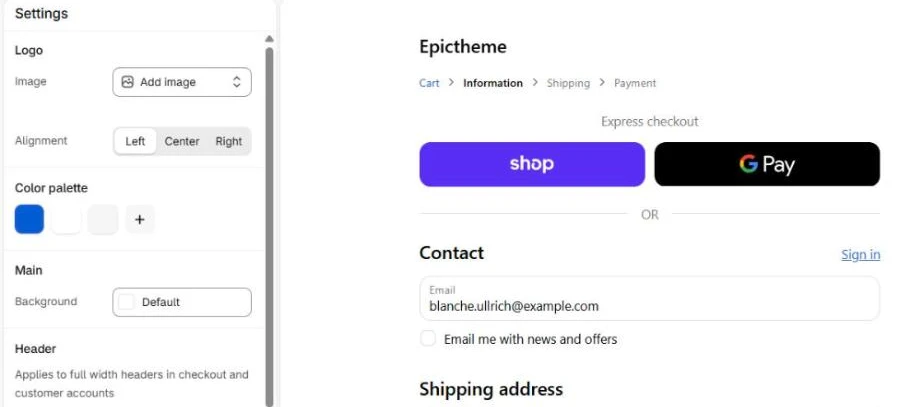
The checkout editor in 2027: logo, alignment and colors on the left, your checkout preview with the express buttons on the right.
The old trick was to upload a checkout-only logo with your support email or phone number next to it. On non Plus stores the header is still the only spot at the top of the checkout where you can do that, so it can still help. Keep it to one short line, like Questions? help@yourstore.com, make the logo file wide with no empty space around it, and check it on a phone. If the text gets too small to read, take it out. On Shopify Plus you can add a proper support block with an app instead.
In the same Settings panel you have the color palette, the header, the accent and button colors and the font (Shopify's branding guide). Use the same button color as your Add to cart button and the same font as your theme. When the checkout looks like the store, nobody wonders if they got sent somewhere else.
Express buttons sit at the top of the checkout and let people pay in two taps with details they already saved. On phones that's a big deal.
Go to Settings > Payments. In Shopify Payments turn on Shop Pay, Apple Pay and Google Pay, and connect PayPal if your buyers use it. Then open your checkout on a phone and check that the buttons really show. Remember point 1: a Required company name makes Apple Pay and Google Pay buyers type extra info, which kills the point of a fast button.
8. Show the delivery time in your shipping rate names
Shipping is where a lot of buyers drop off. The price shows up and they didn't expect it, or they can't see when the order arrives. The price is a business decision, but you can make the rate clear today.
Go to Settings > Shipping and delivery, open your shipping profile and edit each rate. Put the time in the name, like Standard shipping (3 to 5 business days). That name is what buyers see in the checkout. If you have free shipping over an amount, show it in the cart first. Here's how we set up a free shipping bar on Shopify.
9. Turn on the email signup checkbox
Under Marketing opt-in in Settings > Checkout, turn on the Email checkbox, plus SMS or WhatsApp if you send those. It won't raise your conversion rate by itself, but it builds the list your emails and abandoned checkout flows go to. Emails are a big part of how we grew GoldStar Fragrances: they added $100k in email revenue.
10. Check your Thank you page after the August 2026 upgrade
On August 26, 2026 Shopify moved every Basic, Shopify and Advanced store to the new Thank you and Order status pages. Code in the old Additional scripts box and old script tag apps stopped running there. Most stores didn't notice, but some lost their ad tracking or an after-purchase offer without knowing.
- Place a test order and check that Meta, Google and TikTok still record the purchase. Tracking now runs through your apps or Settings > Customer events.
- If you use a post-purchase upsell, check it's still picked in Settings > Checkout under the section for apps after payment.
- In the checkout editor, switch the page at the top to Thank you and Order status and add app blocks there if you need them (reviews, upsells, surveys). This works on every plan.
Shopify Plus only: what you can add on top
If you're on Shopify Plus, you can go further:
- Apps and custom blocks inside the Information, Shipping and Payment steps: trust badges, delivery dates, upsells, a gift note
- Shopify Functions for custom discounts and for hiding or sorting shipping and payment methods. They replaced Shopify Scripts, which stopped running on June 30, 2026
- The Checkout Branding API for deeper styling than the editor gives you
Want to see what the best Plus stores do with that? Here are 10 Shopify Plus checkout examples you can copy ideas from.
What we change first on client stores
The checkout is the last step, not the first. When a store comes to us with a low conversion rate, we go through the checkout settings above in the first hour, because they're quick. The bigger work is usually before the checkout: the product page on a phone, the cart and the shipping offer.
GoldStar Fragrances is a good example. Angela brings the traffic, launches the emails and keeps testing new ideas. We make sure that traffic buys and comes back. Their Shopify conversion rate went from 2.85% in their first month to 5.11% in March 2026, and the store has done $1M+ in sales.
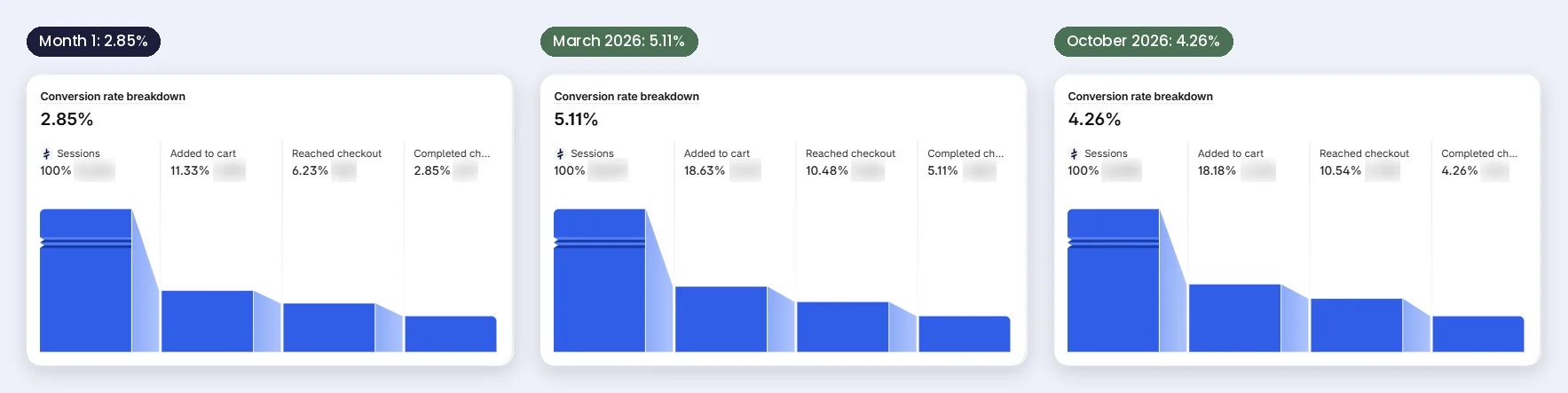
GoldStar Fragrances in Shopify analytics: 2.85% in month 1, 5.11% in March 2026, 4.26% in October 2026.
The cart, right before the checkout, is often where the easy money is. On one store a single shipping protection checkbox in the cart brought in $22,494 extra. Read the shipping protection case study, how we optimize the Shopify cart and checkout, and the full GoldStar case study.
How to check if it worked
Go to Analytics, open the Conversion rate breakdown and look at the steps: sessions, added to cart, reached checkout and completed checkout. The fixes in this article move the last step. Compare 30 days before with 30 days after, and don't change ten other things in the same week or you won't know what worked.
Not sure what a good number is? Here's our article on the average Shopify conversion rate with real numbers from our clients.
Should you do it yourself or get help?
The 10 fixes above you can do yourself in about an hour. Do them today.
If people reach the checkout and still don't buy, or most of them never get to the cart, that's where outside eyes pay off. Our $49 store review gives you the fixes in the order I'd do them, in 48 hours. If you want my team to do the work, everything is on our Shopify conversion rate optimization page.

A message from a client we've worked with for about 2 years.
FAQ
Can you customize the Shopify checkout without Shopify Plus?
Yes, more than most people think. On every plan you can change the logo, colors and font, which fields show, the checkout text and the payment buttons, and you can add apps to the Thank you and Order status pages. Apps inside the Information, Shipping and Payment steps need Shopify Plus.
How do I remove the company name field from the Shopify checkout?
Go to Settings > Checkout > Customer information, set Company name to Don't include and click Save.
How do I change the text on the Shopify checkout?
Go to Settings > Checkout > Checkout language and click Edit checkout content. On the Checkout & system tab, search the word you want to change, edit it and save.
Can I go back to the three-page checkout?
Yes. One-page is the default, but Shopify lets you switch. On Plus it's in your checkout settings, on other plans you switch it from your active theme. Give each layout a few weeks before you decide, not one bad day.
Does checkout.liquid still work in 2027?
No. It stopped working on the checkout steps for Plus stores in August 2024, and the last of it, on the Thank you and Order status pages, was switched off for all other stores on August 26, 2026.
What replaced Shopify Scripts?
Shopify Functions. Scripts couldn't be edited from April 15, 2026 and stopped running on June 30, 2026. If a discount or shipping rule quietly stopped working in summer 2026, that's probably why.
Where should I put upsells if I'm not on Shopify Plus?
In the cart. It's the last page you fully control before the checkout, and it's where we put most upsells for non Plus stores.
Want me to check your cart and checkout?
Send me your store. I'll tell you where buyers drop off and what I'd fix first.
Not ready to talk yet? Run your store through the free Store Analyzer and see your 20+ tips in about 30 seconds.