


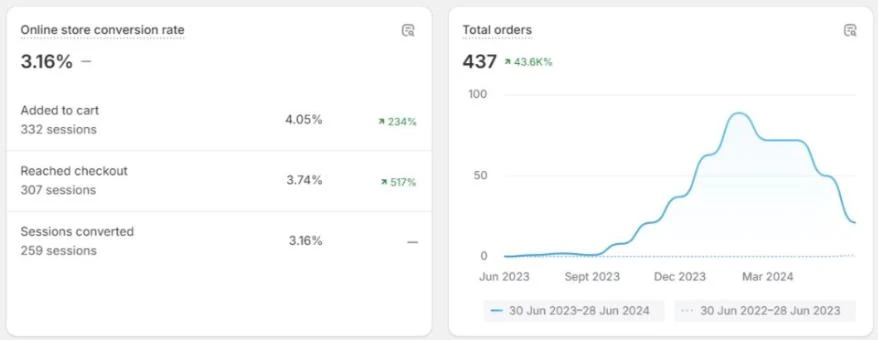
Lightning Dental Lab, the ordering store we built on a normal Shopify plan: 437 orders and 3.16% of sessions ordering in the 12 months to June 2024
Short answer: yes, you can run B2B on Shopify without Plus now. Since April 2, 2026, Shopify B2B works on the Basic, Grow and Advanced plans, at no extra cost. You get companies, wholesale price lists, minimums, net payment terms and a quick order list. The catch is a limit of 3 active catalogs and a few things that stay Plus only.
Before this change, wholesale on a normal plan meant apps and workarounds. That's how we built the ordering store for Lightning Dental Lab, a Canadian dental milling lab that sells crowns, abutments, night guards and dentures to dental laboratories in Canada and the US. 50 hours, 30 days, a custom order form on every product page. The screenshot above is their first full year on it.
In this guide I'll show you what each plan includes today, what the 3 catalog limit means in practice, how to set it up step by step, and what I'd change on the dental lab store if we built it again with native B2B. I'm Nick Ursu, 9+ years as a Shopify Conversion Expert, 1,300+ Shopify projects since 2017.
Bonus: run your store through our free Store Analyzer. It checks your product pages, cart and checkout and shows you what to fix first, B2B or not.
Quick overview
- Which plans: Basic, Grow, Advanced and Plus. Not Starter or Retail
- Cost: no extra fee for B2B on those plans (Shopify says B2B orders can have a different variable platform fee)
- Main limit without Plus: 3 active catalog assignments across your B2B markets
- Plus only: a catalog for one specific company, deposits, partial payments, payment requests per fulfillment
- Works on every B2B plan: companies and locations, fixed or percentage wholesale prices, quantity rules, volume pricing, net terms, saved cards, PO numbers, draft orders to invoice, quick order list
- Doesn't work in B2B checkout: Shop Pay and the other express buttons, subscriptions, local delivery, legacy customer accounts
What changed in 2026 (and why most guides are out of date)
Until this year, Shopify B2B was a Plus feature. Plus starts at $2,300 a month, so most small brands that sell wholesale did it with workarounds: customer tags, hidden collections, a second store with a password, or a wholesale app.
On April 2, 2026 Shopify announced in its changelog that the key B2B features are now on the non-Plus plans, with no extra cost. A lot of the pages that still rank for this search were written before that and tell you to buy an app first. For most small wholesale setups you don't need one anymore.
One more piece of history, because it confuses people: the old Wholesale channel was a separate Plus-only storefront. Shopify moved those stores to B2B on Shopify, so if you read about the Wholesale channel today, it's the old way.
Shopify B2B features by plan
This is the part people get wrong the most, so here it is in one table. I took it from Shopify's own B2B features by plan page and the pricing page, checked on November 23, 2026.
| Feature | Basic | Grow | Advanced | Plus |
|---|---|---|---|---|
| Plan price (monthly / billed yearly) | $39 / $29 | $105 / $79 | $399 / $299 | from $2,300 |
| Companies, locations, location permissions | Yes | Yes | Yes | Yes |
| Active catalog assignments | 3 | 3 | 3 | Unlimited |
| Catalog assigned to one company | No | No | No | Yes |
| Quantity rules and volume pricing | Yes | Yes | Yes | Yes |
| Net terms, payment reminders, saved cards, ACH (US) | Yes | Yes | Yes | Yes |
| Draft order to invoice, checkout to draft, PO numbers, easy reorders | Yes | Yes | Yes | Yes |
| Trade theme and quick order list | Yes | Yes | Yes | Yes |
| Sales staff permissions | No | Yes | Yes | Yes |
| Different storefront and checkout per market | No | No | Yes | Yes |
| Deposits, partial payments, payment per fulfillment | No | No | No | Yes |
| Shopify Flow with B2B data | Yes | Yes | Yes | Yes |
My read of this table: if you sell to a few groups of buyers at a few price levels, Basic or Grow covers you now. Plus starts to make sense when every big buyer has its own negotiated price list, or when you need deposits on large custom orders. If you're still picking a plan, our guide to how much Shopify costs per month goes through the plans in more detail.
What the 3 catalog limit means in real life
A catalog is a list of products and prices for a group of B2B buyers. You can include or leave out products, set a percentage off, or set fixed prices. On Basic, Grow and Advanced you can have up to 3 active catalog assignments across your B2B markets.
The detail that trips people up: Shopify counts assignments, not catalogs. If you assign the same catalog to 2 B2B markets, that's 2 of your 3 used.
Here's how 3 usually plays out on a small brand:
- Catalog 1: standard wholesale, for example 40% off retail, for every shop that stocks you
- Catalog 2: distributors or your biggest accounts, a deeper discount
- Catalog 3: a second country, or a smaller product range for one type of buyer (clinics vs labs, salons vs shops)
That covers most of the wholesale setups I see. You outgrow it when you start promising each account its own prices. At that point it's Plus, or a wholesale app that handles price lists per customer.
From our projects: 25 products in one sheet
Before we designed anything for the dental lab, we put every product from their old site in one sheet: 25 of them, from crowns and implant bars to burs and polishing discs. Next to each one we added the same product on a bigger milling lab's store, and a column for "needs form".
That sheet is where the plan came from. The split we planned around: supplies like burs and discs can be a normal add to cart, made-to-order work like a crown or a night guard needs the order details first. I'd start any B2B job with a sheet like this, because it tells you how many products need more than a price.
How we built a dental lab's ordering store on a normal Shopify plan
Lightning Dental Lab makes dental restorations: zirconia and e.max crowns, custom abutments, night guards, implant bars, dentures. Their buyers are dental laboratories in Canada and the US. Orders used to come in the traditional way, and every order is a case for one patient, with its own shade, scan or impression and instructions.
We built it in 2023, before B2B came to the normal plans. So everything below runs on a regular Shopify store, the Epic theme and one product options app. Here's what we did.
1. Design first, in Figma
We designed the homepage and the product pages in Figma first, and the lab approved them after a few rounds of feedback. The homepage leads with "Shop by type" (full crowns, night guards, partial frameworks, implant bars, digital dentures, custom abutments) and a menu link called "How to send us a case", because that's the first question a new buyer has.
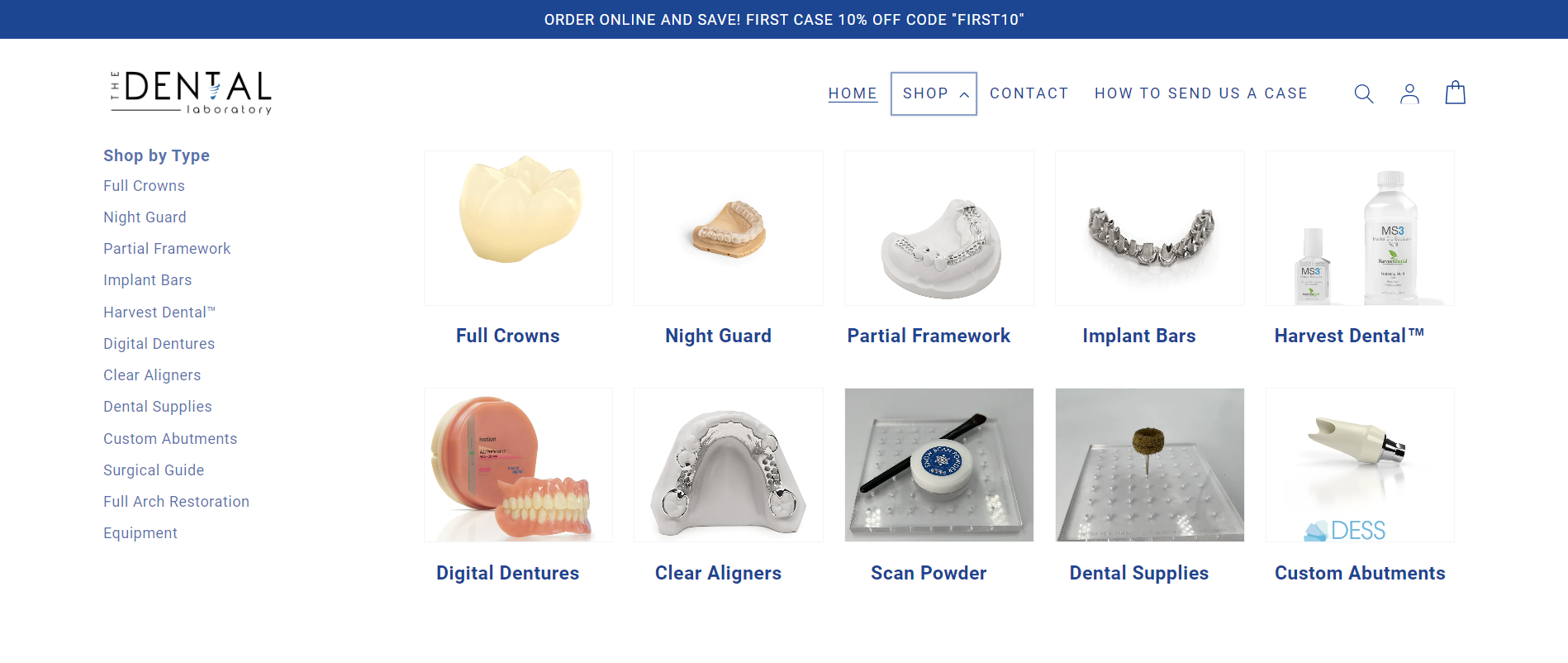
The homepage: shop by type, "How to send us a case" in the menu, and a first case discount in the top bar
2. An order form on every product page
This was the real job. A crown isn't a t-shirt. Without the case details, every order turns into an email thread. So each made-to-order product page has a form, built with a product options app:
- Shade: a dropdown
- Upload a file: for the digital scan
- Case ID: required, so the lab can match the order to the patient case
- File or model: send a file, ship models (+$12), ship an impression (+$21) or intra-oral scanner (+$20)
- Finishing: stain and glazed (+$45) or no finishing
- Specific instructions: a free text box
Under the form, a "Total extras" line adds up the options before the buyer presses add to cart. No surprises at checkout.
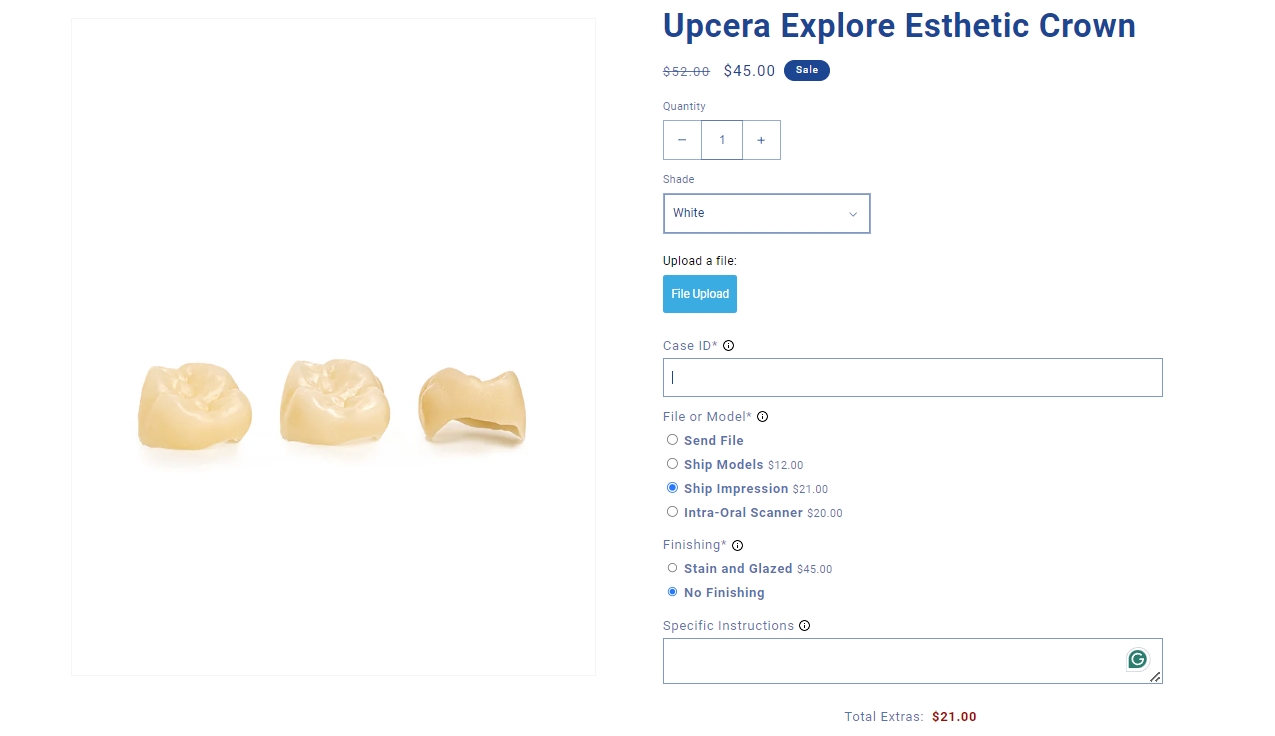
The order form on a crown: case ID, shade, how the scan or impression gets to the lab, finishing, and the extras added up
3. Training so the lab runs it alone
We recorded short videos on how to change the site, manage orders and handle customer emails. A lab's team doesn't want to email a developer to change a price. The whole project took 30 days and 50 hours, and you can see the full write-up in the dental lab case study.
4. What happened next
In the 12 months to June 28, 2024, the store had 8,207 online store sessions and 437 orders. 4.05% of sessions added to cart, 3.74% reached checkout and 3.16% placed an order. For context, our article on what a good Shopify conversion rate is shows the benchmarks Shopify quotes, and most of them sit under 3%. B2B buyers often come to the site ready to order, so it's not a fair fight with retail, but it shows the order form didn't get in the way.
The number I like most for a B2B store is the returning customer rate: 31.25%. In wholesale, the second and the tenth order are where the money is.
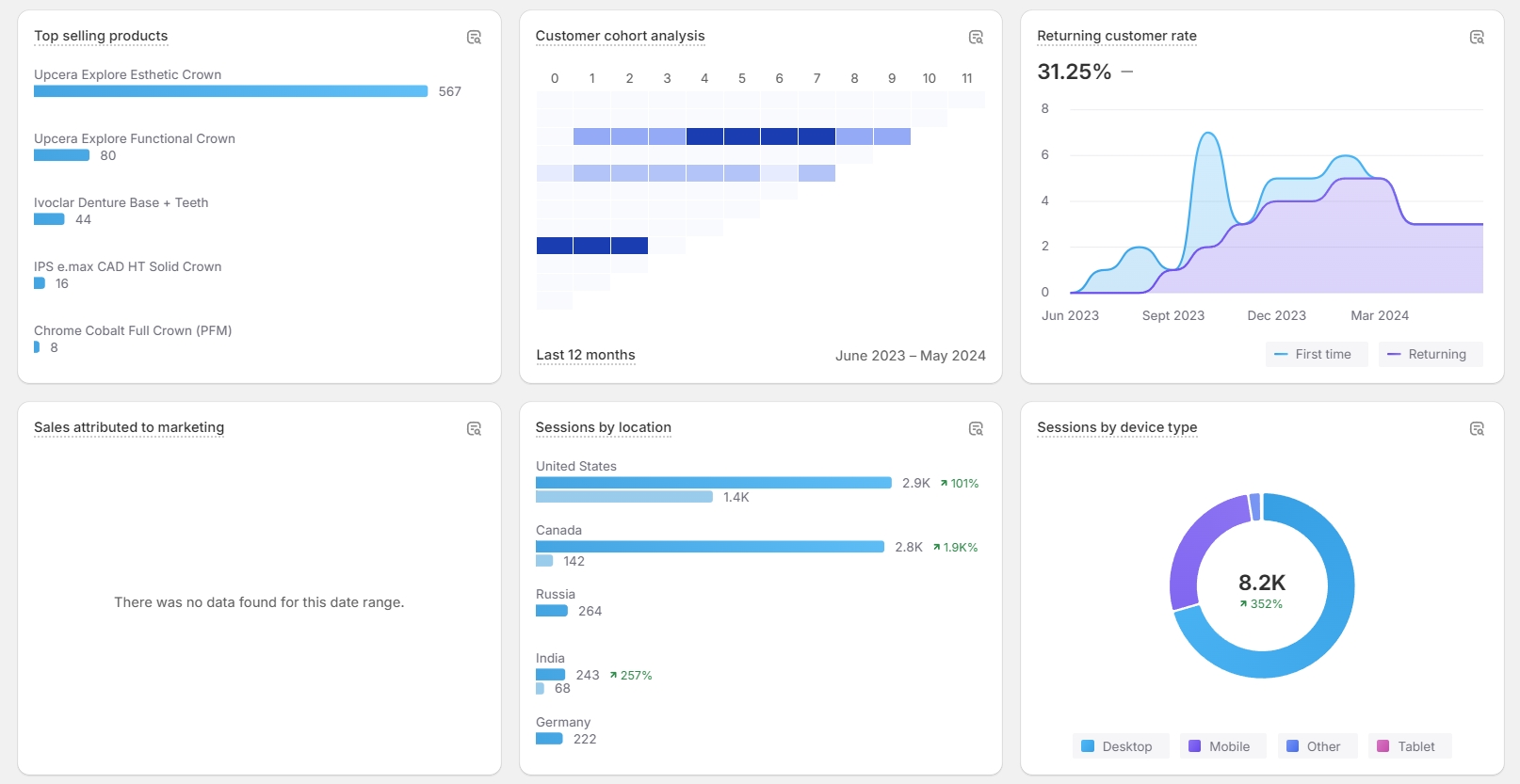
Returning customer rate 31.25%, with most sessions from the US and Canada
From our projects: the products we hid that still showed
In November 2024 the lab sent a list of changes: take clear aligners out of the collections and the mega menu, put 8 products in draft, drop a zirconia option, change some prices. We worked through it and marked it done.
In December they came back: clear aligners still showed in the Shop dropdown, one crown we were asked to remove was still on the site, and their custom abutments showed as sold out. Two lessons. Putting a product in draft doesn't clean a menu link someone added by hand, and a made-to-order product that tracks stock at 0 shows sold out to every buyer. The fix is simple: after any catalog change, click every menu link and search the product name on the live store before you call it done.
Not sure if native B2B covers your wholesale?
Show me your store and how your buyers order on a quick call. I'll tell you if your plan's B2B is enough, or if you need an app, custom forms or Plus.
How to set up Shopify B2B on Basic, Grow or Advanced
These are the steps in the order I'd do them. The settings come from Shopify's help center, the order and the tips come from our builds.
- Check your plan. B2B works on Basic, Grow, Advanced and Plus. If you're on Starter or Retail, you need to upgrade first.
- Turn on the new customer accounts. B2B doesn't work with legacy customer accounts. Do this first, because it changes how every customer logs in.
- Pick a blended store or a B2B-only store. Shopify asks you to decide this before anything else. Blended means retail and wholesale buyers use the same store and wholesale buyers see their prices when they log in. For most small brands I'd go blended: one store, one set of products, one theme to keep fast.
- Create your companies and locations. Each business buyer is a company, each shop or clinic is a location, and each person who orders is a customer on that location. Location permissions decide who can only order and who manages the location.
- Build your catalogs. Pick the products, then set a percentage off or fixed prices, and assign the catalog to a B2B market. Keep the 3 assignment limit in mind before you plan your price levels.
- Add quantity rules and volume pricing. Minimums, maximums and order in multiples (for example cases of 12), plus price breaks for bigger quantities in the same order.
- Set payment terms. Net terms for buyers you trust, card or due on fulfillment for new ones. Buyers can add PO numbers, and you can turn a draft order into an invoice.
- Fix the theme for wholesale buyers. Show the quick order list on product pages so a buyer can add many variants at once. If your products are made to order, add the order fields with a product options app or custom code, like the dental lab form above.
- Test it as a buyer. Make a test company, log in as its customer and place an order. Check the prices, the minimums and the checkout. Shop Pay and the other express buttons don't show for B2B, so don't panic when they're gone.
- Invite your buyers. Send each one a short email with the login link and a line on how to reorder.
Two settings that surprise people: Shopify turns off pickup in store, abandoned checkouts and gift cards at checkout for B2B by default, and you have to contact Shopify Support to turn them on. And one B2B order can have up to 500 line items. Shopify lists all of this on its B2B considerations page.
When native B2B isn't enough
Native B2B covers prices, minimums and payment terms. It doesn't cover everything a wholesale business needs. You'll still need an app, custom code or Plus when:
- Every big account has its own prices. Catalogs for one specific company are Plus only.
- You need more than 3 price groups or markets. That's the limit on Basic, Grow and Advanced.
- You take deposits on big custom orders or let buyers pay in parts. Plus only.
- Your buyers subscribe. Subscriptions don't work in B2B checkout.
- Your products need order details. File uploads, case IDs and options with their own price aren't part of B2B. That's a product options app or custom code, which is what we built for the dental lab.
- Your checkout was customized in checkout.liquid or relies on apps that don't support B2B. Ask each app developer before you switch.
Sometimes the answer is a separate store. One German eco brand we did design work for runs its wholesale shop on its own business subdomain, apart from its retail store. That makes sense when the wholesale range, the content and the buyers are very different. For most brands I'd still start blended and only split if it gets messy.
From our projects: a $15 option and the question it raised
In the same November round, the lab asked us to add a $15 anodizing option to their custom abutments. Our first question back: should it sit on the collection page, or be a variant on each product?
It sounds small, but this is the decision that makes a B2B catalog easy or painful later. Variants multiply fast (shade x material x finishing), and every one of them is another line to price and keep in stock. My answer today: an add-on option with its own price on the product, and keep variants for things that change the stock you hold.
What I'd change if we built the dental lab store today
If the lab came to us now, I'd keep the order form and the design, and move the rest onto native B2B:
- Every lab as a company, with a location per office. Each one sees its own order history and can reorder a case type in a few clicks.
- Net terms for repeat labs instead of a card on every case, and the card for new accounts.
- Two catalogs: standard prices, and a deeper one for their biggest labs. That leaves one free for a US price list.
- Desktop first. 70% of their sessions came from desktop. B2B buyers order from a computer at work, not from a phone on the couch. On a retail store like GoldStar it's the opposite, 8 in 10 on phones.
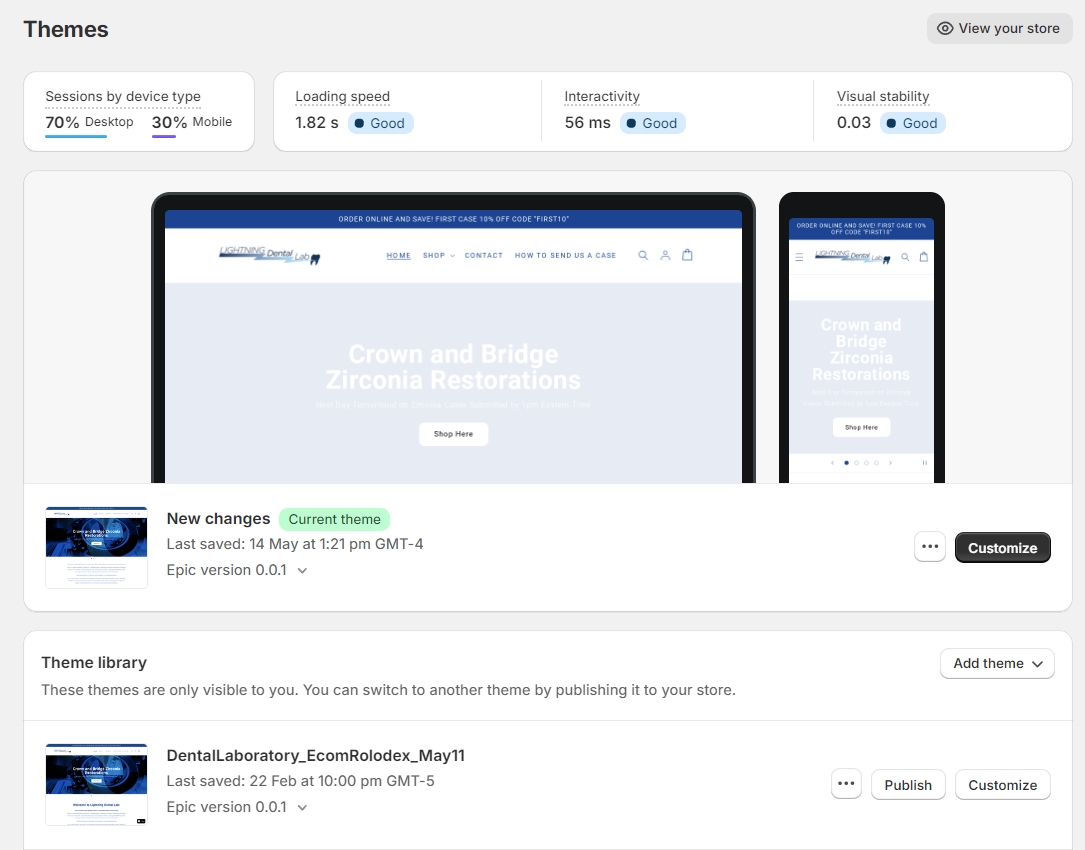
70% of sessions on desktop, loading speed 1.82 seconds (good). B2B buyers shop from the office
Do it yourself or get help?
Set it up yourself if you sell standard products at 1 to 3 price levels and your buyers pay by card or simple net terms. Shopify's settings are clear enough to do it yourself with the steps above.
Get help if your products need order details (like the dental lab), if you're moving wholesale buyers over from another system, or if your theme needs work so wholesale and retail buyers both have a good experience. For reference, the dental lab build took 50 hours in 30 days, design included. Our rate for new clients is $45 an hour, and you can see how we plan and price builds like this on our Shopify development agency page.

Jessica from More Than Lips, a Toronto lip balm brand, after a round of website changes
FAQ
Can you do B2B on Shopify without Plus?
Yes. Since April 2, 2026, Shopify B2B works on the Basic, Grow and Advanced plans. You get companies, catalogs with wholesale prices, quantity rules, volume pricing, net terms and a quick order list. Plus adds unlimited catalogs, catalogs for one specific company, deposits and partial payments.
How much does Shopify B2B cost?
There's no extra fee for B2B on Basic, Grow, Advanced or Plus. You pay the plan: Basic is $39 a month ($29 billed yearly), Grow $105 ($79), Advanced $399 ($299), Plus from $2,300. Shopify notes that B2B orders can have a different variable platform fee than retail orders, so ask Support if your margins are tight.
What's the difference between Shopify B2B and the Wholesale channel?
The Wholesale channel was the old Plus-only wholesale storefront. Shopify moved those stores to B2B on Shopify, which runs inside your normal store and checkout. If a guide tells you to install the Wholesale channel, it's out of date.
Can retail and wholesale customers use the same store?
Yes, that's a blended store. Retail customers see your normal prices. Wholesale buyers log in to their company location and see their catalog prices, minimums and payment terms.
Does Shop Pay work for B2B orders?
No. Shop Pay, Apple Pay, Google Pay and Amazon Pay don't work with B2B checkout. Buyers pay by card, by saved card, by ACH in the US, or on net terms.
How many wholesale customers can I have without Plus?
Shopify's plan page doesn't list a limit on companies. The limit is on catalogs: 3 active catalog assignments on Basic, Grow and Advanced.
Do I still need a wholesale app?
Not for wholesale prices, minimums, volume pricing or net terms. You may still need one for things B2B doesn't do, like a separate price list for each customer without Plus, or order forms with file uploads.

Want wholesale ordering set up on your store?
Me and my team set up companies, catalogs, minimums and order forms, design first in Figma, and test it as one of your buyers before it goes live.
Not ready for a call? Run the free Store Analyzer and see what to fix first on your store.